What is cache-control header

The cache-control header was introduced in HTTP 1.1 to replace Expires header, it lets you define the time for which a resource is cachable in seconds from the time response was generated. But cache-control is more complex, it has set of keywords that you can use to control different aspects of resource cachability

Following are the cache-control directives that can appear in the HTTP response

  • max-age: This directive is used to specify time in seconds for which the response is fresh. I.e. if you set value of max-age to say 3600, then browser can reuse the resource without validating for next 1 hr. Same thing with caching proxy it will tell caching proxy to cache resource for 1 hr.

  • private: The private directive gives the browser permission to store a response but prevent shared caching proxies from doing so. This directive is useful if the response contains content customized for particular user

  • public: The public directive means this response can be cached by both caching proxies and browsers. Also response cached by proxies for one user can be reused for other user. If you specify only max-age and don't add private header it will be considered public by default

  • s-maxage: The s-maxage is same as that of the max-age but with difference that it applies to the shared cache. Ex. if you set max-age equal to 3 hr and s-maxage equal to 1 hr. Then browser will consider the resource as fresh for 3 hours. But the caching proxy will consider it fresh for 1 hr.

  • must-validate: The HTTP allows caches to take liberties with the freshness of objects; by specifying this header, you're telling the cache that you want it to strictly follow your rules.

  • proxy-validate: The HTTP allows caches to take liberties with the freshness of objects; by specifying this header, you're telling the cache proxies that you want it to strictly follow your rules

  • no-cache: Tells the browser and cache that they cant reuse the content without checking with the originating server first. Ex. If you send no-cache then the resource will be cached, but next time when cache gets request for the cache it will send conditional GET request to check if the resource is changed. If yes then server will send HTTP 200 response, if the resource is not changed it will send HTTP 304 response

  • no-store: Means the response cannot be written to the cache cache at all. Ex. If you send no-store for a response then cache wont store it at all and next time when it gets request for that resource it will send that request to the originating server, which will send the full response with HTTP 200 status

What is Expires HTTP Header

The Expires header tells the cache exactly how long the response may be considered fresh. A response that includes an Expires header may be reused without validation until the expiration time is reached. The Expires header is deprecated in HTTP 1.1 because lots of servers and intermediate devices have un-synchronized on incorrect time.

Important Note: The presence of an Expires header can also turn an otherwise un-cachable response into cachable one. For example the response to POST requests are un-cachable by default but they can be cached if there is an Expires line in the reply header.

These are three ways in which we can set Expires header in Apache HTTP Server

  1. mod_expires: You can use mod_expires module to set both Cache-control and Expires header. BUt problem with this approach is that it does not let you set absolute time say Friday night for expiry of resource, instead you can set expiry time like either access time plus fixed time interval or modification time of a resource plus fixed time interval

    <FilesMatch "\.(gif|jpg|jpeg|png|swf)$">
    ExpiresDefault "access plus 3 month"
    </FilesMatch>

    This tells the Apache to set expires time of 3 moths from the time the resource was accessed.
    Since mod_expires sets both cache-control and expires header the cache-control will always take precedence and the value of Expires will be ignored unless the device is HTTP 1.0 and it does not understand cache-control header

  2. mod_header: The mod_headers is a simpler solution which you can use for setting any header on the response

    <FilesMatch "\.(gif|jpg|jpeg|png|swf)$">
    Header append Expires "Fri, 15 Oct 2010 16:49:25 GMT"
    </FilesMatch>

    This tells the Apache to set 15th of October as the expiry date for every image, which could be your next release date. But problem with this approach is that you will have to modify the expires date manually after 15th of October or it will set expiry date in the past and which would cause that resource to be un-cachable.

  3. mod_cern_meta: THe mod_cern_meata allows you to define list of HTTP headers in a file and then you can associate that file with resource

Collecting performance data for WSRP producer web service

I wanted to see if there is a way to get performance data related to WSRP Producer portlet one way is to use the Portlet Level PMI on the producer portlet. And there is one more thing that we can do which is to collect the PMI information for WSRP related web service

You will have to follow these steps to collect the WSRP web service, PMI related data

  • First enable the PMI metrics collection for all the modules

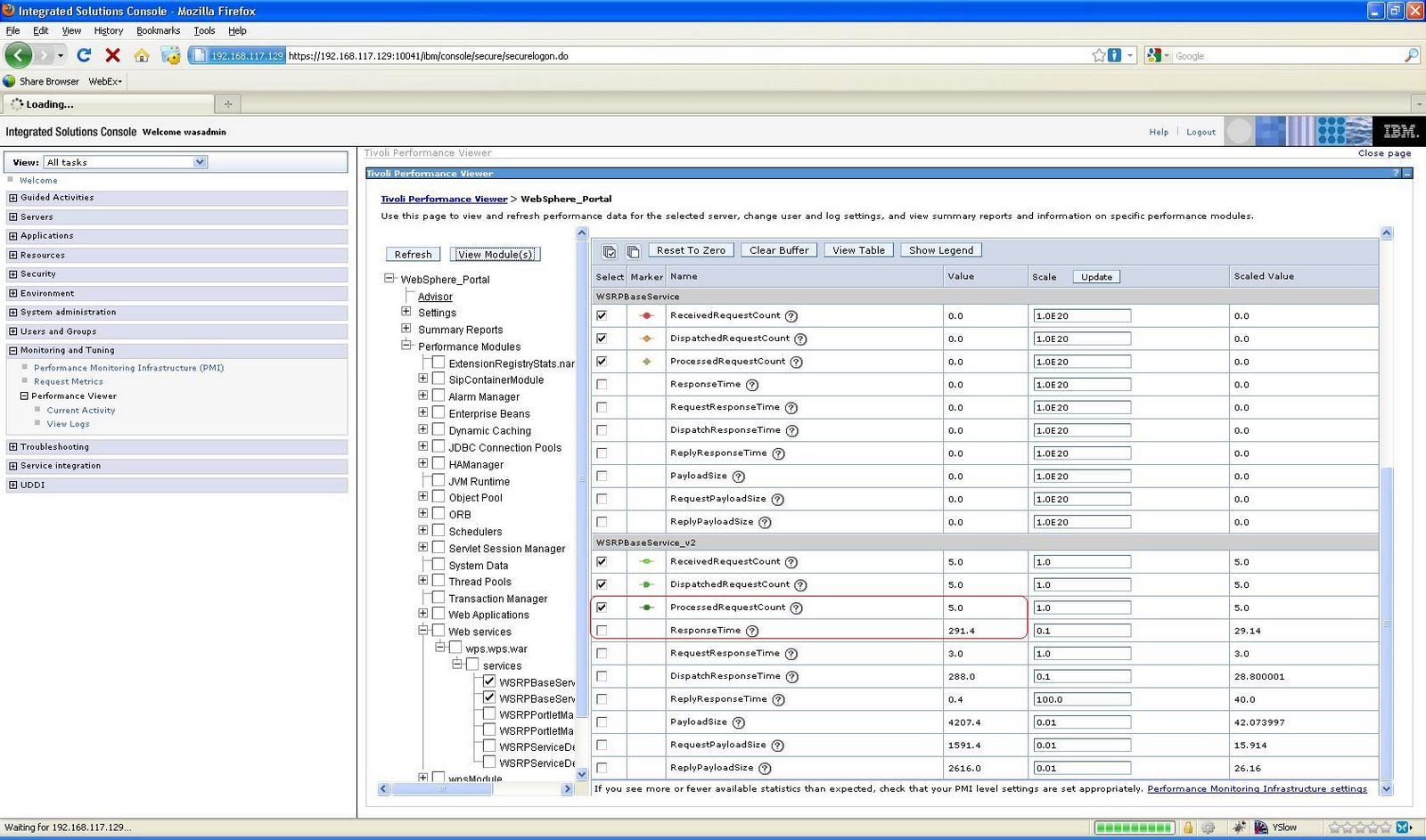
  • Then inside the Performance Viewer -< Current Activity page go to Web Services -< wps.war related services and select WSRPBaseService_V1 and WSRPBaseService_V2 like this


  • Then once both the services are selected click on View MOdules and hit few pages with WSRP portlets on it. Now you should start seeing the data related to all the WSRP web service calls your server is getting and the time it is taking to service the calls like this

    In my case the WSRP producer service got 5 calls and it took 294 ms on average to respond to the calls

Advanced configuration for mod_expires

The How to configure Apache Http Server to return cache-control, expires header has information about how you can use mod_expires module to set cache-control and Expires header. I wanted to learn details of how to set headers using mod_expires and this is what i found

The mod_expires has two directives that you can use to configure its behavior


  • ExpiresDefault: This directive sets the default algorithm for calculating the expiration time for all documents in the affected realm. It can be overridden on a type-by-type basis by the ExpiresByType directive

    ExpiresDefault "access plus 1 month"

    This directive tells that every resource served by the Apache will have expiration date of 1 month after the resource was accessed

  • ExpiresByType: This directive defines the value of the Expires header and the max-age directive of the Cache-Control header generated for documents of the specified type. Ex if you want to setup rule for gif images you can use expression like this

    ExpiresByType image/gif "access plus 3 month"

    This directive will override the expiration time for resources which return image/gif as content type and it will set expiration time of 3 months after the image is accessed by client


In both cases you have to use syntax like this for information on what should be the expiration date

ExpiresDefault "<base> [plus] { }*"


  • Base: Represents what should be the base for calculating expiration time or max-age value. Value of base can be either of following 2

    1. access/now: In this case the base will be when the resource is accessed by the client. Ex. if you want images to be cached for say 1 month from the time it is accessed by client then you can set it to access plus 1 month. So if as a user i access image on 1st Jan, it will set expiration date of 1st Feb but if i access same image on 20th of Jan it will set expiration date of 20th of Feb, so the expiration date will depend on the time when client access the image

    2. modification: Means the modification date of the resource on disk is considered as base. Ex. if your HTML changes everyday night at 12.00 PM and you want to cache it for 1 day you can configure to modification plus 1 day. So if the html was generated say on 1.00 AM today and if first user accesses it at 1.15 AM, it will send expiration date of 1.00 AM tomorrow, if second user accesses that image at 12 PM it will still set the same expiration date as that of the first user. SO the expiration date remains same for every user


  • type: value of type can be either of this

    1. years

    2. months

    3. weeks

    4. days

    5. hours

    6. minutes

    7. seconds


I changed my httpd.conf to use following configuration

ExpiresActive On
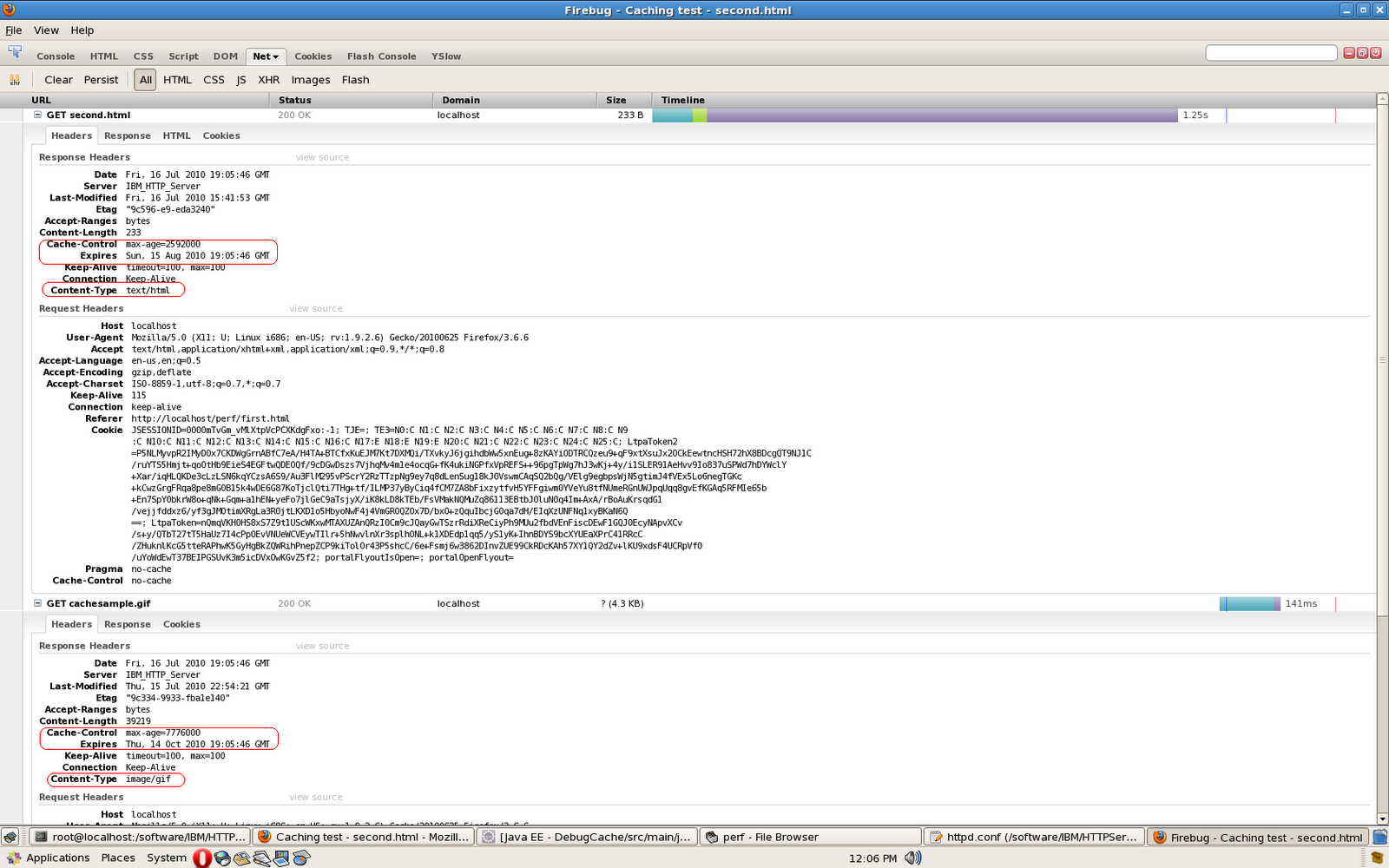
ExpiresDefault "access 1 month"
ExpiresByType image/gif "access plus 3 month"


So by default every resource will expire in 1 month but gif images will expire in 3 months. I tried accessing a html page which has an image and this is what i see

How to configure Apache Http Server to return cache-control, expires header

The Apache HTTP Server has mod_expires, that you can use for setting of the Expires HTTP header and the max-age directive of the Cache-Control HTTP header in server responses.

These HTTP headers are an instruction to the client about the document's validity and persistence. If cached, the document may be fetched from the cache rather than from the source until this time has passed. After that, the cache copy is considered "expired" and invalid, and a new copy must be obtained from the source.


By default the mod_expires is turned off but you can turn it on and configure it by adding following instructions to your httpd.conf


ExpiresActive On
ExpiresDefault "access 1 week"


The ExpiresAction On will turn the mod_expires on but it does not do anything by itself, and you will have to set ExpiresDefault directive to let Apache no what should be the cache-control setting for every resource. In my case i am saying that every document would be fresh for 1 week after user's first access.

I tried accessing a static resource on Apache after configuration and this is what i see


The value of max-age is set to 604800 seconds which means 7 days. Also the Expires header is set by taking the value of Date header and adding 7 days to it.

The mod_expires sets both cache-control and Expires header because the html response might go through a proxy or other device that does not understand HTTP 1.0 and in that case that device will read value of Expires header.

Using META tag in HTML for setting response headers

As per Useful HTML META tags, HTML developer should be able to set the HTTP response headers by adding META tag in the HTML like this


<html>
<head>

<META HTTP-EQUIV="CACHE-CONTROL" CONTENT="NO-CACHE">

<title>Caching test - second.html</title>
</head>
<body>
<a href='/perf/first.html'>Second HTML</a><br/>
<img src='/perf/images/cachesample.gif'/>

</body>
</html>


But we should never rely on this technique to set tag i tried serving this HTML from Apache Http Server as well as IBM's WebSphere Application Server and they dont set the response headers. Some of the browsers read the value of META tag and honor those values but its not very consistent.

The way it works is the HTML developer will generate these tags inside the document and then the server is supposed to read the HTMl response and parse it to find META tag's if it does then it is supposed to set corresponding HTTP headers but this adds performance penalty so its not guaranteed that every HTTP server will do that

Overriding the getLastModified() method in your HttpServlet

I wanted to learn how to the getLastModified() method in HttpServlet class works so i tried playing around with it and this is what i found. These are some of the methods related to getLastModified() from the default implementation of HttpServlet.java class


protected long getLastModified(HttpServletRequest req) {
return -1;
}

protected void service(HttpServletRequest req, HttpServletResponse resp)
throws ServletException, IOException {
String method = req.getMethod();
if (method.equals(METHOD_GET)) {
long lastModified = getLastModified(req);
if (lastModified == -1) {
// servlet doesn't support if-modified-since, no reason
// to go through further expensive logic
doGet(req, resp);
} else {
long ifModifiedSince = req.getDateHeader(HEADER_IFMODSINCE);
if (ifModifiedSince < (lastModified / 1000 * 1000)) {
// If the servlet mod time is later, call doGet()
// Round down to the nearest second for a proper compare
// A ifModifiedSince of -1 will always be less
maybeSetLastModified(resp, lastModified);
doGet(req, resp);
} else {
resp.setStatus(HttpServletResponse.SC_NOT_MODIFIED);
}
}
} else if (method.equals(METHOD_HEAD)) {
long lastModified = getLastModified(req);
maybeSetLastModified(resp, lastModified);
doHead(req, resp);
}
else if (method.equals(METHOD_POST)) {
doPost(req, resp);
} else if (method.equals(METHOD_PUT)) {
doPut(req, resp);
} else if (method.equals(METHOD_DELETE)) {
doDelete(req, resp);
} else if (method.equals(METHOD_OPTIONS)) {
doOptions(req,resp);
} else if (method.equals(METHOD_TRACE)) {
doTrace(req,resp);
} else {
//
// Note that this means NO servlet supports whatever
// method was requested, anywhere on this server.
String errMsg = lStrings.getString("http.method_not_implemented");
Object[] errArgs = new Object[1];
errArgs[0] = method;
errMsg = MessageFormat.format(errMsg, errArgs);
resp.sendError(HttpServletResponse.SC_NOT_IMPLEMENTED, errMsg);
}
}

private void maybeSetLastModified(HttpServletResponse resp,
long lastModified) {
if (resp.containsHeader(HEADER_LASTMOD))
return;
if (lastModified >= 0)
resp.setDateHeader(HEADER_LASTMOD, lastModified);
}


  1. getLastModified(): The default implementation of this method returns -1 as value, so if you dont override this method then the default implementation wont set Last-Modified header

  2. service() : The default implementation of service() method calls the getLastModified() method in two cases one is when it gets GET request and other is when it gets HEAD request. In both cases it checks if the value returned is not -1 then it sets the Last-Modified header with value returned by the method. In case of GET method it takes the value returned by getLastModified() method and compares it to value of the If-Modified-Since, to check if the response is actually changed, if no it wont even call the doGet() method of the servlet instead it will return HTTP 304 Not Modified response to browser

  3. maybeSetLastModified(): method checks if the Last-Modified is already set in the response if not it checks if its value is greater than 0 and sets it


Now i changed my ResourceServingServlet so that it returns value of getLastModified() equal to current time - 10 hours like this

package com.webspherenotes.performance;

import java.io.IOException;
import java.util.Calendar;
import java.util.Date;
import java.util.Enumeration;

import javax.servlet.ServletException;
import javax.servlet.http.HttpServlet;
import javax.servlet.http.HttpServletRequest;
import javax.servlet.http.HttpServletResponse;

/**
* Servlet implementation class ResourceServingServlet
*/
public class ResourceServingServlet extends HttpServlet {
private static final long serialVersionUID = 1L;


protected void doGet(HttpServletRequest request, HttpServletResponse response) throws ServletException, IOException {
System.out.println("Entering ResourceServingServlet.doGet()");

System.out.println("Request path " + request.getPathInfo());
System.out.println("Query String " + request.getQueryString());
printRequestHeaders(request);
response.setContentType("application/javascript");
getServletContext().getRequestDispatcher("/js/test.js").include(request, response);
System.out.println("Exiting ResourceServingServlet.doGet()");
}

private void printRequestHeaders(HttpServletRequest request){
System.out.println("************** Request Header ****************");
Enumeration headerNames = request.getHeaderNames();
while(headerNames.hasMoreElements()){
String headerName = headerNames.nextElement();
String headerValue = request.getHeader(headerName);
System.out.println(headerName + " = " + headerValue);
}
System.out.println("************** *********** ****************");
}

protected long getLastModified(HttpServletRequest req) {
System.out.println("Inside ResourceServingServlet.getLastModified() ");
long modifiedDate = System.currentTimeMillis() - (3600*1000*1);
System.out.println("Returning long time " + new Date(modifiedDate) );
return modifiedDate;
}

}


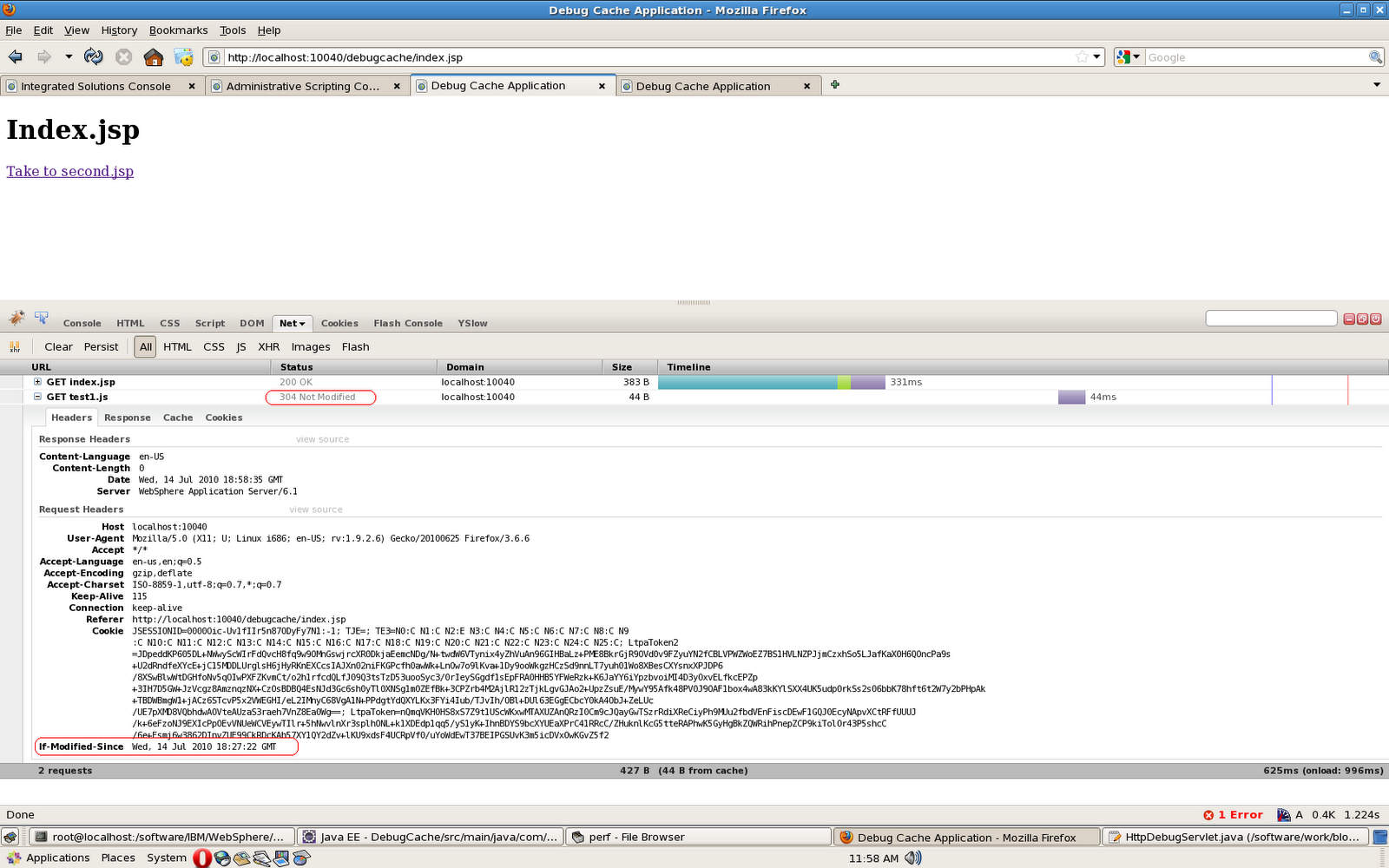
If i clean my browser cache and go to the index.jsp page for the first time at say 14th of July 19.27 GMT it will make a request to get test.js file and with value of Last-Modified 14th of July 18.27 GMT, after that whenever i make request to test.js it will send a If-Modified-Since header with value equal to July 18.27 GMT, asking ResourceServingServlet, if its response has changed after 18.27, if no the servlet will return with only headers without body like this


Setting the value of Last-Modified in case when you want to return a large HTML can give you a big performance boost because it wont have to execute the same doGet() method logic again and again and calculate and transmit the same response back to client again and again

Default HTTP Headers set on Servlet Response in WebSphere Application Server

I wanted to check what all headers are set when i make a request to a HttpServlet deployed in WebSphere Application Server, so i created a simple web application which has 2 JSPs index.jsp and second.jsp that include a JavaScript file like this


<%@ page language="java" contentType="text/html; charset=UTF-8" %>
<!DOCTYPE html PUBLIC "-//W3C//DTD HTML 4.01 Transitional//EN"
"http://www.w3.org/TR/html4/loose.dtd">
<html>
<head>
<meta http-equiv="Content-Type" content="text/html; charset=UTF-8">
<title>Debug Cache Application</title>

<script type="text/javascript" src="resource/test.js?v1"></script>

</head>
<body>
<h1>Index.jsp</h1>
<a href='second.jsp'>Take to second.jsp</a>
</body>
</html>


In the index.jsp i am including test.js JavaScript on the page but that request is handled by ResourceServingServlet, which is mapped to handle all the requests mapped to /resource path. This is how my ResourceServingServlet looks like


package com.webspherenotes.performance;

import java.io.IOException;
import java.util.Enumeration;
import javax.servlet.ServletException;
import javax.servlet.http.HttpServlet;
import javax.servlet.http.HttpServletRequest;
import javax.servlet.http.HttpServletResponse;

public class ResourceServingServlet extends HttpServlet {
private static final long serialVersionUID = 1L;
protected void doGet(HttpServletRequest request, HttpServletResponse response)
throws ServletException, IOException {
System.out.println("Entering ResourceServingServlet.doGet()");

System.out.println("Request path " + request.getPathInfo());
System.out.println("Query String " + request.getQueryString());
printRequestHeaders(request);
response.setContentType("application/javascript");
getServletContext().getRequestDispatcher("/js/test.js").include(request, response);
System.out.println("Exiting ResourceServingServlet.doGet()");
}

private void printRequestHeaders(HttpServletRequest request){
System.out.println("************** Request Header ****************");
Enumeration headerNames = request.getHeaderNames();
while(headerNames.hasMoreElements()){
String headerName = headerNames.nextElement();
String headerValue = request.getHeader(headerName);
System.out.println(headerName + " = " + headerValue);
}
System.out.println("************** *********** ****************");
}
}


The ResourceServingServlet is pretty simple in the doGet() method it is printing information about the request such as request path, query string, then forwarding control to printRequestHeaders() for printing all the HTTP headers and finally forwarding control to test.js file located in js folder for generating markup.

After deploying this servlet in my local WAS 6.1 environment i looked at what all headers are returned by Servlet for the request, note that i am setting only Content-Type header but reset of the headers are set by WAS for us


WAS is setting Content-Language header with value equal to English, i am assuming that's the default value and the Content-Length header equal to 44, which is size of the JavaScript file, Value of Date header is time when the response was generated and value of Server headers is WebSphere Application Server/6.1, which is the server which generated the response

How to find out if the content is coming from cache or original server

Lets say your debugging issue of why the new image that you just uploaded on your server is not getting reflected on a page and want to find if that image is coming from a proxy cache server somewhere in between.

The Http Protocol does not have any header that (Via header can be used by advanced proxies but i had never seen that) can tell you if the image is coming from cache somewhere instead of original server. You can use the Date header to figure out if the request is coming from the cache or actual server.

As per the Specification Date header represents the time when the response was generated by server. Now if Proxy is caching the response it will also cache the Date header value and when you try accessing that resource, cache will return you cached copy as well as value of Date header.

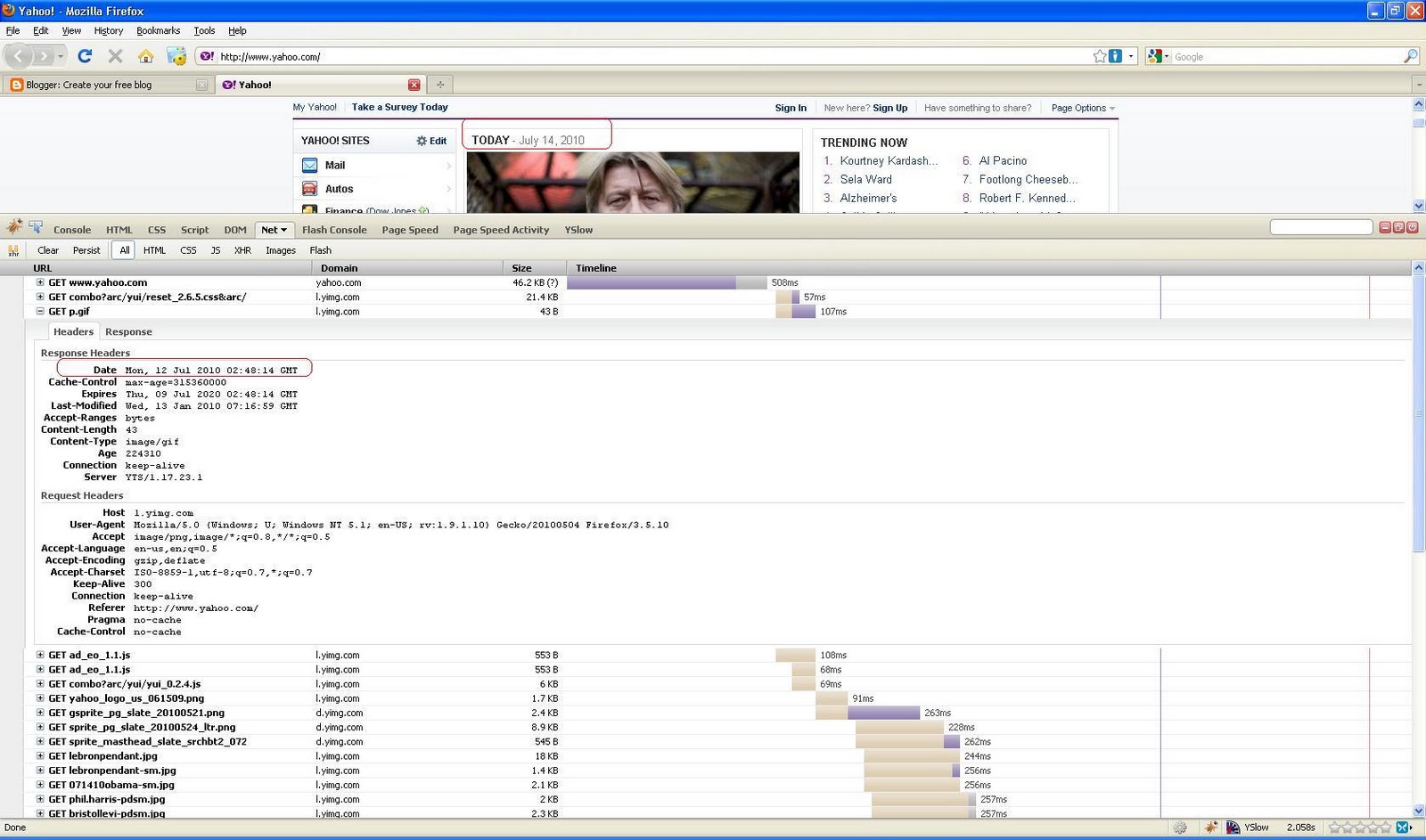
Ex. I tried going to www.yahoo.com on 14 th of July and these are the headers that i am getting


As you can see that the value of Date header is 12th of July, which means that the cache got response from server on 12 th of July and that response is cached. If you look at value of cache-control header it is set to max-age=315360000, which is 10 years. Value of Expires headers is 09 July 2020, which means the server is saying that the image is valid for next 10 years. So when proxy gets a request for the first time it will get the image and keep it in cache for other clients for next 10 years, it wont even check if the image is updated for next 10 years and keep returning Date header with value when it actually got the image from server.

RedirectURLGeneratorFactory Service

WebSphere Portal SPI has a RedirectURLGeneratorFactoryService that can be called only from the processAction() method and used for creating URLs to either portal page or portlet. So far if i wanted to create a URL pointing to a page, only method that i knew was to create a URL mapping and then redirect to that URL

I wanted to try how RedirectURLGeneratorFactoryService works so i created a sample portlet that makes use of this service for redirecting to either a page or portlet, you can download the sample code from here

Important Note: I could use the RedirectURLGeneratorFactoryService to create URL to page and that worked but i am not able to get it working to target a portlet, I am not sure if its because i am not using it right or this is a issue with the WPS 6.1.5 version that i am using

This is how my RedirectServicePortlet.java looks like

package com.webspherenotes.portlet;

import java.io.IOException;

import javax.naming.CompositeName;
import javax.naming.InitialContext;
import javax.naming.InvalidNameException;
import javax.naming.Name;
import javax.naming.NamingException;
import javax.portlet.ActionRequest;
import javax.portlet.ActionResponse;
import javax.portlet.GenericPortlet;
import javax.portlet.PortletException;
import javax.portlet.PortletRequest;
import javax.portlet.PortletResponse;
import javax.portlet.RenderRequest;
import javax.portlet.RenderResponse;
import javax.servlet.ServletRequest;
import javax.servlet.ServletResponse;

import com.ibm.portal.ModelException;
import com.ibm.portal.ObjectID;
import com.ibm.portal.content.ContentModel;
import com.ibm.portal.content.ContentPage;
import com.ibm.portal.content.LayoutControl;
import com.ibm.portal.content.LayoutModel;
import com.ibm.portal.model.ContentModelHome;
import com.ibm.portal.model.PortletModelHome;
import com.ibm.portal.portlet.service.PortletServiceHome;
import com.ibm.portal.portlet.service.state.RedirectURLGeneratorFactoryService;
import com.ibm.portal.portletmodel.PortletModel;
import com.ibm.portal.portletmodel.PortletWindow;
import com.ibm.portal.state.EngineURL;
import com.ibm.portal.state.RedirectURLGenerator;
import com.ibm.portal.state.exceptions.StateException;

public class RedirectServicePortlet extends GenericPortlet {

RedirectURLGeneratorFactoryService redirectionURLGeneratorFactoryService;

ContentModelHome contentModelHome;
PortletModelHome portletModelHome;

public void init() throws PortletException {
System.out.println("Entering RedirectServicePortlet.init()");
try {
InitialContext ctx = new InitialContext();
final PortletServiceHome redirectServiceHome = (PortletServiceHome) ctx
.lookup("portletservice/com.ibm.portal.portlet.service.state.RedirectURLGeneratorFactoryService");
redirectionURLGeneratorFactoryService = (RedirectURLGeneratorFactoryService) redirectServiceHome
.getPortletService(RedirectURLGeneratorFactoryService.class);

contentModelHome = (ContentModelHome) ctx
.lookup(ContentModelHome.JNDI_NAME);
portletModelHome = (PortletModelHome) ctx
.lookup(PortletModelHome.JNDI_NAME);
} catch (NamingException e) {
e.printStackTrace(System.out);
}
System.out.println("Exiting RedirectServicePortlet.init()");
}

protected void doView(RenderRequest request, RenderResponse response)
throws PortletException, IOException {
System.out.println("Entering RedirectServicePortlet.doView()");
response.setContentType("text/html");
getPortletContext().getRequestDispatcher("/index.jsp").include(request,
response);
System.out.println("Exiting RedirectServicePortlet.doView()");

}

public void processAction(ActionRequest request, ActionResponse response)
throws PortletException, IOException {
System.out.println("Entering RedirectServicePortlet.processAction()");
try {
RedirectURLGenerator redirectURLGenerator = redirectionURLGeneratorFactoryService
.getURLGenerator(request, response);
if(request.getParameter("action").equals("portlet")){
ObjectID portletWindowObjectId = getPortletWindowID(request, response,
"com.webspherenotes.popup.static", "com.webspherenotes.popup.control");
System.out.println("Control object Id " + portletWindowObjectId);
EngineURL portletRedirectURL = redirectURLGenerator
.createPortletURL(portletWindowObjectId);
System.out.println("After creating URL " + portletRedirectURL.toString());
response.sendRedirect(portletRedirectURL.toString());
}else{
ObjectID pageObjectId = getObjectID("com.webspherenotes.popup.static");
EngineURL pageRedirectURL = redirectURLGenerator.createPageURL(pageObjectId);
System.out.println("After creating URL " + pageRedirectURL.toString());
response.sendRedirect(pageRedirectURL.toString());
}

} catch (StateException e) {
e.printStackTrace(System.out);
}
System.out.println("Exiting RedirectServicePortlet.processAction()");
}

private ObjectID getPortletWindowID(PortletRequest request,
PortletResponse response, String pageUniqueName,
String controlUniqueName) {
try {
ContentModel contentModel = contentModelHome
.getContentModelProvider().getContentModel(
(ServletRequest) request,
(ServletResponse) response);
ContentPage contentPage = (ContentPage) contentModel.getLocator()
.findByUniqueName(pageUniqueName);
System.out.println("Content Page " + contentPage);
LayoutModel layoutModel = contentModel.getLayoutModel(contentPage);
LayoutControl layoutControl = (LayoutControl) layoutModel
.getLocator().findByUniqueName(controlUniqueName);
System.out.println("Layout Control " + layoutControl);
PortletModel portletModel = portletModelHome
.getPortletModelProvider().getPortletModel(contentPage,
(ServletRequest) request,
(ServletResponse) response);
PortletWindow portletWindow = portletModel
.getPortletWindow(layoutControl);
System.out.println("Porltet Window " + portletWindow);
return portletWindow.getObjectID();
} catch (ModelException e) {
e.printStackTrace();
}
return null;
}

private ObjectID getObjectID(String uniqueNameStr) {
try {
InitialContext ctx = new InitialContext();
final Name uniqueName = new CompositeName("portal:uniquename");
uniqueName.add(uniqueNameStr);
ObjectID oidForUniqueName = (ObjectID) ctx.lookup(uniqueName);
return oidForUniqueName;
} catch (InvalidNameException e) {
e.printStackTrace(System.out);
} catch (NamingException e) {
e.printStackTrace(System.out);
}
return null;
}
}


In the doView() method of the portlet i am forwarding control to a JSP that displays two actionURLs, when user clicks on either of this URL the control will go to processAction() method and in side that method i check if name of the action parameter is page, i am getting ObjectID of a page which has uniquename com.webspherenotes.popup.static, then calling redirectURLGenerator.createPageURL(pageObjectId); method to create redirect URL to the page. Finally i am calling ActionResponse.sendRedirect() method to redirect to the page URL,

If you click other Redirect to portlet then the processAction() method will try to find a PortletWindow for a com.webspherenotes.popup.control LayoutControl on the com.webspherenotes.popup.static page. Then i am calling redirectURLGenerator.createPortletURL(portletWindowObjectId) method for creating URL to a portlet on a page and then redirecting it. THe URL is getting created but clicking on it does not redirect