Showing posts with label PortalAccessControl. Show all posts

Administer the page security

One of the common uses of portal scripting interface is to use it for controlling access control. The Portal Scripting interface provides two different beans that allows you to manipulate the access control.
Lets say you want to modify the access control for "Test Page" page(Unique name for page is testpage). If thats the case then you should follow this procedure

  1. Load the access control object for this page using

    set acl [$Access getacl Content [$Content find page uniquename testpage]]

    This will load all the access control information for this is acl object.

  2. Once the access information for a resource is loaded in acl bean then you can decide if you want to either only view the information or edit the information. In our case since we want to edit the page information call
    $PacList edit $acl


  3. In the next step we can actual grant or revoke of the user role.
    Ex.
    $PacList grant User special Authenticated

    This will assign All authenticated users User role on the page
    $PacList revoke PrivilegedUser special Authenticated

    This will remove Privileged Usre role for all authenticated users on this page.
    $PacList grant Editor name "johndoe"

    This will assign Editor role to John Doe on this page

  4. Once your done manipulating the access control information then you can commit your changes by calling
    $PacList done

    This command would write back your changes in Portal Access Control

Delegated administrative policy

An administrator is a user who is authorized to modify the access control configuration by changing role assignments and creating or deleting role blocks. When you install portal or create new VP, you set an administrator user, who becomes the domain administrator and can admister all the resources in that domain.

WebSphere Portal also supports delegated administration, what that means is Portal Admin can give certain access rights to other user and that user can pass some of his user rights to other administrator. Take a look at this diagram. The wpsadmin is portal administrator, so he can assign say Editor or Privleged User role to Sunil for particular page in Asia Marketing team. He can also delegate administrative rights for Marketing team to Mark and then mark would be able to assign rights to Sunil for particular page or he can pass the Admin rights for pages under Asia Marketing to James and James would be able to assign the appropriate user Rights to Sunil.


WebSphere Portal has delegated administration policy that determines how users are permitted to delegate their privileges to other users or groups. The general policy for creating or deleting role assignment is as follows. A user Mark/marketingadmin can assign a Editor role to Sunil only in one of the following cases are met

  1. Mark has the Administrator@Portal or Security Administrator@Portal role. That means he is the super admin for portal.

  2. Since Mark is not super admin, he can assign Editor Role to sunil on one of the Marketing Portal pages only if all of the following conditions are met

    • Mark has the Security Administrator@Markeing Page or Administrator@Marketing Page role

    • Mark has atleast Editor@Marketing Page role.

    • Mark has the Delegator@Sunil, Security Administrator@Sunil or Administrator@Sunil role. Its better to create asiamarketingusers/marketinguser group and assign admin rights to Mark on that group


So if Mark wants to assign Editor role to Sunil on Asia Marketing Page then he must have Delegator@Sunil + Security_Administrator@Asia Marketing Page + Editor@Asia Marketing Page.

Initial Access Control Settings

When you install portal server, the installation program will ask you for administrative user name. That user will become administrator of the portal. In addition to that the installation program will also create administrative group usually wpsadmins that group will get Administrative role on the portal.

This is set of permissions that portal installation program will assign

  • Administrative User: Gets unlimited access on all resources

  • Administrative Group(wpsadmins): Same as that of administrative user

  • All Authenticated Portal User: Gets User or Privileged User rights on preinstalled portlets and some of the pages that get created as part of install process

  • Anonymous Portal User: Gets User rights on public pages such as login, selfcare, sitemap,..


Take a look at Initial Access Control Settings for further information on what all rights are assigned to various user/groups during portal install

Virtual Users and Groups

The portal supports predefined virtual users and groups that allow for access control configuration that applies to abstract sets of users. These virtual users and groups are not stored in the user registry. They only exist within the access control context. You cannot change group membership or other attributes of these virtual users and groups


  1. Anonymous Portal User: This virtual user models a portal user who has not yet logged into the portal. Assigning roles to this user on a resource allows access to this resource prior to authentication to the portal server.This is useful for creating public welcome pages. The Anonymous Portal User is not considered to be a member of any group within the portal.On pages and their virtual resource parents CONTENT_NODES and PORTAL, you can only assign the Anonymous Portal User to the User role type

  2. All Authenticated Portal Users: This virtual user group models the set of all users who are known by the portal. After successfully logging in to the portal, users lose the Anonymous Portal User identity and become authenticated members of the All Authenticated Portal Users virtual user group. Roles assigned to this user group allow establishment of permissions that will apply to all authenticated users and thus support setting up the default privileges for authenticated portal access.

  3. All Portal User Groups:This virtual user group contains all non-virtual user groups.

Private Page

A private page can be accessed only by its owner. Privileged Users (users assigned a role of type Privileged User) can explicitly create new private pages that are accessible only by themselves. Additionally, a Privileged User on a non-private page can personalize the page and create new private pages underneath it. Customizing a non-private page usually creates a private copy of the corresponding non-private page. Any changes that a Privileged User makes to a non-private page are not accessible by other users.

For private resources, which are resources accessible only by the owner of the resource, ownership provides the same set of allowed actions as the Privileged User role type plus the allowance to delete the resource. So in the case of both non-private and private resources, these allowed actions include the ability to delete the resource.Private resources can only be owned by users, not by user groups. It is not possible to define roles on private resources, and resource ownership cannot be inherited.


Note: Private pages cannot be controlled by an external security manager. Access control for private pages is always internally controlled by WebSphere Portal.

Application Roles

There is a higher level concept of roles called application roles. Application roles are identified by a unique name and can contain an arbitrary set of other roles (an example is Editor@Market News page and Editor@Market News portlet). This makes it possible to use application roles to bundle cohesive allowed actions, simplifying access control administration. Application roles with the same name in different database domains are correlated, so it is possible to aggregate roles from different database domains within one application role.

Access control portlets are not set up to handle application roles, but application roles can be handled through the XML configuration interface.

Meaning of Virtual Resource

This is description of all the virtual resources

  • Content Nodes The root node of all pages, labels, and external URLs. Pages contain the content that determines the portal navigation hierarchy. If a new top-level page is created, it is automatically a child resource of the Pages virtual resource. If a new page is created beneath an existing page, the new page is automatically child of the existing page. Pages inherit access control configuration from their parent page unless role blocks are used.

  • Designer Deploy Service Protects the ability to execute the automatic deployment feature of IBM Workplace™ Designer.

  • Event Handlers Protects management of Event Handlers. This virtual resource has no child resources.

  • External Access Control Protects modifying access control configuration for resources that are controlled externally by a security manager such as Tivoli Access Manager. Also protects the ability to externalize or internalize a resource. This virtual resource has no child resources.

  • Markups Protects the ability to control markups for the portal. This virtual resource has no child resources.

  • Portal This is the root node of all resources in the release domain. Roles on this resource affect all other resources in the release domain by default through inheritance unless role blocks are used. Resources in other domains like Templates and Policies are not affected through role mappings on this resource.

  • Portal Settings Protects portal settings that can be modified through the Portal Settings Portlet or the XML configuration interface. This virtual resource has no child resources.

  • Portlet Applications The root node of all installed portlet applications. Portlet applications are the parent containers for portlets. If a new Web module is installed, the portlet applications that are contained within that Web module are automatically child resources of the Portlet Applications virtual resource. Portlets that are contained within a portlet application appear as child nodes of that portlet application. Thus a two-layer hierarchy consisting of portlet applications and the corresponding portlets exists beneath the Portlet Applications virtual resource. Portlets inherit access control configuration from their parent portlet applications unless role blocks are used.

  • PSE Sources The root node of all search collections. If a new search collection is created, it is automatically a child of this virtual resource. Roles on this resource affect all defined search collections unless role blocks are used. For further information about search collections refer to the Information Center section on Portal Search.

  • Template Deployment Protects the deployment of arbitrary composite application templates into portal. This virtual resource has no child resources.

  • URL Mapping Contexts The root node of all URL mapping contexts. URL mapping contexts are user-defined definitions of URL spaces that map to portal content. If a new top-level URL mapping context is created, it is automatically a child resource of the URL Mapping Contexts virtual resource. If a new URL mapping context is created beneath an existing context, the new context is automatically a child of the existing context. URL mapping contexts inherit access control configuration from their parent context unless role blocks are used.

  • User Groups The root node of all user groups. Each user group in the portal inherits its access control configuration from the User Groups virtual resource. It is not possible to create role blocks on individual user groups.

  • User Self Enrollment Protects the Selfcare and User Enrollment facilities (sign up and Edit My Profile). This virtual resource has no child resources.

  • Users This virtual resource has no child resources. The Users virtual resource protects sensitive operations that deal with user management. For example, in order to add a user to a user group, you must have the Security Administrator@Users role. Users are implicitly protected resources. Users cannot be protected individually, but only through their group membership. As a result, it is not possible to have a role assignment on a specific user. Roles must be on user groups instead. So, you can edit Mary's user profile if you have a role assignment on some user group to which Mary belongs.

  • Virtual Portal URL Mappings Protects the ability to modify a URL Mapping linked to a virtual portal.

  • Web Modules The root node of all Web modules. Web modules are portlet WAR files that are installed on WebSphere Application Server. Web modules can contain multiple portlet applications. If a new Web module is installed, it is automatically a child of the Web Modules virtual resource. Roles on this resource affect all child resources (all installed Web modules) unless role blocks are used.

  • WSRP This is the parent resource of the virtual resources WSRP Export and WSRP Producers. By default, roles on the WSRP resource affect the other two virtual WSRP resources and all WSRP resource instances via inheritance. As long as there are no role blocks in between, users who have role assignments on the WSRP resource have access rights on all WSRP resources.

  • WSRP Export This virtual resource controls the ability of a user to provide and withdraw portlets as a WSRP Service.

  • WSRP Producers This is the root node of all registered Producer instances. Each Producer that is registered in the portal inherits its access control configuration from the WSRP Producers virtual resource unless role blocks are used.

  • XML configuration interface Protects the ability to execute XML configuration interface scripts. This virtual resource has no child resources.

Resources in JCR Domain

The following figure shows the hierarchy of resources in the JCR domain. These resources are related to Personalization, Document Libraries, Web Content Management, Application Templates, and Resources Policies

Photobucket

Resource Permission inheritance applies to this hierarchy as well as to the release domain. Permission granted on the JCR Content Root node are propagated to all children in the hierarchy. Use Application Templates, Policies, Document Libraries and Web Content Libraries, Inheritance and Propagation role blocks to reduce this propagation of permissions to children in the hierarchy.

Managing Portal Access Control

You can use one of these tools for administering access control

  1. Resource Persmissions

  2. User and Groups Permission

  3. Manage Users and Groups

  4. Portal Scripting interface

  5. XMLAccess


By default access control data is stored in websphere portal database but you can configure external security manager to store part of access control data and to manage role assignment.

All unauthenticated users are considered anonymous users. Anonymous user has specific access to a resource or service.

The Administrator@Portal and Security Administrator@Portal roles contain a special permission that is not available to any other role. This permission allows the Administrator or Security Administrator to make arbitrary changes to the access control configuration of all resources. The Administrator and Security Administrator can create and delete roles, role assignments, and role blocks. If the configuration allows an external security manager such as IBM Tivoli Access Manager for e-business to manage role assignments, additional privileges need to be set to allow arbitrary changes to the access control configuration. To change the access control configuration for resources that are externally managed, you must have the Administrator@External Access Control or the Security Administrator@External Access Control role.

How Access Control Information is stored in database

Resource data is stored in one of four different database domains. In order to allow for consistent database back-up and restore, the access control data protecting individual resources is always stored in the same database domain as the resource data. In each of the four domains, the individual protected resources are stored in a hierarchical fashion as a single tree of resources (also referred to as the protected resource hierarchy).

Resources can appear in different domains depending on the type of resource. JCR nodes are exclusively contained in the JCR domain. User customization data represented by private resources are exclusively contained in the customization domain. The community domain contains resources related to collaborative applications, and the release domain contains all remaining resources. Resources can be administered in the following ways:

Protected Resources of the release domain can be managed through the access control administration portlets and through the XML Configuration interface
Template and Policy resources are stored in the JCR domain and can also be managed through the access control administration portlets and through the XML Configuration interface
Resources in the community domain can only be managed through collaboration application specific administrative portlets. Resources in this domain are not shown in the access control administration portlets
The customization domain only holds private resources of users. No role assignments are possible in this domain, so resources in this domain are also not shown in the access control administration portlets
Note: Role inheritance never crosses domain boundaries, thus limiting the inheritance scope. Therefore, a role assignment for a user on the Content Nodes virtual resource in the release domain will only grant access to Content Nodes resources (pages) in the release domain.

Role Blocks

Role blocks prevent inheritance through the resource hierarchy.

Two kinds of role blocks exist:

  1. Inheritance blocks: prevent a resource from acquiring role assignments from parent resources. Visualize this as inserting a block above the resource.

  2. Propagation blocks: prevent a resource from extending role assignments to child resources. Visualize this as inserting a block below the resource.

Photobucket

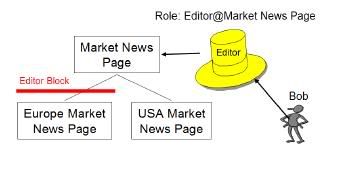
There could be situations where you dont want user to inherit roles. Ex. In this diagram Bob has Editor Role on Market News Page and because of inheritance he will get Editor role for both Eurpoean Market News Page and USA Market News Page. If you want you can block his role inheritance at European Market News Page, so that he does not get Editor role for either Eurpoean Market News Page or pages below it.

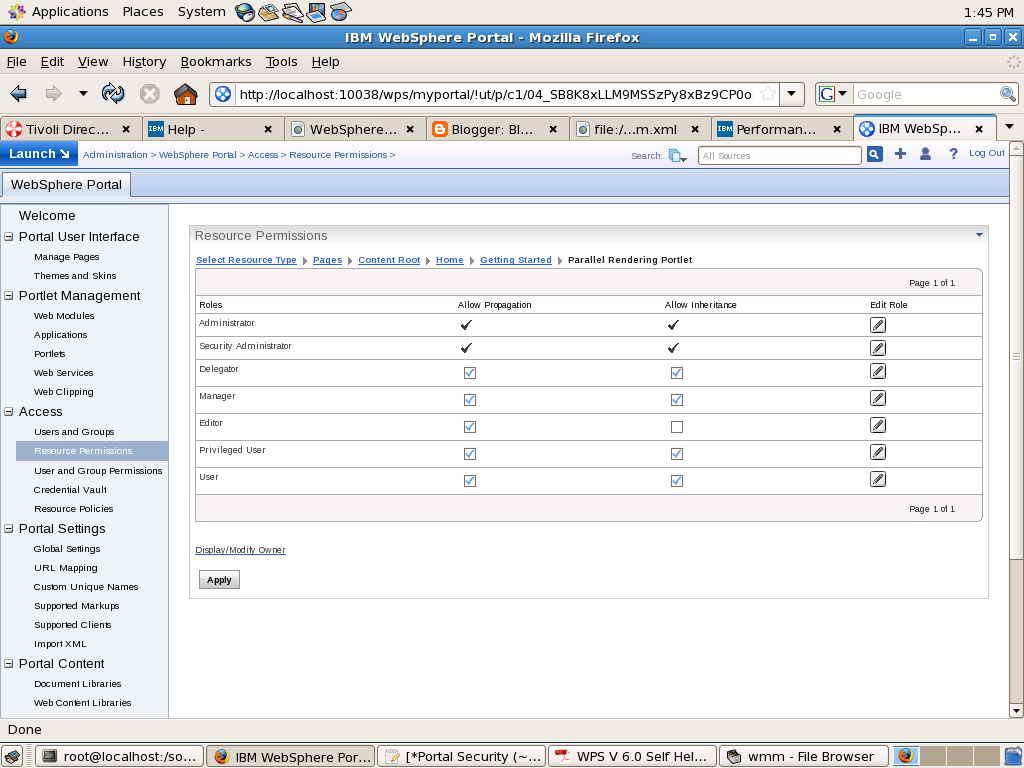
You can block roles using Resource Permissions Portlet like this
Photobucket

In this i am blocking Editor Role from being inherited from its parent. Similarly if you want to make John Doe editor of "Parallel Rendering Portlet" page you can un check Allow Propagation check box for Editor role

A role block is role type specific and tied to a specific resource. For example, an inheritance block for roles of type Editor on the Europe Market News page ensures that the Europe Market News page does not inherit any Editor role assignments from its parent resource, the Market News page. This role block does not affect inheritance of other role types. For example, Manager roles are still inherited. So, all users with the Manager@Market News Page role inherit the Manager@Europe Market News Page role unless a separate role block for the Manager role type exists.

Role blocks for roles of type Administrator and Security Administrator can only be inserted or removed through the XML configuration interface. For example, if Mary has the Administrator@Market News Page role, and the USA Market News Page is a child of the Market News Page, Mary automatically has the Administrator@USA Market News Page role. The Administrator@USA Market News Page role cannot be blocked with an inheritance or a propagation block set through the Portal Scripting Interface, or the User and Group Permissions or Resource Permissions portlets

All role types (including the Administrator and Security Administrator roles) are automatically blocked for the following types of resources:

  • Private pages

  • Externalized resources that have an internal parent resource

  • Internal resources that have an externalized parent resource


For example, if access to the Market News page is controlled internally by WebSphere Portal , and the USA Market News Page is controlled externally by IBM Tivoli® Access Manager for e-business, none of the roles on the Market News Page are inherited by the USA Market News Page. So, if Mary has the role Editor@Market News Page, she does not automatically get the role Editor@USA Market News Page because the USA Market News page is managed externally. If both the Market News page and the USA Market News page are managed externally (or if both are managed internally), Mary inherits the role Editor@USA Market News Page unless a role block is used. In general, there is never any inheritance between two resources that differ in their externalization state. In other words, an externally protected resource never inherits from an internally protected resource and vice versa.

Role Assignment

WPS provides flexible role assignment. Ex. Lets say you want to assign Privileged User rights for Lotus Notes portlet so that he can change his Lotus Notes related preference, this does not mean that you would have to give him Privileged user rights at portal level, instead you can assign him those rights only for Lotus Notes portlet.

In case of WPS you can assign user roles at particular root level. What that means is if you assign Editor rights to John Doe for Marketing Page then he will get that rights for Marketing page as well as all the pages under marketing. Similarly if you assign Privileged role to John Doe for Portlet Application then he will get Privileged User rights for all the portlets in that particular portlet application.

If you want you can also assign a role to user at portal level. Ex. If you want make John Doe administrator of portal then you can go to Resource Permissions Portlet and click on Virtual resources -> Portal and assign Administrator role to John Doe.

Roles and Role types

In WPS you can asssign a particular role to user for particular resource. What that means is your saying that user can perform set of operations on protected resource. There are two ways in which you can assign permissions to user, first is either you assign it to user directly(implict) or you assign those permissions to a group and user is part of that group(explicit). The set of permissions granted to specific user is defined by the union of all permissions contained in all explicitly and implicitly assigned roles of this user.

The WPS server defines following role types

  • User: Viewing portal content.

  • Privileged User: Viewing portal content, personalizing portlets and pages and creating new private pages

  • Contributor: Viewing portal content and creating new resources. The contributor role type does not include the permissions to edit resources. It only allows you to create new resource

  • Editor: Creating new shared resources and configuring existing resources that are used by multiple users.

  • Manager: Creating new shared resources as well as configuring and deleting existing resources that are used by multiple users

  • Security Administrator: Creating and deleting role assignments on resources. Being assigned Security Administrator role at some resource means that the user shall be allowed to act as a delegated administrator for that resource, in other words the Security Administrator on a resource is allowed to delegate a subset of their privileges on the resource to other people according to the Delegated Administration Policy. For example, a user who is assigned Security Administrator and Editor role on a resource can assign this Editor role to other people provided he has Delegator role on those people. Having the Security Administrator role on a resource alone does not give view or edit access to the resource.

  • Administrator: Unrestricted access on resources. This includes creating, configuring, and deleting resources. Administrators can also change the access control settings on resource; in other words grant other people access to those resources.

  • Delegator: Assigning the Delegator role to principals (users and groups) allows roles to be granted to them. Having the Delegator role on other resources, such as specific portlets, is not useful. The set of roles that can be granted to those principals is defined through the Security Administrator and Administrator role types. For example a user has a Delegator role on the SalesTeam user group but no Delegator role on the Managers user group, so this user can grant roles only to the SalesTeam or individual members of the SalesTeam user group but not to the Managers user group. Having the Delegator role on a resource does not give direct access to the resource. The purpose of the Delegator role type is to allow the granting of roles to users or groups, so assigning Delegator role on resources or resource types that are not users or user groups will not grant those users additional privileges.


The roles are arranged in hierarchy

Photobucket

Each role type extends the privileges contained in the role types directly beneth it in the hierarchy. Ex. Contributor can do everything that User can do and Editor can everything that both Contributor and User can do.

Protected Resource

In order to make management of actions simpler the portal server has arranged the resources in hierarchy i.e. Lets say you have a Portlet Application that contains 5 Portlet, you want John Doe to act as manager or all those 5 portlets so instead of going and adding John Doe as manager for each of the portlet you can go and add him as manager or the Portlet Application (Portlets are children of the portlet application).

Photobucket

The vast majority of the resources within this hierarchy represent portal resource instances that require access control protection (such as individual portal pages or portlets); but some of them are special virtual resources.

Virtual resources are used in two ways:
1. They guard sensitive operations that do not affect specific resource instances as such but the whole portal or a whole portal concept. For example, the virtual resource XmlAccess is used to protect the ability to use the XmlAccess configuration tool.
2. They group resources of the same or related resource types. For example, the virtual resource Content Nodes is the root node of all pages (resource instances of resource type Content Node) within the portal page hierarchy

Introduction to Portal Access Control (PAC)

Portal Access Control is single decision point within the WebSphere Portal Server. It controls access to all the protected resources.

The Portal server has a concept of protected resource Ex. Portlet, Page, Xmlaccess,.. Portal defines set of actions that can be performed on the resource Ex. Creating a page, deleting a page, updating a page,... In order to control what all actions a user can perform on resource portal has introduced concept of role. Ex. User role means you can perform only read action and admin role means you can perform read, add, update and delete action. So when you want a user John Doe to only view particular page but not update and delete the page then you should assign User role to him for that page. But if you want user John Doe to be able to update and delete page then you should assign him Manager role which allows him to perform update, delete actions on that resource.