EJB Container failover and WLM
The EJB client ORB plays same role in EJB world as that of HTTP Server plugin plays in the Web application world. Irrepective of if the client is a standalone Java client, another EJB or a servlet in a web application server in which the EJB is running, the EJB client ORB eliminates any one point of failure by dispatching requests among 1 to n application servers residing on multiple nodes. The EJB Client ORB will redirect EJB requests across cluster once a server is unavailable or not responding to response.


Installapp option during node federation
When you federate node to a cell, any existing installed enterprise applications are uninstalled as part of federation process. If you wish to federate any existing user-installed applications into the cell, you can specify the
-installapp command line argument when invoking addNode or you can select the Include applications check box if using the WAS Admin console for adding new node. If selected an attempt will be made to copy the applications installed on the application server instance into the cell, but applications with same name as applications that are currently installed into the cell will not be federated into the cell configuration
WAS ND Architecture main components
Deployment Manager
The Deployment Manager process provides a centralized administration mechanism for all nodes in a cell, including all WAS processes on each nodes as well as the cell configuration repository for both WAS and installed applications. The Dmgr works in conjunction with each node agent to control processes on each node and to maintain the configuration for each node. By providing a central point for management, the Dmgr allows you to control cells consisting of numerous nodes and in turn nodes running one or more server.
Node agent
A node agent is a local administrative agent process running on every node in the cell. The node agent server acts as local proxy for deployment manager, providing capability to manage servers and the configuration for each servers defined on a node. The node agent is intended solely as an administative process, the node agent does not provide a J2EE application runtime.If you use wsadmin tool to directly connect to node agent then you will only get access to AdminControl functions, AdminConfig and AdminApp functions are not available to safeguard against accidental changing of the configuration data
Application server
Application server in ND environment is same as the application server in standalone environment, but the difference is that it does not have a Administrative console application, instead configuration for the application server is managed centerally by the Deployment Manager. If you use wsadmin tool to directly connect to application server then you will only get access to AdminControl functions, AdminConfig and AdminApp functions are not available to safeguard against accidental changing of the configuration data
JMS Server
This server hosts the WebSphere Embedded messaging service on a node. In WAS ND there can be one JMS server node.
Admin Client
WAS provides two different admin clients, one is Web based Admin console and other is wasadmin command which is a command line tool
The Deployment Manager process provides a centralized administration mechanism for all nodes in a cell, including all WAS processes on each nodes as well as the cell configuration repository for both WAS and installed applications. The Dmgr works in conjunction with each node agent to control processes on each node and to maintain the configuration for each node. By providing a central point for management, the Dmgr allows you to control cells consisting of numerous nodes and in turn nodes running one or more server.
Node agent
A node agent is a local administrative agent process running on every node in the cell. The node agent server acts as local proxy for deployment manager, providing capability to manage servers and the configuration for each servers defined on a node. The node agent is intended solely as an administative process, the node agent does not provide a J2EE application runtime.If you use wsadmin tool to directly connect to node agent then you will only get access to AdminControl functions, AdminConfig and AdminApp functions are not available to safeguard against accidental changing of the configuration data
Application server
Application server in ND environment is same as the application server in standalone environment, but the difference is that it does not have a Administrative console application, instead configuration for the application server is managed centerally by the Deployment Manager. If you use wsadmin tool to directly connect to application server then you will only get access to AdminControl functions, AdminConfig and AdminApp functions are not available to safeguard against accidental changing of the configuration data
JMS Server
This server hosts the WebSphere Embedded messaging service on a node. In WAS ND there can be one JMS server node.
Admin Client
WAS provides two different admin clients, one is Web based Admin console and other is wasadmin command which is a command line tool
Managed vs unmanaged processes
A node is a logical grouping of managed servers. A node usually corresponds to a logical or physical computer system with a distinct IP host address. Nodes cannot span multiple computers.
Nodes in the network deployment topology can be managed or unmanaged. A managed node has a node agent process that manages its configuration and servers. Unmanaged nodes do not have a node agent.
A managed node has a node agent that manages all servers on a node, whether the servers are WebSphere Application Servers, Java Message Service (JMS) servers (on Version 5 nodes only), Web servers, or generic servers. The node agent represents the node in the management cell and keeps the configuration up to date.
A supported Web server can be on a managed node or an unmanaged node. You can define only one Web server to a stand-alone WebSphere Application Server node. This Web server is defined on an unmanaged node. You can define Web servers to the deployment manager. These Web servers can be defined on managed or unmanaged nodes.
Nodes in the network deployment topology can be managed or unmanaged. A managed node has a node agent process that manages its configuration and servers. Unmanaged nodes do not have a node agent.
A managed node has a node agent that manages all servers on a node, whether the servers are WebSphere Application Servers, Java Message Service (JMS) servers (on Version 5 nodes only), Web servers, or generic servers. The node agent represents the node in the management cell and keeps the configuration up to date.
- Managed node: A managed node has a node agent that manages all servers on a node, whether the servers are WebSphere Application Servers, Java Message Service (JMS) servers (on Version 5 nodes only), Web servers, or generic servers. The node agent represents the node in the management cell and keeps the configuration up to date. All WAS processes are called managed servers or managed processes, meaning that all are parto f a single administration domain (cell) and results can be centerally managed and monitored. In WAS following processes are managed process
- Deployment Manager
- Node Agent
- Application Server
- JMS Server
- Unmanaged nodes: An unmanaged node does not have a node agent to manage its servers. Unmanaged nodes in the Network Deployment environment can have server definitions such as Web servers, but not Application Server definitions. Unmanaged nodes in the Network Deployment environment cannot have a node agent added to it, and therefore cannot become a managed node. In the stand-alone Application Server environment, nodes do not have node agents and are also considered unmanaged nodes. The deployment manager cannot manage a stand-alone Application Server because it is not known to the cell. A stand-alone Application Server can be federated. When it is federated, a node agent is automatically created, and the node becomes a managed node in the cell.
A supported Web server can be on a managed node or an unmanaged node. You can define only one Web server to a stand-alone WebSphere Application Server node. This Web server is defined on an unmanaged node. You can define Web servers to the deployment manager. These Web servers can be defined on managed or unmanaged nodes.
Application Server component
WebSphere Application Server relies on following server components to provide enterprise level environment
- Web Browser: The end user uses a Web browser to interact with the deployed applications. The administrator makes use of browser to access the WebSphere Application Server Administration Console
- IP Sprayer: IP sprayer is normally a hardware unit that seats in front of your web server and distributes user requests among different HTTP server. If you dont use IP sprayer instead point the application URL to HTTP Server then that server becomes single point of failure also if you have a big user load then you might want to distribute users requests among different HTTP server which in turn would distribute user requests to different WAS server. The IP sprayer can either randomly distribute requests between different HTTP Servers or they can be sophisticated things like if the user request particular application then forward that request to high performance/ powerful server
- Load balance: The end user of WAS, normally points to the load balance, which takes care of distributing the user requests between different HTTP servers. The load balancer makes sure that no individual server is overwhelemed with the requests while other servers are idel.
- HTTP Server and Web Server Plugin: THe HTTP server is used for two things first is to server static content and in addition to that it also makes use of WebSPhere Plugin to distribute requests among different servers where the application is configured (Usually different servers in cluster). The HTTP server is normally configured to use either weighted round robin scheduling algorith, where the first request is distributed to a random application server, which servers as a starting point and then the subsequent requests are distributed according to the assigned weights of the application server. You can also configure plugin to use random system in which case the server weightage is not taken into consideration and the requests are distributed randomly. The HTTP server also takes care of session affinity, which makes sure that the request from the client goes to same server which served last request for that client
- Firewall: A firewall is a hardware and software system that manages the flow of information between the Internet and your companies network. It takes care of things like blocking user access to only few predefined ports, it can block virus and denial of service attacks.
- Database server: Most of the enterprise applications use RDBMS for data storage and retrieval functionality. The Application developers decide what database to use, there structure,.. The WebSPhere application server does not store any configuration data in db, that data is stored in .xml files on the file system
- Websphere MQ: WebSPhere MQ is messaging backbone that is used for exchanging point-to-point message and publish-and-subscribe messaegs with applications that reside a WebSphere MQ network.
Procedure to enable SSL between web server and WebSphere Application Server
I wanted to try enabling SSL between my WebServer and WebSphere Application Server so i followed this process to do that
- Create 2 self signed certificates one is C:\Cert\HTTPServer\conf\keys\WAS6PluginCertificates.kdb and other is C:\Cert\WebSphere\AppServer\profiles\Dmgr01\config\cells\dmgrCell01\WAS6WebContainerCertificates.jks
- Exchange public keys of self signed certificates
Exchanging public certificate
This section provides details and step-by-step instructions for exchanging public certificates between two key stores or trust (certificate) stores. You must perform the certificate exchange when you want to set up trust between two parties based on certificates. Usually you use this process with self-signed certificates because real certificates issued by well-known Certificate Authorities are already included in the key and trust stores.
- Start ikeyman and open the file that you just C:\Cert\HTTPServer\conf\keys\WAS6PluginCertificates.kdb, whose public certificate you want to export
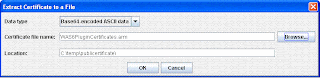
- Now select the personal certificate that you created, in my case it is WASPluginCertificate and click on Extract Certificate button

- ikeyman tool will display a dialog where you can set location where the public certificat should be exported. Export it to c:\temp\publiccertificate\WAS6PluginCertificates.arm
- Now open the C:\Cert\WebSphere\AppServer\profiles\Dmgr01\config\cells\dmgrCell01\WAS6WebContainerCertificates.jks file in iKeyman tool
- Switch to the Signer certificate view by selecting signer certificate in the key database content section

- Now click on add, and it will show you the Add CA's certificate from file dialog, select the c:\temp\publiccertificate\WAS6PluginCertificates.arm file that you exported and click OK

- It will ask you to enter a lable for the public certificate enter WAS6PluginCertificatesCertificate.
- Now you should be able to see the certificate that you just imported in the list


Creating self signed certificate

IBM provides a ikeyman tool that you can use to create self signed certificate and manage keys by following these steps
- Go to the WAS_HOME/bin directory and execute ikeyman tool, it will open a GUI based tool like this

- Now click on Key Database File - New. It will open a dialog box, in that change Key Database type to CMS and enter file and path name. In my case i am creating WAS6PluginCertificates.kdb file in C:\Cert\HTTPServer\conf\keys\ directory and click OK

- It will ask you for the password for the Key database file, enter a password, then check Stash the password to a file checkbox.

- It will create a .kdb file and import bunch of keys for you by default and show a message like this
- Once the .kdb file is created next step is to create a Self Signed certificate so click on Create - New Self Signed Certificate like this

- Enter the details for self signed certificate such as, key label, Organizations,...
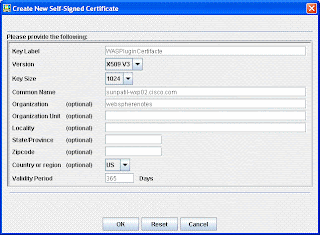
- Thats it your self signed certificate is created, you can check them by going to the directory where we saved it. You will see 4 different files for that certificate are created out of that .sth is the stash password file


Role Mapping in installed application
If you did not map application roles to users during installation you can map security roles to users and groups in installed application by following these rules
- Go the WAS Admin COnsole, select the enterprise application in which you want to map roles, If your application defines roles, then you will see "Security role to user/group mapping" link in the Detail properties section, click on that link

- When you click on that link you will get a "Security role to user/group mapping" page like this, which will list out all the roles in your application and let you map those roles


Role mapping during application installation
During the process of running the application installation, you see the Map
security roles to users or groups step. In this step, you have the option of
selecting any of the roles and assigning a user or a group from the user registry
using one of the lookups. You can also assign one of the special subjects
(Everyone or All authenticated) to the role.
Follow these steps to map roles during the installation.
security roles to users or groups step. In this step, you have the option of
selecting any of the roles and assigning a user or a group from the user registry
using one of the lookups. You can also assign one of the special subjects
(Everyone or All authenticated) to the role.
Follow these steps to map roles during the installation.
- In the enterprise application installation wizard, choose "Show me all installation options and parameters" radio box on the first screen. If you dont do that then the installation option wont show you option to Map security roles to users or groups page

- Follow the installation wizard and then on the Map security roles to users or groups pages, you will get list of roles defined in your application and you could either assign them to roles all authenticated users or everyone or you can select the application role and click on Look up Users or Look up Groups button

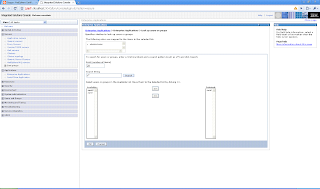
- If you want to select individual users that should be assigned particular application role, you will get a screen like this select the users


Subscribe to:
Posts (Atom)