Showing posts with label elasticsearch. Show all posts

How to use ElasticSearch as storage from Hive in cloudera

.In the Using ElasticSearch as external data store with apache hive entry i talked about how you can create a table in Hive so that actual data is stored in ElasticSearch. Problem with that approach was that i had to pass the full path to elasticsearch-hadoop-hive-<eshadoopversion>.jar as parameter every time.

hive -hiveconf hive.aux.jars.path=/opt/elastic/elasticsearch-hadoop-2.4.3/dist/elasticsearch-hadoop-hive-2.4.3.jar;
Other option for doing same thing is to open hive session and then calling following command as first thing

ADD JAR /opt/elastic/elasticsearch-hadoop-2.4.3/dist/elasticsearch-hadoop-hive-2.4.3.jar;
Problem with both these approaches is that you will have to keep letting hive know the full path to elasticsearch jars every single time. Instead you can take care of this issue by copying elasticsearch-hadoop-hive-<eshadoopversion>.jar into same directory on every node in your local machine. In my case i copied it to /usr/lib/hive/lib directory by executing following command

sudo cp /opt/elastic/elasticsearch-hadoop-2.4.3/dist/elasticsearch-hadoop-hive-2.4.3.jar /usr/lib/hive/lib/.
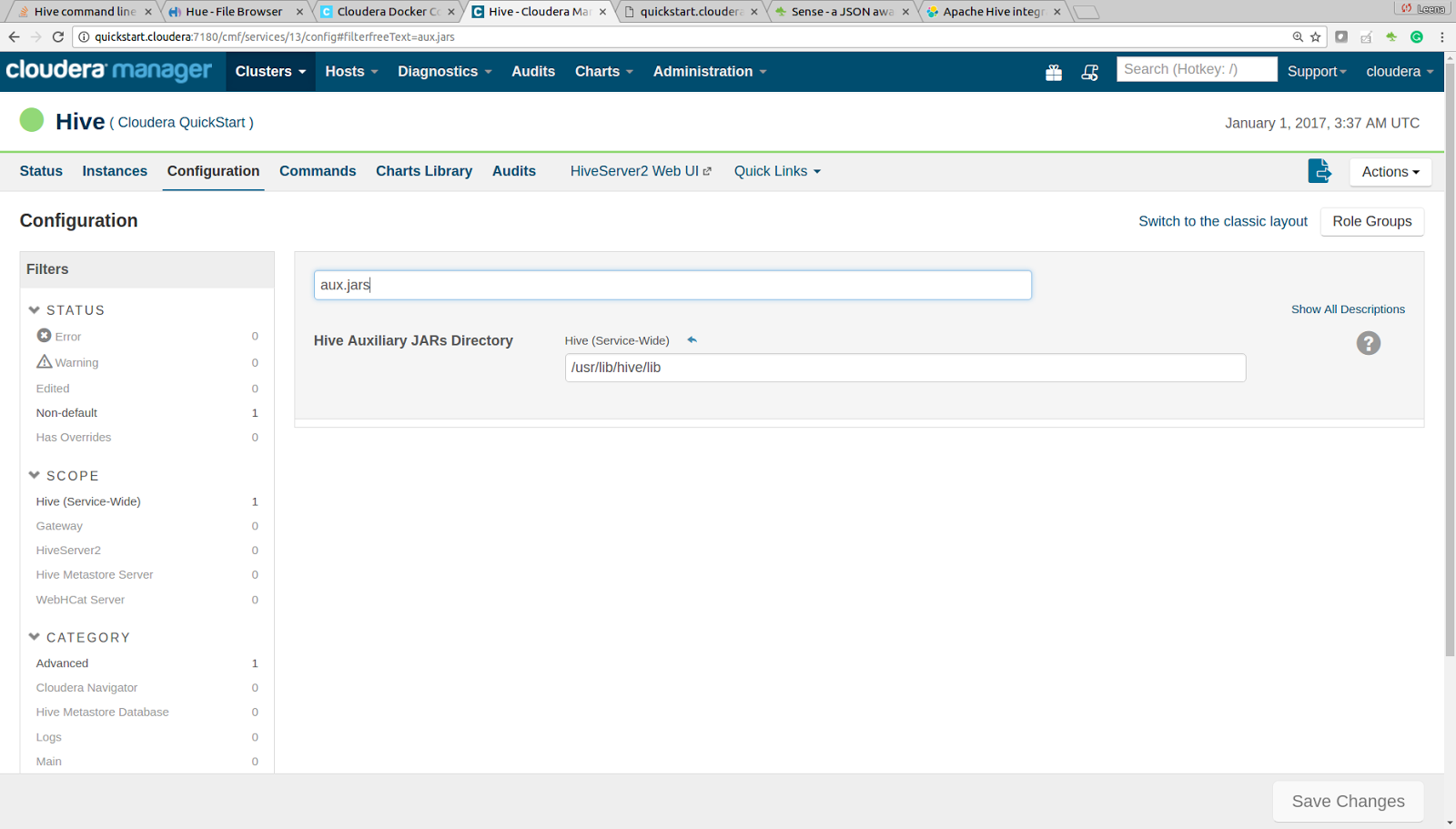
Then set the value of Hive Auxiliary JARs Directory hive.aux.jars.path property to /usr/lib/hive/lib directory like this.
Then restart the hive service and now you should be able to access any elastic search backed table without adding the elasticsearch hadoop jar explicitly

Installing ElasticSearch on existing docker container

I was using a Cloudera Quickstart docker image for one experiment and wanted to install ElasticSearch on it but i had trouble in accessing from my host, but i found workaround by following these steps
  • First i installed ElasticSearch by downloading and unzipping ElasticSearch version 2.4.3 and unzipping it in /opt/elastic folder
  • Then i started elasticsearch by executing /bin/elasticsearch, and it started ok. When i ran curl -XGET "http://localhost:9200/ from inside docker images i was able to access ElasticSearch, but when i tried to access it from my host machine, i could not access it. But where as i was able to access other services running on my docker image. So first i tried running netstat on my docker image to see why i was able to access other services but not elasticsearch (Also to make sure if elasticsearch was actually listening on port 9200 and i got output like this
  • Looking at the port mapping i could see that other services were mapped to 0.0.0.0 but elasticsearch was only mapped to 127.0.0.1, so i opene <ELASTICSEARCH_HOME>/config/elasticsearch.yml and added two more lines to it like this
    
    http.host: 0.0.0.0
    transport.host: 127.0.0.1
    
  • Then i restarted elasticsearch server and i checked the netstat again and i could see this mapping, and when i tried accessing elasticsearch from host machine it worked

Writing data from Spark to ElasticSearch

ElasticSearch for Apache Hadoop project has introduced a way to directly write to ElasticSearch without going through Elastic Search OutputFormat. I wanted to try that out so i built simple application that saves output of word count into Elastic Search, you can download this project from github First thing that i had to do was to build maven pom.xml that includes org.elasticsearch.elasticsearch-hadoop version 5.0 jar. I could not find it in the regular maven repository so i had to include elasticsearch repository in my pom.xml Then this is how my Spark program looks like, the main part is line 42 where i create Map of all the properties that i need for saving this RDD into ElasticSearch and then line 43, where i am calling wordCountJson.saveToEs(esMap), which actually takes care of writing data into elasticsearch

Create ElasticSearch cluster on single machine

I wanted to figure out how to create a multi-node ElasticSearch cluster on single machine. So i followed these instructions
  1. First i did download elasticsearch zip file.
  2. Create 3 folders in /temp like node1, node2 and node3
  3. Unzip elasticsearch.zip in each one of these folders like this
  4. Then i opend the node1/elasticsearch-1.4.2/conf/elasticsearch.yml and i did change value of cluster.name to sunilscluster and value of node.name to first. I did same in the node2 and node 3 but i did set value of node.name to second and third on node2 and node3 respectively
  5. Next step was to install marvel on each of the nodes by executing bin/plugin -i elasticsearch/marvel/latest
  6. Then i went to each of the directory and did start elasticsearch. When the nodes were coming up i could see messages in the log indicating that the nodes were able to discover each other
Once all 3 nodes were started i could see them in marvel
Note: There might be efficient way of doing this in which i could share binaries. I tried creating 3 different elasticsearch.yml and running the elasticsearch server 3 times using elasticsearch -Des.config=/node1/elasticsearch.yml,elasticsearch -Des.config=/node2/elasticsearch.yml but that did not work.

Using NodeClient for connecting to ElasticSearch server

There are 2 options for connecting to ElasticSearch server from java program
  1. TransportClient
  2. NodeClient
As per ElasticSearch.org you should use ransportClient when you want to use short lived connection but you should use NodeClient when you want to use few long-lived connection. If your creating a Web Application that talks to ElasticSearch then you would be better off creating only one connection object during startup of application and destroy the object during shutdown of application. The basic org.elasticsearch.client.Client object is thread safe so you can call it from multiple threads of Web Application. I was trying to figure out how to use NodeClient and ran into few issues but now i have my sample working, and these are my notes during the development process First i did download ElasticSearch version 1.1.1 on my local machine and i tried running it as standalone server (I did not change any thing in the configuration) and then i used following code for connecting to it and it worked In my local ElasticSearch log i could see a log line indicating when my Client connected to cluster and when it disconnected from cluster like this
At this point i was not connected to my office network. But as soon as i connected to my office network (Which has few other elasticsearch server's working), same code started failing and i got org.elasticsearch.cluster.block.ClusterBlockException: blocked by: [SERVICE_UNAVAILABLE/1/state not recovered / initialized];[SERVICE_UNAVAILABLE/2/no master] exception

4618 [elasticsearch[Tiboro][generic][T#1]] DEBUG org.elasticsearch.discovery.zen  - [Tiboro] filtered ping responses: (filter_client[true], filter_data[false]) {none}
7621 [elasticsearch[Tiboro][generic][T#1]] DEBUG org.elasticsearch.discovery.zen  - [Tiboro] filtered ping responses: (filter_client[true], filter_data[false]) {none}
10623 [elasticsearch[Tiboro][generic][T#1]] DEBUG org.elasticsearch.discovery.zen  - [Tiboro] filtered ping responses: (filter_client[true], filter_data[false]) {none}
13625 [elasticsearch[Tiboro][generic][T#1]] DEBUG org.elasticsearch.discovery.zen  - [Tiboro] filtered ping responses: (filter_client[true], filter_data[false]) {none}
16626 [elasticsearch[Tiboro][generic][T#1]] DEBUG org.elasticsearch.discovery.zen  - [Tiboro] filtered ping responses: (filter_client[true], filter_data[false]) {none}
19628 [elasticsearch[Tiboro][generic][T#1]] DEBUG org.elasticsearch.discovery.zen  - [Tiboro] filtered ping responses: (filter_client[true], filter_data[false]) {none}
22630 [elasticsearch[Tiboro][generic][T#1]] DEBUG org.elasticsearch.discovery.zen  - [Tiboro] filtered ping responses: (filter_client[true], filter_data[false]) {none}
25632 [elasticsearch[Tiboro][generic][T#1]] DEBUG org.elasticsearch.discovery.zen  - [Tiboro] filtered ping responses: (filter_client[true], filter_data[false]) {none}
28634 [elasticsearch[Tiboro][generic][T#1]] DEBUG org.elasticsearch.discovery.zen  - [Tiboro] filtered ping responses: (filter_client[true], filter_data[false]) {none}
31611 [main] WARN  org.elasticsearch.discovery  - [Tiboro] waited for 30s and no initial state was set by the discovery
31611 [main] INFO  org.elasticsearch.discovery  - [Tiboro] elasticsearch/tuC0zIEOSMaxL6reqCYjPA
31611 [main] DEBUG org.elasticsearch.gateway  - [Tiboro] can't wait on start for (possibly) reading state from gateway, will do it asynchronously
31617 [main] INFO  org.elasticsearch.http  - [Tiboro] bound_address {inet[/0:0:0:0:0:0:0:0:9201]}, publish_address {inet[/192.168.1.10:9201]}
31621 [elasticsearch[Tiboro][clusterService#updateTask][T#1]] DEBUG org.elasticsearch.cluster.service  - [Tiboro] processing [updating local node id]: execute
31621 [elasticsearch[Tiboro][clusterService#updateTask][T#1]] DEBUG org.elasticsearch.cluster.service  - [Tiboro] cluster state updated, version [0], source [updating local node id]
31622 [elasticsearch[Tiboro][clusterService#updateTask][T#1]] DEBUG org.elasticsearch.cluster.service  - [Tiboro] set local cluster state to version 0
31622 [elasticsearch[Tiboro][clusterService#updateTask][T#1]] DEBUG org.elasticsearch.cluster.service  - [Tiboro] processing [updating local node id]: done applying updated cluster_state (version: 0)
31622 [main] INFO  org.elasticsearch.node  - [Tiboro] started
Value of client org.elasticsearch.client.node.NodeClient@16888fd4
Caught exception
31630 [main] INFO  org.elasticsearch.node  - [Tiboro] stopping ...
org.elasticsearch.cluster.block.ClusterBlockException: blocked by: [SERVICE_UNAVAILABLE/1/state not recovered / initialized];[SERVICE_UNAVAILABLE/2/no master];
	at org.elasticsearch.cluster.block.ClusterBlocks.globalBlockedException(ClusterBlocks.java:138)
	at org.elasticsearch.cluster.block.ClusterBlocks.globalBlockedRaiseException(ClusterBlocks.java:128)
	at org.elasticsearch.action.search.type.TransportSearchTypeAction$BaseAsyncAction.(TransportSearchTypeAction.java:107)
	at org.elasticsearch.action.search.type.TransportSearchQueryThenFetchAction$AsyncAction.(TransportSearchQueryThenFetchAction.java:68)
	at org.elasticsearch.action.search.type.TransportSearchQueryThenFetchAction$AsyncAction.(TransportSearchQueryThenFetchAction.java:62)
	at org.elasticsearch.action.search.type.TransportSearchQueryThenFetchAction.doExecute(TransportSearchQueryThenFetchAction.java:59)
	at org.elasticsearch.action.search.type.TransportSearchQueryThenFetchAction.doExecute(TransportSearchQueryThenFetchAction.java:49)
	at org.elasticsearch.action.support.TransportAction.execute(TransportAction.java:63)
	at org.elasticsearch.action.search.TransportSearchAction.doExecute(TransportSearchAction.java:108)
	at org.elasticsearch.action.search.TransportSearchAction.doExecute(TransportSearchAction.java:43)
	at org.elasticsearch.action.support.TransportAction.execute(TransportAction.java:63)
	at org.elasticsearch.client.node.NodeClient.execute(NodeClient.java:92)
	at org.elasticsearch.client.support.AbstractClient.search(AbstractClient.java:212)
	at org.elasticsearch.action.search.SearchRequestBuilder.doExecute(SearchRequestBuilder.java:1043)
	at org.elasticsearch.action.ActionRequestBuilder.execute(ActionRequestBuilder.java:85)
	at org.elasticsearch.action.ActionRequestBuilder.execute(ActionRequestBuilder.java:59)
	at HelloESClient.getNodeClient(HelloESClient.java:34)
	at HelloESClient.main(HelloESClient.java:15)
31639 [main] INFO  org.elasticsearch.node  - [Tiboro] stopped
Exiting HelloESClient.main()
The problem was my client was trying to discover all different ES servers on my office network and that was causing problem. So i had to make changes in the code to introduce settings object then i set discovery.zen.ping.multicast.enabled to false and discovery.zen.ping.unicast.hosts to localhost, note that i did not change anything on elastisearch configuration. It was running as usual. After making changes i used following code to connect to elasticsearch server on my local. This client is saying only talk to elasticsearch on my local machine. After that i wanted to figure out how this will work in case of cluster, so stopped my elasticsearch server. I changed elasticsearch.yml to following now instead of default cluster name of elasticsearch. I changed it to use sunilscluster as cluster name and i did restart my es.

cluster.name: sunilscluster
node.name: deves11
In order for my NodeClient to work i had to change it and set clusterName("sunilscluster") like this Once this was done i tried connecting to ElasticSearch server in development cluster, which was on separate network with master nodes as masternode1, masternode2, masternode3. For that all i had to do was change value of discovery.zen.ping.unicast.hosts to masternode1.dev.com,masternode2.dev.com,masternode3.dev.com but i got following error The problem is when you use NodeClient it tries to talk to es server on UDP, lot of times the ports are blocked. Only solution to this is that either open UDP port or run your client on machine where UDP port can be accessed, take a look at this for more information

2014-12-30 10:14:09 DEBUG zen:104 - [nodeclient1] filtered ping responses: (filter_client[true], filter_data[false])
	--> target [[masternode1][1u63mFF0SrG7J3UQ3rtLkQ][n01sml101][inet[/172.30.0.0:9300]]{data=false, master=true}], master [[masternode1][1u63mFF0SrG7J3UQ3rtLkQ][n01sml101][inet[/172.30.0.0:9300]]{data=false, master=true}]
2014-12-30 10:14:09 DEBUG netty:104 - [nodeclient1] connected to node [[masternode1][1u63mFF0SrG7J3UQ3rtLkQ][n01sml101][inet[/172.30.0.0:9300]]{data=false, master=true}]
2014-12-30 10:14:09 INFO  zen:114 - [nodeclient1] failed to send join request to master [[masternode1][1u63mFF0SrG7J3UQ3rtLkQ][n01sml101][inet[/172.30.0.0:9300]]{data=false, master=true}], reason [org.elasticsearch.transport.RemoteTransportException: [masternode1][inet[/172.30.0.0:9300]][discovery/zen/join]; org.elasticsearch.transport.ConnectTransportException: [nodeclient1][inet[/172.29.8.36:9300]] connect_timeout[30s]; java.net.ConnectException: Connection refused: /172.29.8.36:9300]
2014-12-30 10:14:09 DEBUG netty:104 - [nodeclient1] connected to node [[#zen_unicast_1#][VDD7S0ITAA024][inet[masternode1.dev.com/172.30.0.0:9300]]]
2014-12-30 10:14:12 DEBUG netty:104 - [nodeclient1] disconnected from [[#zen_unicast_1#][VDD7S0ITAA024][inet[masternode1.dev.com/172.30.0.0:9300]]]
2014-12-30 10:14:12 DEBUG zen:104 - [nodeclient1] filtered ping responses: (filter_client[true], filter_data[false])
	--> target [[masternode1][1u63mFF0SrG7J3UQ3rtLkQ][n01sml101][inet[/172.30.0.0:9300]]{data=false, master=true}], master [[masternode1][1u63mFF0SrG7J3UQ3rtLkQ][n01sml101][inet[/172.30.0.0:9300]]{data=false, master=true}]
2014-12-30 10:14:12 INFO  zen:114 - [nodeclient1] failed to send join request to master [[masternode1][1u63mFF0SrG7J3UQ3rtLkQ][n01sml101][inet[/172.30.0.0:9300]]{data=false, master=true}], reason [org.elasticsearch.transport.RemoteTransportException: [masternode1][inet[/172.30.0.0:9300]][discovery/zen/join]; org.elasticsearch.transport.ConnectTransportException: [nodeclient1][inet[/172.29.8.36:9300]] connect_timeout[30s]; java.net.ConnectException: Connection refused: /172.29.8.36:9300]
2014-12-30 10:14:12 DEBUG netty:104 - [nodeclient1] connected to node [[#zen_unicast_1#][VDD7S0ITAA024][inet[masternode1.dev.com/172.30.0.0:9300]]]
2014-12-30 10:14:15 DEBUG netty:104 - [nodeclient1] disconnected from [[#zen_unicast_1#][VDD7S0ITAA024][inet[masternode1.dev.com/172.30.0.0:9300]]]
2014-12-30 10:14:15 DEBUG zen:104 - [nodeclient1] filtered ping responses: (filter_client[true], filter_data[false])

How to use ElasticSearch from Web Application (How to fix java.lang.OutOfMemoryError: PermGen space error in Tomcat with ElasticSearch client as use case)

Recently i was working on a issue of Memory leak in the Web Application that talks to ElasticSearch. The problem was when i tried to deploy/undeploy the application few times without restarting server Tomcat ran out of memory and i got Exception in thread "http-bio-8080-exec-30" java.lang.OutOfMemoryError: PermGen space error. I wanted to figure out what is going on, so first i did create this simple web application that uses ElaticSearch client and provides a JAX-RS api to proxy calls to ElasticSearch. This is how my sample ESClient.java looks like this takes care of establishing connection with ElasticSearch using TransportClient I could use the RESTClient to make a POST call for search like this
Now when i use the VisualVM for looking at the application, i could see elasticsearch created a threadpool of about 17 threads that are connected to the ElasticSearch like this
When i was stop/ my application for updating it, these threads created by ElasticSearch do not getting closed and because of the classes loaded by the web application cannot be garbage collected and i can see following warning messages on the console. [Dec 23, 2014 8:09:55 PM] [org.apache.catalina.loader.WebappClassLoader clearReferencesThreads] [SEVERE]: The web application [/ESClientWeb] appears to have started a thread named [elasticsearch[Blink][[timer]]] but has failed to stop it. This is very likely to create a memory leak. I see bunch of these messages in the console like this
When i use the Find Leak functionality on Apache Tomcat console i could see my application name shows up like this multiple times, once for every update
After couple of redeploy's my Tomcat runs out of memory and throws Exception in thread "http-bio-8080-exec-30" java.lang.OutOfMemoryError: PermGen space error like this
In order to solve this problem, all i had to do was to create ContextListener like this, i am creating object of org.elasticsearch.client.transport.TransportClient during startup and closing it during application stopping. I had to make couple of changes in ESClient.java like this After making these changes i could see the thread pool getting destroyed during shutdown of application and as a result the application classes are getting garbage collected and no more OutOfMemoryError

How to update records in Hive Table that uses ElasticSearch for storage

I had a requirement in which i wanted to update the Hive table. Now Hive is more of append only database and you cant update records in it (That limitation comes from Text files stored in HDFS which is how stores data by default). But if your using Hive with elasticSearch as storage then you can get this to work. When your using ElasticSearch as storage mechanism then every call from hive to insert or delete data gets forwarded to ElasticSearch API, and ElasticSearch has ability to update existing records. I used this to implement the updatable Hive table. So the scenario is lets assume you have a elasticsearch Index that stores First Name, Last Name and Email as document in ElasticSearch. For that create a new index in ES with name equals cricketers and type equals player by making a CURL call like this.

curl -XPOST "http://localhost:9200/cricketers/player/1" -d'
{
    id: "1",
    fname: "First",
    lname: "Cricketer",
    email: "first.cricketer@gmail.com"
}'
This call will first create a Index named cricketers in ES and insert one document in it, with id equals 1. Next step is to define a external table in Hive that uses org.elasticsearch.hadoop.hive.EsStorageHandler as StorageHandler and is pointing to cricketers/player index that you created in last step. Also important setting is 'es.mapping.id'='id' which is saying that use value of id column as primary key/id in elasticsearch.

create external table cricketers_es(id String, fname String, lname String, email String) stored by 'org.elasticsearch.hadoop.hive.EsStorageHandler' 
TBLPROPERTIES('es.resource'='cricketers/player', 'es.index.auto.create'='false', 'es.mapping.id'='id')
Once the table is created you can check records in it by executing select * from cricketers_es command. Now you should see 1 record that is there in the Index.
Since hive does not have concept of update statement. You will have to create a hive table that will have the records that you want to insert/update(Only delta) and then you will use this delta table for updating the cricketers_es table. In order to do that first create a text file that holds delta of the records that you want to update. In my case i did create this simple cricketers.txt file like this and upload into to HDFS at /user/hue folder

1,sachin,tendulkar,sachin.tendulakar@bcci.com
2,Rahul,Dravid,rahul.dravid@bcci.com
After that create a Hive table called cricketers_stage which will be used for holding the delta records you want by executing following statement

create table cricketers_stage(id String, fname String, lname String, email String) ROW FORMAT DELIMITED FIELDS TERMINATED BY ',';
Now use following Hive statement to load your delta records into cricketers_stage like this.

LOAD DATA INPATH '/user/hue/cricketers.txt' INTO TABLE `default.cricketers_stage`
Next step ElasticSearch write mode to upsert by setting following property in the Hive console.

es.write.operation=upsert
The last step is to execute following statement in Hive which will take content of cricketers_stage and insert those records into cricketers_es table.

insert into cricketers_es select * from cricketers_stage
Now if you run select * from cricketers_es you should see 2 records your first record is updated and record with id 2 is new insert.

1,sachin,tendulkar,sachin.tendulakar@gmail.com
2,Rahul,Dravid,rahul.dravid@bcci.com
You can also verify the records in elasticsearch by executing following CURL command

curl -XPOST "http://localhost:9200/cricketers/player/_search?pretty=true" -d'
{
  "query": {
      "match_all": {}
  }
}'
Saving complex object in elasticsearch as output of MapReduce program

In the Using ElasticSearch to store output of MapReduce program i built a sample MapReduce program that writes output to the ElasticSearch. I wanted to figure out how to write output of MapReduce job into elasticseach so that it creates complex JSON structure which has embedded object and uses date type. I decided to create this sample program which reads .csv file and generates contact records in elasticsearch, which look like this . You can download sample code for this project from here I followed these steps for creating the program.
  1. First thing i did was create hadoop/contact index in ElasticSearch by using following mapping. You can create the index by making HTTP POST call to http://localhost:9200/hadoop
  2. Once the index was created i created a Contact.java object which looks like this As you can see this is a simple POJO which has list of Address objects which is another pojo. It also uses CustomDateSerializer as custom date serializer
  3. Next step was to create CustomDateSerializer.java which is a class that has both the Mapper and the MapReducer driver class.
    • ContactImportMapper: This is a mapper class that gets one line from Contact.txt at a time and it splits it based on comma and then uses the values to create Contact.java object. In the mapper class on line 67, i am converting the Contact object into JSON using Jackson parser and then setting the JSON as value of Text. Then on line 70, i am writing NullWriter as key and Contact JSON as value, which gets inserted into ES
    • ContactImportDriver: This class is same as any other MapReduce driver with few exceptions, On line 101 i am calling job.getConfiguration().set("es.input.json", "yes");, which tells ElasticSearch output to treat the output as JSON. Then on line 109, i am setting OutputFormatter to EsOutputFormat so that ElasticSearch Hadoop framework can take control of persisting output. job.setOutputFormatClass(EsOutputFormat.class);
  4. Once the program was built i am passing 2 parameters to program first is the full path of contact.txt file and second argument is the ElasticSearch index and type in hadoop/contact format. This is how the content of contact.txt file looks like
    
    Sachin,Tendulkar,24-Apr-1973,1 Main Street,Mumbai,India 
    Rahul,Dravid,01-Jan-1973,1 Main Street,Bangalore,India
    Anil,Kumble,17-Oct-1970,1 Main Street,Bangalore,India
    Virat,Kohali,05-Nov-1988,1 Main Street,Delhi,India
    Mahendra Singh,Dhoni,07-Jul-1981,1 Main Street,Ranchi,India
    Saurav Ganguli,08-Jul-1982,1 Main Street,Kolkata,India
    
After executing the code i did execute following query to find out all the players, with date of birth between 1970-1974 like this This is how my sample output looks like

Configure LogStash to read Apache HTTP Server logs and add GeoIP information in it.

LogStash is a tool that you can use for managing your logs. Basic idea is you configure logstash to read the log file, it enhances log records and then it writes those records to ElasticSearch. Then you can use Kibana to view your log files. I wanted to figure out where my web traffic is coming from, so i configured the LogStash server to read the HTTP server log, then used its geoip capability to find out the location of the request based on the ip of the request and store it in elastic search. This is how my logstash configuration looks like, before starting this i did download the GeoCity database from maxmind and configured LogStash to use it. Next i did start elasticsearch server on local machine to collect logs and used following command to start logstash server

java -jar logstash-1.3.2-flatjar.jar agent -f httpaccess.conf
Once logstash server was started i could see how it was parsing logs and posting them in elasticsearch. For example for the following log statement

129.143.71.36 - - [31/Aug/2011:08:35:17 -0700] "GET /favicon.ico HTTP/1.1" 200 3935 "-" "Mozilla/5.0 (X11; U; Linux i686; en-US) AppleWebKit/534.10 (KHTML, like Gecko) Chrome/8.0.552.224 Safari/534.10"
I could see logstash converting it into following JSON before posting it into elasticsearch

Reading content of ElasticSearch index into Pig Script

In the Using ElasticSearch for storing ouput of Pig Script , i built a sample for storing output of Pig Script into ElasticSearch. I wanted to try out the reverse, in which i wanted to use Index/Search Result in elastic search as input into Pig Script, so i built this sample
  1. First follow step 3 in the Using ElasticSearch for storing ouput of Pig Script to download and upload the ElasticSearch Hadoop jars into HDFS store.
  2. After that create a pig script like this, In this script first 2 lines are used to make the ElasticSearch Hadoop related jars available to Pig. Then the DEFINE statement is creating alias for org.elasticsearch.hadoop.pig.EsStorage and giving it a simple/user friendly name of ES. Then the 4th line is telling Pig to load the content of pig/cricket index on local elastic search into variable A. The last line is used for dumping content of variable A.
    
    REGISTER /user/root/elasticsearch-hadoop-2.0.0.RC1/dist/elasticsearch-hadoop-2.0.0.RC1.jar
    REGISTER /user/root/elasticsearch-hadoop-2.0.0.RC1/dist/elasticsearch-hadoop-pig-2.0.0.RC1.jar
    
    DEFINE ES org.elasticsearch.hadoop.pig.EsStorage;
    A = LOAD 'pig/cricket' USING ES;
    DUMP A;
    
After i executed the script i could see the output like this
Note: Before i got it to work i was using v = LOAD 'pig/cricket' USING org.elasticsearch.pig.EsStorage command to load the content of ES and it kept throwing the following error. I realized that i was using the wrong package name

grunt> v = LOAD 'pig/cricket' USING org.elasticsearch.pig.EsStorage;
2014-05-14 15:56:48,873 [main] ERROR org.apache.pig.tools.grunt.Grunt - ERROR 1070: Could not resolve org.elasticsearch.pig.EsStorage using imports: [, java.lang., org.apache.pig.builtin., org.apache.pig.impl.builtin.]
Details at logfile: /root/pig_1400106825043.log

Using ElasticSearch for storing ouput of Pig Script

I wanted to learn how to use ElasticSearch for storing output of Pig Script. So i did create this simple text file that has names of cricket players and their role in the team and email id. Then i used Pig script for simply loading the text file into Elastic Search. I used following steps
  1. First i did create cricket.txt file that contains the crickets information like this
    
    Virat Kohli batsman virat@bcci.com
    MahendraSingh Dhoni batsman mahendra@bcci.com
    Shikhar Dhawan batsman shikhar@bcci.com
    
  2. The next step was to upload the cicket.txt file to HDFS /user/root directory
    
    hdfs dfs -copyFromLocal cricket.txt /user/root/cricket.txt
    
  3. After that i did download the ElasticSearch Hadoop zip and i did expand it on my local. After that i decided to upload the whole elasticsearch-hadoop-2.0.0.RC1 directory to HDFS so that it is available from all the clusters
    
    dfs dfs -copyFromLocal elasticsearch-hadoop-2.0.0.RC1/ /user/root/
    
  4. Then i did create this cricketes.pig script which registers the ElasticSearch related jar files into pig as first step then, it loads the content of cricket.txt file into cricket variable and then stores that content into pig/cricket index on local host
    
    
    /*
    Register the elasticsearch hadoop related jar files
    */
    
    REGISTER /user/root/elasticsearch-hadoop-2.0.0.RC1/dist/elasticsearch-hadoop-2.0.0.RC1.jar
    REGISTER /user/root/elasticsearch-hadoop-2.0.0.RC1/dist/elasticsearch-hadoop-pig-2.0.0.RC1.jar
    
    -- Load the content of /user/root/cricket.txt into Pig
    cricket = LOAD '/user/root/cricket.txt' AS( fname:chararray, lname:chararray, skill: chararray, email: chararray);
    DUMP cricket;
    -- Store the content of cricket variable into instance of elastic search on local server, into pig/crciket index
    STORE cricket into 'pig/cricket' USING org.elasticsearch.hadoop.pig.EsStorage;
    
After loading the pig script i did verify the content of the pig/cricket index on ES and i could see the content of text file like this

Using elasticsearch as external data store with apache hive

ElasticSearch has this feature in which you can configure Hive table that actually points to index in ElasticSearch. I wanted to learn how to use this feature so i followed these steps
  1. First i did create contact/contact index and type in ElasticSearch and i did insert 4 records in it like this
  2. Next i did download ElasticSearch Hadoop zip file on my Hadoop VM by executing following command
    
    wget http://download.elasticsearch.org/hadoop/elasticsearch-hadoop-2.0.0.RC1.zip
    
    I did expand the elasticsearch-hadoop-2.0.0.RC1.zip in the /root directory
  3. Next i had to start the hive console by executing following command, take a look at how i had to add elasticsearch-hadoop-2.0.0.RC1.jar to the aux.jars.path hive -hiveconf hive.aux.jars.path=/root/elasticsearch-hadoop-2.0.0.RC1/dist/elasticsearch-hadoop-2.0.0.RC1.jar
  4. Next i did define artists table in hive that points to contact index in the elasticsearch server like this
    
    CREATE EXTERNAL TABLE artists (
    fname STRING,
    lname STRING,
    email STRING)
    STORED BY 'org.elasticsearch.hadoop.hive.EsStorageHandler'
    TBLPROPERTIES('es.resource' = 'contact/contact',
                  'es.index.auto.create' = 'false') ;
    
  5. Once the table is configured i could query it like any normal Hive table like this

Using ElasticSearch to store output of MapReduce program

I wanted to use use ElasticSearch for storing the output of MapReduce program. So i modified the WordCount(HelloWorld) MapReduce program so that it stores output in ElasticSearch instead of Text File. You can download the complete project from here
  1. First change the maven build script to declare dependency on elasticsearch-hadoop-mr like this, I had to try out few combination before this worked (Watch out for jackson mapper version mismatch)
  2. Next change your MapReduce Driver class, to use EsOutputFormat as output format. You will have to set value of es.nodes property to set the host and port of elastic search server that you want to use for storing output. THe value of es.resource points to the Index and type name of elastic search where output should be stored. In my case ElasticSearch is running on local machine.
    
    public int run(String[] args) throws Exception {
            if (args.length != 2) {
                System.err.printf("Usage: %s [generic options] <input> <output>\n",
                        getClass().getSimpleName());
                ToolRunner.printGenericCommandUsage(System.err);
                return -1;
            }
    
            Job job = new Job();
    
            job.setJarByClass(WordCount.class);
            job.setJobName("WordCounter");
            logger.info("Input path " + args[0]);
            logger.info("Oupput path " + args[1]);
    
            FileInputFormat.addInputPath(job, new Path(args[0]));
            FileOutputFormat.setOutputPath(job, new Path(args[1]));
    
            //Configuration for using ElasticSearch as OutputFormat
            Configuration configuration = job.getConfiguration();
            configuration.set("es.nodes","localhost:9200");
            configuration.set("es.resource","hadoop/wordcount2");
            job.setOutputFormatClass(EsOutputFormat.class);
            job.setOutputKeyClass(Text.class);
            job.setOutputValueClass(MapWritable.class); 
    
            job.setMapOutputKeyClass(Text.class);
            job.setMapOutputValueClass(IntWritable.class);
    
            job.setMapperClass(WordCountMapper.class);
            job.setReducerClass(WordCountReducer.class);
    
            int returnValue = job.waitForCompletion(true) ? 0:1;
            System.out.println("job.isSuccessful " + job.isSuccessful());
            return returnValue;
        }
    
  3. I had to start ElasticSearch 1.1 server on my local machine as last step before starting MapReduce program
  4. After running the program when i search wordcount2 index i found results like this

Installing ElasticSearch on Amazon EC2

I wanted to set up ElasticSearch on Amazon EC2 and these are the steps that i followed to do that
  • Connect to your Amazon EC2 instance using SSH and execute following command to download ElasticSearch v 90.9 on my instance
    
    wget https://download.elasticsearch.org/elasticsearch/elasticsearch/elasticsearch-0.90.9.tar.gz
    
    It took less than a minute to download the elasticsearch binary on the instance
  • Next i executed following command to unzip the elasticsearch-0.90.9.tar.gz
    
    tar -xf elasticsearch-0.90.9.tar.gz
    
  • After extracting the elasticsearch binaries start it by executing following command
    
    elasticsearch-0.90.9/bin/elasticsearch –f
    
  • After starting the ElasticSearch instance i could use the ES REST API from the SSH console on the same instance
    
    curl -XGET http://localhost:9200/_search
    
  • But since i want to access it from my local machine/outside the instance i had to open the 9200 port on that instances firewall that i could do by changing the security group and adding 9200 and 9300 ports to it
  • Then you can use the public DNS for your EC2 instance and query the REST instance from your local machine like this
    
    curl -XGET http://<yourinstancename>.us-west-1.compute.amazonaws.com:9200/_search
    

Using Elastic Search to implement Locate US/ Geo Saptial Search

Elastic Search has nice support for geo spatial search. I wanted to try that out. So i started by creating a index called testgeo and i did add addresses of few walmart locations in it. Then i used Elastic Search to figure out what store location is close to my location. I followed these steps to implement this sample
  1. First i did create a new Index named testgeo like this, while creating index i marked location field as geo_type, this makes it possible to make geo distance queries.
    
    curl -XPUT 'localhost:9200/testgeo' -d '{
        "mappings": {
            "walmart": {
              "properties": {
                "shopName": {
                    "type": "string"
                 },
                 "address": {
                    "properties": {
                       "city": {
                          "type": "string"
                       },
                       
                       "state": {
                          "type": "string"
                       },
                       "streetName": {
                          "type": "string"
                       },
                       "location": {
                          "type": "geo_point"
                          }
                       }
                    }
                 }
                 
              }
        }
    }'
    
  2. Then i did add few locations to my index for each of the location i used the latitude, longitude for address of the location and stored it in my testgeo index
    
    curl -XPOST 'localhost:9200/testgeo/walmart' -d '{
       "storeName": "Walmart Supercenter - Marina",
       "address": {
          "streetName": "150 Beach Rd",
          "cityName": "Marina",
          "state": "CA",
          "zipCode": 93933,
          "location": [
             -121.800565,
             36.69359
          ] 
       }
    }'
                
    curl -XPOST 'localhost:9200/testgeo/walmart' -d '{
       "storeName": "Walmart Mkt - Modesto",
       "address": {
          "streetName": "\"1421 Coffee Rd",
          "cityName": "Modesto",
          "state": "CA",
          "zipCode": 95355,
          "location": [
             -120.976622,
             37.664054
          ] 
       }
    }'
                
    curl -XPOST 'localhost:9200/testgeo/walmart' -d '{
       "storeName": "Walmart Supercenter - Patterson",
       "address": {
          "streetName": "\"1030 Sperry Ave",
          "cityName": "Patterson",
          "state": "CA",
          "zipCode": 95363,
          "location": [
             -121.142528,
             37.464052
          ] 
       }
    }'            
    
  3. Once my index data is in place i could query the index with type equal to geo_distance, and i had to give a location from which i want to search all the stores in 100 KM of the location
    
    curl -XPOST 'localhost:9200/testgeo/repair/_search?pretty=true'  -d '
    {
        "query": {
            "filtered": {
               "query": {
                    "match_all": {}
                },
               "filter": {
                   "geo_distance": {
                      "distance": 100,
                      "distance_unit": "km",
                      "address.location": {
                         "lat": 37.53,
                         "lon": -121.97
                      }
                   } 
               }
            }
        }
    }'
    
Elastic Search returned list of stores matching the criteria.