mvn package -Dmaven.repo.local=/opt/mavenrepo/repository
Showing posts with label maven. Show all posts
Showing posts with label maven. Show all posts
Setting up local repository for maven
Before couple of days i was working with my colleague on setting up a cluster in AWS for Spark Lab. One problem we ran into is every time you start a spark build it download bunch of this dependencies(In our case around 200 MB mostly because of complexity of our dependencies). We thought if every student has to download all the dependencies it would take lot of time and cost money for network bandwidth consumption.
So the way we ended up solving this issue is first we ran the maven build for first user say user1. Once that script worked we copied the /user/user01/.m2/repository folder to /opt/mavenrepo directory. Then everytime some other user ran the maven script they pointed to the existing directory on that machine and use the dependencies that are already downloaded.


How to create Spark Scala fat jar with dependencies using Maven
If your developing a Spark application in Scala or your developing a Standalone Scala application and you want to create a fat jar that includes dependencies you can use following Maven Script as template for your build file.
Couple of things are different here you must include
scala-library as one of the library and then also include maven-scala-plugin that takes care of compiling the scala code. The value of sourceDirectory specifies the directory that contains your scala code.
Then for packaging the project as a fat jar you can use maven-assembly-plugin as you would for any other java project built using Maven.
Debugging your code using Embedded Jetty in Maven
In the Using Embedded Jetty server post i blogged about how to use Embedded Jetty Server using Maven, I wanted to debug one issue in this configuration and i followed these steps to do that
- First start the server using
mvndebug.bat jetty:runinstead of usingmvn.bat jetty:run. Please note that i am using Maven 3.0, if you dont have mvndebug then you can just open mvn.bat/.sh in notepad and uncommen this line and then use mvn jetty:run@REM set MAVEN_OPTS=-Xdebug -Xnoagent -Djava.compiler=NONE -Xrunjdwp:transport=dt_socket,server=y,suspend=n,address=8000By default the Jetty server will start with suspended=y, which means the server would wait on the first line till you attach to it from Eclipse, if you dont want that you can set suspend=y
- Next in your Eclipse, start debug using remote attach and attach localhost port 8000 like this

- Next setup break points and hit the URL which would invoke the code that you want to debug and you would see that that Eclipse prompts you once the break point is hit like this


Using Embedded Jetty server
Recently i started using Embedded Maven Jetty plugging during development, it makes development so easy and simple. For example take a look at Hello Embedded Server sample, which is a Sample Servlet 3.0 compliant servlet that uses pom.xml(Maven build file) like this
 In my case i did setup

<project xmlns="http://maven.apache.org/POM/4.0.0"
xmlns:xsi="http://www.w3.org/2001/XMLSchema-instance"
  xsi:schemaLocation="http://maven.apache.org/POM/4.0.0
  ttp://maven.apache.org/maven-v4_0_0.xsd">
  <modelVersion>4.0.0</modelVersion>
  <groupId>com.webspherenotes.embedded</groupId>
  <artifactId>HelloEmbeddedServer</artifactId>
  <packaging>war</packaging>
  <version>1.0-SNAPSHOT</version>
  <name>Hello Embedded server Maven Webapp</name>
  <url>http://maven.apache.org</url>
  <dependencies>
    <dependency>
      <groupId>javax.servlet</groupId>
      <artifactId>javax.servlet-api</artifactId>
      <version>3.0.1</version>
    </dependency>
  </dependencies>
  <build>
    <finalName>HelloEmbeddedServer</finalName>
    <plugins>
      <plugin>
        <artifactId>maven-compiler-plugin</artifactId>
        <configuration>
          <source>1.5</source>
          <target>1.5</target>
        </configuration>
      </plugin>

      <plugin>
        <groupId>org.mortbay.jetty</groupId>
        <artifactId>jetty-maven-plugin</artifactId>
        <version>8.1.2.v20120308</version>
        <configuration>
          <scanIntervalSeconds>10</scanIntervalSeconds>
          <webApp>
            <contextPath>/HelloEmbeddedServer</contextPath>
          </webApp>
        </configuration>
      </plugin>

    </plugins>
  </build>
</project>
mvn jetty:run and it takes care of compiling the app and deploying it in Jetty server.
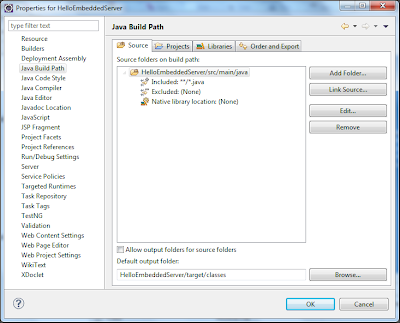
The default configuration of this plugin would assume that your target classes are available in <projectrootdirectory>/target/classes, and read classes from that directory and use them, so we dont have to build the .war file, instead you can keep working with the expanded version. Now if you use mvn eclipse:eclipse to setup your project in the Eclipse IDE then you will notice that your project is setup to generate .class files in <projectrootdirectory>/target/classes folder like this

scanIntervalSeconds attribute with value equal to 10 which tells Maven Jetty plugin to scan <projectrootdirectory>/target/classes directory and reinitialize the app if something has changed. By default whenever i make changes and save them Eclipse will recompiling the .java file and copy classes into <projectrootdirectory>/target/classes directory, and those changes would get picked up automatically in 10 seconds.

Subscribe to:
Comments (Atom)