Request/reply messaging using TopicRequestor

In the Request/Reply messaging using QueueSender , i tried out the QueueRequestor approach for request/reply messaging, similarly i wanted to try out the TopicRequestor, so i built this sample code First create a TopicRequestor class and use it for sending message, the control blocks at the topicRequestor.request() method till it gets response, Even if there are more than one consumer the request() method would return on the first response, rest of the responses would be ignored.

package com.webspherenotes.jms;

import javax.jms.Session;
import javax.jms.TextMessage;
import javax.jms.Topic;
import javax.jms.TopicConnection;
import javax.jms.TopicConnectionFactory;
import javax.jms.TopicPublisher;
import javax.jms.TopicRequestor;
import javax.jms.TopicSession;
import javax.naming.InitialContext;

public class SampleTopicRequestor {

  /**
   * @param args
   */
  public static void main(String[] args)throws Exception{
    InitialContext context = new InitialContext();
    
    TopicConnectionFactory topicConnectionFactory = (TopicConnectionFactory)context.lookup("TopicCF");
    
    TopicConnection topicConnection = topicConnectionFactory.createTopicConnection();
    
    TopicSession topicSession = topicConnection.createTopicSession(false, Session.AUTO_ACKNOWLEDGE);
    
    Topic topic = (Topic)context.lookup("topic1");
    
    TopicPublisher topicPublisher = topicSession.createPublisher(topic);
    
    TextMessage textMessage = topicSession.createTextMessage();
    textMessage.setText("Hello how are you doing?");
    
    TopicRequestor topicRequestor = new TopicRequestor(topicSession, topic);
    topicConnection.start();
    
    TextMessage replyMessage =(TextMessage) topicRequestor.request(textMessage);
    System.out.println("Topic response " + replyMessage.getText());

    topicConnection.close();
  }

}

On the consumer side the value of the replyTo header would be a temporary topic but i wanted to try out the generic Destination and MessageProducer for sending message.

package com.webspherenotes.jms;

import java.io.BufferedReader;
import java.io.InputStreamReader;

import javax.jms.Destination;
import javax.jms.JMSException;
import javax.jms.Message;
import javax.jms.MessageListener;
import javax.jms.MessageProducer;
import javax.jms.Session;
import javax.jms.TextMessage;
import javax.jms.Topic;
import javax.jms.TopicConnection;
import javax.jms.TopicConnectionFactory;
import javax.jms.TopicSession;
import javax.jms.TopicSubscriber;
import javax.naming.InitialContext;
import javax.naming.NamingException;

public class SampleTopicConsumer implements MessageListener {
  
  TopicConnection topicConnection;
  TopicSession topicSession;

  public SampleTopicConsumer() {
    try {
      InitialContext context = new InitialContext();

      TopicConnectionFactory topicConnectionFactory = (TopicConnectionFactory) context
          .lookup("TopicCF");

       topicConnection = topicConnectionFactory
          .createTopicConnection();

      topicSession = topicConnection.createTopicSession(false,
          Session.AUTO_ACKNOWLEDGE);

      Topic topic = (Topic) context.lookup("topic1");
      
      TopicSubscriber topicSubscriber = topicSession.createSubscriber(topic);
      
      topicSubscriber.setMessageListener(this);
      topicConnection.start();
    } catch (NamingException e) {
      // TODO Auto-generated catch block
      e.printStackTrace();
    } catch (JMSException e) {
      // TODO Auto-generated catch block
      e.printStackTrace();
    }
  }


  @Override
  public void onMessage(Message message) {
    try {
      TextMessage textMessage =(TextMessage)message;
      System.out.println("The message is " + textMessage.getText());

      Destination replyToDestination = textMessage.getJMSReplyTo();
      MessageProducer messageProducer = topicSession.createProducer(replyToDestination);
      
      TextMessage replyMessage = topicSession.createTextMessage();
      replyMessage.setText("Reply message to " + textMessage.getText());
      messageProducer.send(replyMessage);
      System.out.println( textMessage.getJMSReplyTo());

    } catch (JMSException e) {
      // TODO Auto-generated catch block
      e.printStackTrace();
    }
    
  }


  /**
   * @param args
   */
  public static void main(String[] args) throws Exception {
    SampleTopicConsumer sampleTopicConsumer = new SampleTopicConsumer();
    BufferedReader stdin = new BufferedReader(new InputStreamReader(
        System.in));
    System.out.println("Press enter to quit application");
    stdin.readLine();
    sampleTopicConsumer.topicConnection.close();
  }

}

Request/Reply messaging using QueueSender

I wanted to try out this Request/Reply messaging so i developed this simple MessagePublisher class, which sends a message to Queue using QueueSender and then block control for the response to come back.

package com.webspherenotes.jms;

import javax.jms.Queue;
import javax.jms.QueueConnection;
import javax.jms.QueueConnectionFactory;
import javax.jms.QueueRequestor;
import javax.jms.QueueSender;
import javax.jms.QueueSession;
import javax.jms.Session;
import javax.jms.TextMessage;
import javax.naming.InitialContext;

public class MessagePublisher {

  public static void main(String[] argv){
    try {
      InitialContext context = new InitialContext();
      
      QueueConnectionFactory queueConnectionFactory = (QueueConnectionFactory)context.lookup("QueueCF");
      
      QueueConnection queueConnection = queueConnectionFactory.createQueueConnection();
      QueueSession queueSession = queueConnection.createQueueSession(false, Session.AUTO_ACKNOWLEDGE);
      
      Queue queue = (Queue)context.lookup("LoanRequestQ");
      queueConnection.start();
      
      QueueSender queueSender = queueSession.createSender(queue);
      QueueRequestor queueRequestor = new QueueRequestor(queueSession, queue);
      
      TextMessage textMessage = queueSession.createTextMessage();
      textMessage.setText("This is sample message");
      //queueSender.send(textMessage);
      System.out.println("Before calling queueSender.request()");

      TextMessage responseMessage = (TextMessage)queueRequestor.request(textMessage);
      System.out.println("After calling queueSender.request()");

      System.out.println("Response message is " + responseMessage.getText());
      
      queueConnection.close();
    } catch (Exception e) {
      // TODO Auto-generated catch block
      e.printStackTrace(System.out);
    }
    
  }
}
This is how the MessageConsumer.java looks like it implements the MessageListener interface to receive the message asynchronously. In the onMessage() method, after reading the Message it creates a QueueSender to the temporary queue for sending the message and sends response to that queue.

package com.webspherenotes.jms;

import java.io.BufferedReader;
import java.io.InputStreamReader;

import javax.jms.JMSException;
import javax.jms.Message;
import javax.jms.MessageListener;
import javax.jms.Queue;
import javax.jms.QueueConnection;
import javax.jms.QueueConnectionFactory;
import javax.jms.QueueReceiver;
import javax.jms.QueueSender;
import javax.jms.QueueSession;
import javax.jms.Session;
import javax.jms.TextMessage;
import javax.naming.InitialContext;
import javax.naming.NamingException;

public class MessageConsumer implements MessageListener {
  QueueConnection queueConnection;
  QueueSession queueSession;

  public MessageConsumer() {
    try {
      InitialContext context = new InitialContext();
      QueueConnectionFactory queueConnectionFactory = (QueueConnectionFactory) context
          .lookup("QueueCF");
      queueConnection = queueConnectionFactory.createQueueConnection();
      queueSession = queueConnection.createQueueSession(false,
          Session.AUTO_ACKNOWLEDGE);
      Queue queue = (Queue) context.lookup("LoanRequestQ");
      QueueReceiver queueReceiver = queueSession.createReceiver(queue);
      queueReceiver.setMessageListener(this);
      queueConnection.start();
    } catch (NamingException e) {
      e.printStackTrace();
    } catch (JMSException e) {
      e.printStackTrace();
    }
  }

  @Override
  public void onMessage(Message message) {
    try {
      TextMessage textMessage = (TextMessage) message;
      System.out.println("Inside MessageConsumer.onMessage "
          + textMessage.getText());
      Queue replyTo = (Queue) textMessage.getJMSReplyTo();

      QueueSender replyToSender = queueSession.createSender(replyTo);
      System.out.println("Value of JMSReplyTo "
          + textMessage.getJMSReplyTo());
      TextMessage replyMessage = queueSession.createTextMessage();
      System.out.println("After creating replyMessage");
      replyMessage.setText("This is reply for " + textMessage.getText());
      System.out.println("Before calling send()");
      replyToSender.send(replyMessage);
      System.out.println("After calling send()");

    } catch (JMSException e) {
      e.printStackTrace(System.out);
    }
  }

  public static void main(String[] argv) {
    try {
      MessageConsumer messageConsumer = new MessageConsumer();
      BufferedReader stdin = new BufferedReader(new InputStreamReader(
          System.in));
      System.out.println("Press enter to quit application");
      stdin.readLine();
      messageConsumer.queueConnection.close();
    } catch (Exception e) {
      e.printStackTrace();
    }
  }

}

Downloading dependency source for maven

In the Debugging your code using Embedded Jetty in Maven , i talked about how you can debug the code deployed in embedded Jetty server using Maven. Most of the enterprise applications use few dependencies, and some times you might want to debug the dependency code in addition to your own code, in those cases, you might want to download the dependency source code(if it exists in maven repository) You have 2 options for downloading the dependencies code
  1. Either you can execute mvn eclipse:eclipse -DdownloadSources=true command to download the source code along with the jars while setting up eclipse project
  2. You can execute mvn dependency:sources to download the source

Debugging your code using Embedded Jetty in Maven

In the Using Embedded Jetty server post i blogged about how to use Embedded Jetty Server using Maven, I wanted to debug one issue in this configuration and i followed these steps to do that
  1. First start the server using mvndebug.bat jetty:run instead of using mvn.bat jetty:run. Please note that i am using Maven 3.0, if you dont have mvndebug then you can just open mvn.bat/.sh in notepad and uncommen this line and then use mvn jetty:run @REM set MAVEN_OPTS=-Xdebug -Xnoagent -Djava.compiler=NONE -Xrunjdwp:transport=dt_socket,server=y,suspend=n,address=8000
    By default the Jetty server will start with suspended=y, which means the server would wait on the first line till you attach to it from Eclipse, if you dont want that you can set suspend=y
  2. Next in your Eclipse, start debug using remote attach and attach localhost port 8000 like this
  3. Next setup break points and hit the URL which would invoke the code that you want to debug and you would see that that Eclipse prompts you once the break point is hit like this

Using Embedded Jetty server

Recently i started using Embedded Maven Jetty plugging during development, it makes development so easy and simple. For example take a look at Hello Embedded Server sample, which is a Sample Servlet 3.0 compliant servlet that uses pom.xml(Maven build file) like this

<project xmlns="http://maven.apache.org/POM/4.0.0" 
xmlns:xsi="http://www.w3.org/2001/XMLSchema-instance"
  xsi:schemaLocation="http://maven.apache.org/POM/4.0.0 
  ttp://maven.apache.org/maven-v4_0_0.xsd">
  <modelVersion>4.0.0</modelVersion>
  <groupId>com.webspherenotes.embedded</groupId>
  <artifactId>HelloEmbeddedServer</artifactId>
  <packaging>war</packaging>
  <version>1.0-SNAPSHOT</version>
  <name>Hello Embedded server Maven Webapp</name>
  <url>http://maven.apache.org</url>
  <dependencies>
    <dependency>
      <groupId>javax.servlet</groupId>
      <artifactId>javax.servlet-api</artifactId>
      <version>3.0.1</version>
    </dependency>
  </dependencies>
  <build>
    <finalName>HelloEmbeddedServer</finalName>
    <plugins>
      <plugin>
        <artifactId>maven-compiler-plugin</artifactId>
        <configuration>
          <source>1.5</source>
          <target>1.5</target>
        </configuration>
      </plugin>

      <plugin>
        <groupId>org.mortbay.jetty</groupId>
        <artifactId>jetty-maven-plugin</artifactId>
        <version>8.1.2.v20120308</version>
        <configuration>
          <scanIntervalSeconds>10</scanIntervalSeconds>
          <webApp>
            <contextPath>/HelloEmbeddedServer</contextPath>
          </webApp>
        </configuration>
      </plugin>

    </plugins>
  </build>
</project>
Now all that i have to do is execute mvn jetty:run and it takes care of compiling the app and deploying it in Jetty server. The default configuration of this plugin would assume that your target classes are available in <projectrootdirectory>/target/classes, and read classes from that directory and use them, so we dont have to build the .war file, instead you can keep working with the expanded version. Now if you use mvn eclipse:eclipse to setup your project in the Eclipse IDE then you will notice that your project is setup to generate .class files in <projectrootdirectory>/target/classes folder like this
In my case i did setup scanIntervalSeconds attribute with value equal to 10 which tells Maven Jetty plugin to scan <projectrootdirectory>/target/classes directory and reinitialize the app if something has changed. By default whenever i make changes and save them Eclipse will recompiling the .java file and copy classes into <projectrootdirectory>/target/classes directory, and those changes would get picked up automatically in 10 seconds.

Using JMeter to load test SOAP based web service

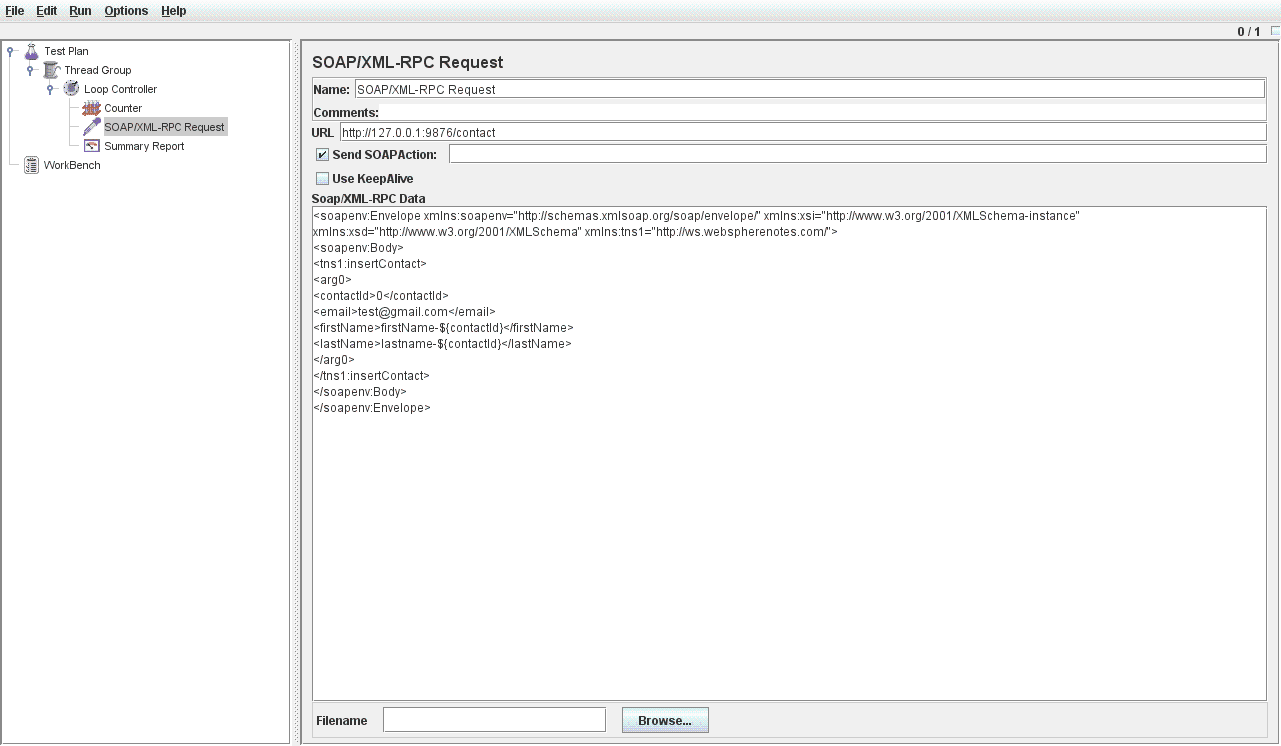
The Using JMeter for load testing REST service entry talks about how to test REST service using JMeter, but what if you have JAX-WS service that you want to load test with JMEter, if that's the case you have to make one simple change and same script should work. You can download the sample load script from here My sample JAX-WS service has insertContact method that takes Contact object as input, i want to pass different firstName, lastNames to this service. So that first contact that gets inserted as values like [firstName-1,lastName-1,email] and then the second contact should be [firstName-2,lastName-2,email],.. etc. I followed these steps. You can download the sample JAX-WS that i used for testing from here You can follow same steps from 1-5 as in Using JMeter for load testing REST service , only thing that will change will be step 4, While testing REST service the step 4 was to make HTTP request, in case of SOAP service the step 4 is to make SOAP/XML-RPC request like this.
I used one of the SOAP testing tools like Generic Test Client in the RAD to get the basic SOAP request XML which looks like this

<soapenv:Envelope xmlns:soapenv="http://schemas.xmlsoap.org/soap/envelope/" xmlns:xsi="http://www.w3.org/2001/XMLSchema-instance" xmlns:xsd="http://www.w3.org/2001/XMLSchema" xmlns:tns1="http://ws.webspherenotes.com/">
<soapenv:Body>
<tns1:insertContact>
<arg0>
<contactId>0</contactId>
<email>test@gmail.com</email>
<firstName>firstName-${contactId}</firstName>
<lastName>lastname-${contactId}</lastName>
</arg0>
</tns1:insertContact>
</soapenv:Body>
</soapenv:Envelope>
Then i just changed this xml to use dynamic variables.

Using JMeter for load testing REST service

I had this REST service that i wanted to load test, but my REST service takes dynamic data so i decided to use Apache JMeter for load testing and these the steps that i followed. If you want to download the Apache JMeter test you can download it from here My REST service allows me to add a new Contact, for that it takes firstName, lastName and email id as parameters, i wanted to generate different values for example first contact should be [firstName-1,lastName-1,email] and then the second contact should be [firstName-2,lastName-2,email],.. etc. I followed these steps
  1. First create a Thread Group with 1 thread like this
    This means run all your tests in single thread and execute the test only once.
  2. Next create a Loop Counter which is like for statement which says run the statements 10 times
  3. Inside the loop, you want to get the current loop count in a variable so you can create a counter variable, you can say that create a counter that starts from either 1-10 or 10-20,.. you can define name of the counter variable, in my case it is contactId
  4. Next comes the actual HTTP request, in my case my REST service is listening at http://localhost:8080//ManageContact/rest/contact and i want to make HTTP GET request to this URL with 3 form variables, firstName, lastName and email. I wanted to generate the form field values dynamically with the counter variable in it
  5. The last element in the test is Summary Report which is used for collecting the summary of the load test. After running the test i can see the testing results in the Summary Report like this

Performance monitoring of portlet

One of the common requirement that i hear is how do i monitor performance of my portlets and get some useful information when the portlet is misbehaving. I used the concept of Global Filters to create a filter that will monitor all your portlets (render, resource, action and Event phase) and write a message in the log if one of the method takes more than the threshold time. You can download the performance filter code from here

This is how one of the doFilter() method of PerformanceFilter looks like

public void doFilter(RenderRequest request, RenderResponse response,FilterChain filterChain)
throws IOException, PortletException {
long beforeTime = System.currentTimeMillis();
filterChain.doFilter(request, response);
long afterTime = System.currentTimeMillis();
long executionTime = (afterTime - beforeTime)/100;
System.out.println("Time for execution " + executionTime);
if(executionTime > debugThreshold){
Map portletInfoMap = getCurrentPortletInfo(request.getWindowID(),
(ServletRequest)request, (ServletResponse)response);
portletInfoMap.put("PORTLET_METHOD", "render");
portletInfoMap.put("PORTLET_EXECUTIONTIME", Long.toString(executionTime));
printDebugInformation(request, response,portletInfoMap);
}
}


In the doFilter() method i am taking the time before and after i forwarded control up the chain and using that time to calculate execution time. If the execution time is more than threshold then i am printing debug information. In my simple filter i am only printing request parameter, but you can print all the information that you want ex. portlet prefrences, portlet session information...

Since this is a Global Filter i have a plugin.xml file which looks like this

<?xml version="1.0" encoding="UTF-8"?>
<?eclipse version="3.0"?>
<plugin id="com.webspherenotes.filter.performancemonitorfilter" name="WS_Server"
provider-name="IBM" version="2.0.0">
<extension point="com.ibm.ws.portletcontainer.portlet-filter-config">
<portlet-filter-config
class-name="com.webspherenotes.portlet.PerformanceMonitorFilter" order="99">
<description> Performance Filter, order = 102 </description>
<lifecycle>RENDER_PHASE</lifecycle>
<lifecycle>RESOURCE_PHASE</lifecycle>
<lifecycle>ACTION_PHASE</lifecycle>
<lifecycle>EVENT_PHASE</lifecycle>
<init-param>
<name>DEBUG_THRESHOLD</name>
<value>1</value>
</init-param>

</portlet-filter-config>
</extension>
</plugin>


I am reading value of DEBUG_THRESHOLD input parameter from plugin.xml and using it to decide when should i generate debug log. In my case if the portlet takes more than 1 second to respond then i am generating log. This is how a sample log looks like


****Problematic portlet found ****
Page -> wps.LoginPorltet Name -> wps.p.Login Method -> render Took 7

Accessing JPA from JAX-RS service directly

I wanted to create a REST service that uses JPA bean and i wanted to see if i can do that without using a EJB and these are my notes about how to do that. You can download the sample application from here. I am using JEE 6 compliant Websphere application Server for testing this code. First i did create the Contact.java which is my JPA entity like this

package com.webspherenotes.jpa;

import java.io.Serializable;
import javax.persistence.*;
import javax.xml.bind.annotation.XmlRootElement;


/**
 * The persistent class for the CONTACT database table.
 * 
 */
@Entity
@XmlRootElement
public class Contact implements Serializable {
  private static final long serialVersionUID = 1L;

  @Id
  private int contactid;

  private String email;

  private String firstname;

  private String lastname;

    public Contact() {
    }

  public int getContactid() {
    return this.contactid;
  }

  public void setContactid(int contactid) {
    this.contactid = contactid;
  }

  public String getEmail() {
    return this.email;
  }

  public void setEmail(String email) {
    this.email = email;
  }

  public String getFirstname() {
    return this.firstname;
  }

  public void setFirstname(String firstname) {
    this.firstname = firstname;
  }

  public String getLastname() {
    return this.lastname;
  }

  public void setLastname(String lastname) {
    this.lastname = lastname;
  }

}
Next i had to create a persistence.xml file like this in the META-INF folder like this

<?xml version="1.0" encoding="UTF-8"?>
<persistence version="2.0" xmlns="http://java.sun.com/xml/ns/persistence" 
xmlns:xsi="http://www.w3.org/2001/XMLSchema-instance" 
xsi:schemaLocation="http://java.sun.com/xml/ns/persistence 
http://java.sun.com/xml/ns/persistence/persistence_2_0.xsd">
  <persistence-unit name="MyJPAJAXRS">
    <jta-data-source>jdbc/demodb</jta-data-source>
    <class>com.webspherenotes.jpa.Contact</class>
  </persistence-unit>
</persistence>
As you can see from my persistence.xml my application has only one entity which is Contact.java. Next declare the persistence-context-ref in the web.xml file like this

<?xml version="1.0" encoding="UTF-8"?>
<web-app id="WebApp_ID" version="3.0" xmlns="http://java.sun.com/xml/ns/javaee" 
xmlns:xsi="http://www.w3.org/2001/XMLSchema-instance" xsi:schemaLocation="http://java.sun.com/xml/ns/javaee 
http://java.sun.com/xml/ns/javaee/web-app_3_0.xsd">
  <display-name>MyJPAJAXRS</display-name>
  <welcome-file-list>
    <welcome-file>index.html</welcome-file>
    <welcome-file>index.htm</welcome-file>
    <welcome-file>index.jsp</welcome-file>
    <welcome-file>default.html</welcome-file>
    <welcome-file>default.htm</welcome-file>
    <welcome-file>default.jsp</welcome-file>
  </welcome-file-list>
  <persistence-context-ref>
    <persistence-context-ref-name>
      MyJPAJAXRS
    </persistence-context-ref-name>
    <persistence-unit-name>MyJPAJAXRS</persistence-unit-name>
    <persistence-context-type>Transaction</persistence-context-type>
  </persistence-context-ref>
</web-app>
This is how my REST service looks like, note that you cannot inject EntityManager directly in your REST service class because your creating object of the REST service class in Application object instead of container creating it, so you would have to do some more work to look up the EntityManager in the init method of the REST service class like this

package com.webspherenotes.jpa;

import java.util.List;

import javax.annotation.PostConstruct;
import javax.naming.InitialContext;
import javax.naming.NamingException;
import javax.persistence.EntityManager;
import javax.persistence.PersistenceContext;
import javax.persistence.Query;
import javax.ws.rs.Consumes;
import javax.ws.rs.DELETE;
import javax.ws.rs.FormParam;
import javax.ws.rs.GET;
import javax.ws.rs.POST;
import javax.ws.rs.PUT;
import javax.ws.rs.Path;
import javax.ws.rs.PathParam;
import javax.ws.rs.Produces;
import javax.ws.rs.core.MediaType;

@Path("/contact")
public class ContactService {
  
  @PersistenceContext(name="MyJPAJAXRS")
  EntityManager entityManager;
  
  @PostConstruct
  public void init(){
    System.out.println("Entering ContactService.init()");
    try {
      InitialContext context = new InitialContext();
      entityManager = (EntityManager)context.lookup("java:comp/env/MyJPAJAXRS");
      System.out.println("Object of mySessionBeanLocal " + entityManager);
    } catch (NamingException e) {
      // TODO Auto-generated catch block
      e.printStackTrace();
    }
    System.out.println("Exiting ContactService.init()");
  }

  @GET
  @Produces(MediaType.APPLICATION_XML)
  public List getContactList(){
    System.out.println("Inside ContactService.getContactList() " );
    Query q = entityManager.createQuery("SELECT x from Contact x");
  
    return (List)q.getResultList();
  }

  @POST
  @Consumes(MediaType.APPLICATION_FORM_URLENCODED)
  @Produces(MediaType.APPLICATION_XML)
  public Contact insertContact(@FormParam("contactId")int contactId,@FormParam("firstName")
  String firstName,
      @FormParam("lastName")String lastName,@FormParam("email") String email) {
    Contact contact = new Contact();
    contact.setContactid(contactId);
    contact.setFirstname(firstName);
    contact.setLastname(lastName);
    contact.setEmail(email);
    entityManager.persist(contact);
    return contact;
  }
  
  @GET
  @Path("/{contactId}")
  @Produces(MediaType.APPLICATION_XML)
  public Contact getContact(@PathParam("contactId")int contactId) {
    Contact contact = entityManager.find(Contact.class, contactId);
    return contact;
  }

  @PUT
  @Path("/{contactId}")
  @Produces(MediaType.APPLICATION_XML)
  @Consumes(MediaType.APPLICATION_FORM_URLENCODED)
  public Contact updateContact(@PathParam("contactId")int contactId,@FormParam("firstName") 
  String firstName,
      @FormParam("lastName")String lastName,@FormParam("email") String email) {
    Contact contact = new Contact();
    contact.setContactid(contactId);
    contact.setFirstname(firstName);
    contact.setLastname(lastName);
    contact.setEmail(email);
    entityManager.merge(contact);
    return contact;
  }
  @DELETE
  @Path("/{contactId}")
  public void deleteContact(@PathParam("contactId")int contactId) {
    Contact contact = new Contact();
    contact.setContactid(contactId);
    entityManager.remove(contact);
  }
  
  
}

Using JAMON for monitoring REST service

JAMON is very nice and powerful performance monitoring tool. You can use it to monitor performance of java program. I wanted to monitor performance of a REST service so i built this generic purpose filter that any one can use. Once installed it generates performance stats like this. You can download the sample code from here
I followed these steps to create the filter
  1. First download the JAMON binaries from AMON home page
  2. Expand the binaries and copy the jamon.jar file in the shared library of your application server
  3. Next install jamon.war which is web application that ships with jamon binary and provides a UI to look at the stats. The screen shot that you see is taken using jamon.war
  4. I already have a REST service that exposes a CONTACT table as a resource, it provides GET, POST, PUT and DELETE operations on the Contact resource
  5. For the JAMON monitoring part i did create this simple filter
    
    package com.webspherenotes.performance.filter;
    
    import java.io.IOException;
    import javax.servlet.DispatcherType;
    import javax.servlet.Filter;
    import javax.servlet.FilterChain;
    import javax.servlet.FilterConfig;
    import javax.servlet.ServletException;
    import javax.servlet.ServletRequest;
    import javax.servlet.ServletResponse;
    import javax.servlet.annotation.WebFilter;
    import javax.servlet.http.HttpServletRequest;
    
    import com.jamonapi.Monitor;
    import com.jamonapi.MonitorFactory;
    
    /**
     * Servlet Filter implementation class RESTServiceJAMONFilter
     */
    @WebFilter(dispatcherTypes = {DispatcherType.REQUEST }
              , urlPatterns = { "/*" })
    public class RESTServiceJAMONFilter implements Filter {
    
        public RESTServiceJAMONFilter() {
            // TODO Auto-generated constructor stub
        }
    
      public void destroy() {
        // TODO Auto-generated method stub
      }
    
      /**
       * @see Filter#doFilter(ServletRequest, ServletResponse, FilterChain)
       */
      public void doFilter(ServletRequest request, ServletResponse response, FilterChain chain) 
      throws IOException, ServletException {
    
        HttpServletRequest httpServletRequest= (HttpServletRequest)request;
        Monitor monitor = MonitorFactory.start(RESTCacheKeyBuilder.buildCacheKey(httpServletRequest));
        chain.doFilter(request, response);
        monitor.stop();
      }
    
      public void init(FilterConfig fConfig) throws ServletException {
        // TODO Auto-generated method stub
      }
    
    }
    
    Inside the filter i start a monitor before passing control up the filter chain and i stop the JAMON monitor once the request is completed, that's all that you have to do to create and record JAMON monitor. You might notice that while starting filter i am calling RESTCacheKeyBuilder.buildCacheKey(httpServletRequest) , this class takes care of creating the monitor key Ex.GET - /JAMONRESTService/rest/contact/xxx is the key that gets created when you call the service by invoking http://localhost:9080/JAMONRESTService/rest/contact/21 url
  6. This is how my key builder looks like
    
    package com.webspherenotes.performance.filter;
    
    import javax.servlet.http.HttpServletRequest;
    
    public class RESTCacheKeyBuilder {
      
      public static String buildCacheKey(HttpServletRequest request){
        StringBuilder cacheKeyBuilder = new StringBuilder();
        cacheKeyBuilder.append(request.getMethod());
        cacheKeyBuilder.append(" - ");
        cacheKeyBuilder.append(request.getContextPath());
        cacheKeyBuilder.append(request.getServletPath());
        cacheKeyBuilder.append(request.getPathInfo());
        String cacheKey = cacheKeyBuilder.toString();
        System.out.println("Cache Key " + cacheKey);
        cacheKey = cacheKey.replaceAll("[0-9]+", "xxx");
        System.out.println("After replacing digits " + cacheKey);
        return cacheKey;
      }
    }
    
    Its very simple, all it does is adds the HTTP method name for the call and the URL for the call, i am replacing all the numbers with xxx. So that the calls for same resource generates same key. Ex. /JAMONRESTService/rest/contact/xxx key would get generated for http://localhost:9080/JAMONRESTService/rest/contact/22 http://localhost:9080/JAMONRESTService/rest/contact/2 http://localhost:9080/JAMONRESTService/rest/contact/210 and as a result i can see how is my GET call on CONTACT resource doing