Showing posts with label ajaxproxy. Show all posts

Using Ajax Proxy in the Connections

The Connections server has Ajax Proxy that you can use to make cross domain calls. In order to try the Ajax proxy i did create a iWidget that makes call to http://www.atech.com from the page http://wpconnections.atech.com/. In order to test iWidget i did add it to Connections HomePage. You can download the AjaxProxy iWidget from here

This is how my AjaxProxy.xml file the iWidget xml definition file looks like

<?xml version="1.0" encoding="UTF-8" ?>
<iw:iwidget id="AjaxProxy"
xmlns:xsi="http://www.w3.org/2001/XMLSchema-instance"
xmlns:iw="http://www.ibm.com/xmlns/prod/iWidget"
supportedModes="view" mode="view" lang="en" iScope="com.webspherenotes.ajaxproxy"
allowInstanceContent="true" >
<iw:resource uri="ajaxproxy.js" />
<iw:content mode="view">
<![CDATA[
<div>Ajax proxy</div>
<span id="replacecontent">Replace content</span>
]]>
</iw:content>
</iw:iwidget>


The ajaxproxy.xml declares ajaxproxy.js as a resource, which has all the JavaScript logic for the widget. The ajaxproxy widget displays a place holder div, replacecontent

This is how my ajaxproxy.js file looks like

dojo.provide("com.webspherenotes.ajaxproxy");
dojo.declare("com.webspherenotes.ajaxproxy", [], {
onview: function(){
console.log("Inside the onView function()");
var currContext = this.iContext;
try{
dojo.xhrPost({
url: "/homepage/web/proxy/http/www.atech.com",

load: function(data, ioargs){
currContext.getElementById("replacecontent").innerHTML = data;
console.log(data);
},
error: function(error,ioargs){
alert("Error :" + data);
}
});
}catch(error){
console.log("Error in the dojo.xhrPost " + error );
}
}
});


The onview() method of the ajaxproxy widget will get called to generate the VIEW mode markup, in this method i am making HTTP POST to /homepage/web/proxy/http/www.atech.com which actually means http://www.atech.com, once the response is back i will get control in the load() method and i am using the response to display markup in the widget, which looks like this
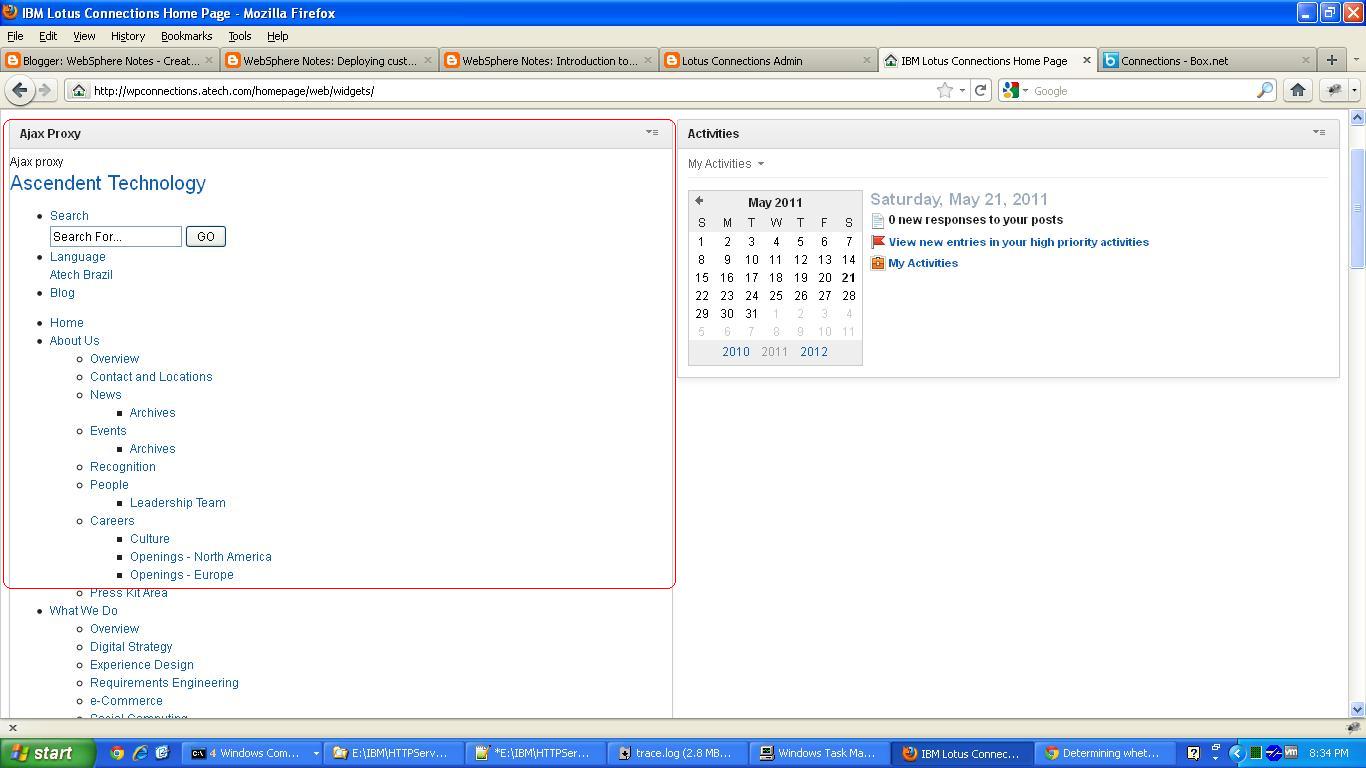


The markup looks unformatted because it does not include the necessary resources. When you deploy the widget on your server it will fail with 403 forbidden error at the time of making xhrPost() call unless your ajax proxy is configured to make POST request.

Troubleshooting Ajax Proxy

I was trying to configure the Ajax proxy in the Connections product but i ran into bunch of issues, so i had to figure out how to turn the trace for Ajax proxy by turning trace for com.ibm.ws.ajaxproxy.*=all but once i did i can see it does generate good trace like this.


[5/19/11 22:02:38:407 PDT] 00000087 ProxyServlet 3 com.ibm.ws.ajaxproxy.servlet.ProxyServlet service entering service(..)com.ibm.ws.ajaxproxy.servlet.ProxyServlet
[5/19/11 22:02:38:501 PDT] 00000087 ProxyServlet 3 com.ibm.ws.ajaxproxy.servlet.ProxyServlet service
com.ibm.ws.ajaxproxy.servlet.ProxyServlet service(..) Method:GET; URI:/homepage/web/proxy/ibm/us/en/sandbox/ver1/; QueryString:null; ContextPath:/homepage; ServletPath:/web/proxy; PathInfo:/ibm/us/en/sandbox/ver1/
[5/19/11 22:02:38:501 PDT] 00000087 ProxyServlet 3 com.ibm.ws.ajaxproxy.servlet.ProxyServlet service com.ibm.ws.ajaxproxy.servlet.ProxyServlet service(..) targetPath: http://www.ibm.com
[5/19/11 22:02:38:501 PDT] 00000087 Policy 3 com.ibm.ws.ajaxproxy.proxy.RequestBean com.ibm.ws.ajaxproxy.proxy.Policy RequestBean(URL, String, String):[Ljava.lang.Object;@6f726f72
[5/19/11 22:02:38:501 PDT] 00000087 Policy 3 com.ibm.ws.ajaxproxy.proxy.RequestBean com.ibm.ws.ajaxproxy.proxy.Policy RequestBean(URL, String, String):http://www.ibm.com/ibm/us/en/sandbox/ver1/
[5/19/11 22:02:38:532 PDT] 00000087 URINormalizer 3 com.ibm.ws.ajaxproxy.util.URINormalizer normalize com.ibm.ws.ajaxproxy.util.URINormalizer normalize(..) Orginal URI: http://www.ibm.com/ibm/us/en/sandbox/ver1/ Normalized URI: http://www.ibm.com/ibm/us/en/sandbox/ver1/
[5/19/11 22:02:38:532 PDT] 00000087 ProxyServlet 3 com.ibm.ws.ajaxproxy.servlet.ProxyServlet service com.ibm.ws.ajaxproxy.servlet.ProxyServlet service(..) Attempting to match Policy too: /http/www.ibm.com/ibm/us/en/sandbox/ver1/
[5/19/11 22:02:38:532 PDT] 00000087 ProxyServlet 3 com.ibm.ws.ajaxproxy.servlet.ProxyServlet service com.ibm.ws.ajaxproxy.servlet.ProxyServletPolicies for: *

ACF: none
Actions:
GET

Cookies:

Headers:
Users:

[5/19/11 22:02:38:532 PDT] 00000087 ProxyServlet 3 com.ibm.ws.ajaxproxy.servlet.ProxyServlet service com.ibm.ws.ajaxproxy.servlet.ProxyServlet service(..)1305867758532

[5/19/11 22:02:38:532 PDT] 00000087 ProxyServlet 3 com.ibm.ws.ajaxproxy.servlet.ProxyServlet service com.ibm.ws.ajaxproxy.servlet.ProxyServlet service(..)1305867758532
[5/19/11 22:02:38:532 PDT] 00000087 ProxyServlet 3 com.ibm.ws.ajaxproxy.servlet.ProxyServlet service com.ibm.ws.ajaxproxy.servlet.ProxyServlet service(..) HostConfiguration set too: HostConfiguration[host=http://wpconnections.atech.com]
[5/19/11 22:02:38:532 PDT] 00000087 ProxyServlet 3 com.ibm.ws.ajaxproxy.servlet.ProxyServlet service com.ibm.ws.ajaxproxy.servlet.ProxyServlet service(..) Assigning GetMethod as method
[5/19/11 22:02:38:532 PDT] 00000087 Policy 3 com.ibm.ws.ajaxproxy.proxy.Policy getValidHeaders com.ibm.ws.ajaxproxy.proxy.Policy getValidHeaders(..) entering
[5/19/11 22:02:38:532 PDT] 00000087 Policy 3 com.ibm.ws.ajaxproxy.proxy.Policy getValidHeaders com.ibm.ws.ajaxproxy.proxy.Policy getValidHeaders(..)Reusing pattern for User-Agent
[5/19/11 22:02:38:532 PDT] 00000087 Policy 3 com.ibm.ws.ajaxproxy.proxy.Policy getValidHeaders com.ibm.ws.ajaxproxy.proxy.Policy getValidHeaders(..)Reusing pattern for Accept.*
[5/19/11 22:02:38:532 PDT] 00000087 Policy 3 com.ibm.ws.ajaxproxy.proxy.Policy getValidHeaders com.ibm.ws.ajaxproxy.proxy.Policy getValidHeaders(..)Reusing pattern for Content.*
[5/19/11 22:02:38:532 PDT] 00000087 Policy 3 com.ibm.ws.ajaxproxy.proxy.Policy getValidHeaders com.ibm.ws.ajaxproxy.proxy.Policy getValidHeaders(..)Reusing pattern for Authorization.*
[5/19/11 22:02:38:532 PDT] 00000087 Policy 3 com.ibm.ws.ajaxproxy.proxy.Policy getValidHeaders com.ibm.ws.ajaxproxy.proxy.Policy getValidHeaders(..) exiting
[5/19/11 22:02:38:532 PDT] 00000087 ProxyServlet 3 com.ibm.ws.ajaxproxy.servlet.ProxyServlet service com.ibm.ws.ajaxproxy.servlet.ProxyServlet service(..) Adding Request Header [User-Agent : Mozilla/5.0 (Windows NT 5.1; rv:2.0.1) Gecko/20100101 Firefox/4.0.1]
[5/19/11 22:02:38:532 PDT] 00000087 ProxyServlet 3 com.ibm.ws.ajaxproxy.servlet.ProxyServlet service com.ibm.ws.ajaxproxy.servlet.ProxyServlet service(..) Adding Request Header [Accept-Charset : ISO-8859-1,utf-8;q=0.7,*;q=0.7]
[5/19/11 22:02:38:532 PDT] 00000087 ProxyServlet 3 com.ibm.ws.ajaxproxy.servlet.ProxyServlet service com.ibm.ws.ajaxproxy.servlet.ProxyServlet service(..) Adding Request Header [Accept-Encoding : gzip, deflate]
[5/19/11 22:02:38:532 PDT] 00000087 ProxyServlet 3 com.ibm.ws.ajaxproxy.servlet.ProxyServlet service com.ibm.ws.ajaxproxy.servlet.ProxyServlet service(..) Adding Request Header [Accept : text/html,application/xhtml+xml,application/xml;q=0.9,*/*;q=0.8]
[5/19/11 22:02:38:532 PDT] 00000087 ProxyServlet 3 com.ibm.ws.ajaxproxy.servlet.ProxyServlet service com.ibm.ws.ajaxproxy.servlet.ProxyServlet service(..) Adding Request Header [Accept-Language : en-us,en;q=0.5]
[5/19/11 22:02:38:532 PDT] 00000087 ProxyServlet 3 com.ibm.ws.ajaxproxy.servlet.ProxyServlet service com.ibm.ws.ajaxproxy.servlet.ProxyServlet service(..) Adding Request Header [Content-Type : application/x-www-form-urlencoded]
[5/19/11 22:02:38:532 PDT] 00000087 Policy 3 com.ibm.ws.ajaxproxy.proxy.Policy getFilteredCookieString com.ibm.ws.ajaxproxy.proxy.Policy getFilteredCookieString(..) rawCookieString: editMode=false; __utma=249276503.1859418337.1303153383.1303153383.1303153383.1; __utmz=249276503.1303153383.1.1.utmcsr=(direct)|utmccn=(direct)|utmcmd=(none); JSESSIONID=0000UQ_tLLLGMSwyBt5z5_Xd10t:15td46icp; LtpaToken2=VQZuwqjVCdZQtnucuRYbpDNspppYkuTG5jaRDPRMbfI89rxcJBaJ0J4qUMgkw6M3OWJ8N2DpI5zm5f+4AIM3l5IDBdt8WiI04G6MTELExy0nTdt5pBlquum/DMA8OoTYZcpADrN/dHicV8hTiiExAjyZQrOe8WQ2QvA9hFnS1IK5wZM+C7a400lcOt3pzh1T3mr65/SPKXW2LLfFIAXIzFcrqj18Af7Ak6zcb1MmX9lFTRdgopVSxVOBq+5ReL0SJkwwuuaO/WiZptOmuP/1Js4QJ60ekfn8+AQ0znWdtV8khwgV/6Searq14egNeSswzoLdtla8XmxXvT9bN+Ht/5VtXKEXkGRwNglHlbZmg74mHIjnhgf4svqYzJM6kuWK/fnHtkFfAj5iaJQ46zYUzGwMHEMaYqfU217WliF4BD5W8wSrZPc+qYseNUb9zMQ3pF0k4sVi5fkYWWkZ9G6eWNvXCinjQPq5Xt3CtJh+sERJs3zuKepD/milfm29QCsTN0klc8bLCT+x+NFx2bwrAs2hpfywQWoFguwt3pdUw71GfaCzvSU3eIj7EmWDfzm9kQtWpDYSfzhSlbDkKb4N5joSNWlOVWk7BRqkWDqx4bSY3jLUFkg8YIAqSf07ZX4LXp0S5FGkCRs8iTZAmpWuddZoWjGkh4TZwUOKd8oGz1hCqVYsaXHK6ZOX6xjpP7dBC++1NGFeuB5dRIy2swj8MA==; LtpaToken=3FQ3Cxvhqjt0NgBdBtA7adO0uhc79AJbvbc1BgkpjWBRdRevNX0wEoT9Q66qd56aALSOlleaerpij2MXbCGkCSx2cHx/SSNjxdBqYWeXIYvG+542IsczVs3w97GxmBXURp0pc/AYTDd1+ZCmep2zGqyhnKbGNdbQJ5eHMON3KLzerrgtrX9H4rrfvLZUEH3Ejq4ota4XMwrqNz2cJCUOJxig+ygmf0oAUR34kUp+8LSebTY+P8uwEGS/d4d8uh3jWR1seXu4XHUDceqV308GH1ewCMraOEJPq2/k5Cw7vHjcd3V+xdKK3PrV+0Ao65DdyMph+XZuo8yroJ730pHqSFYkAy+TsU6DfSJZm+XTcRo=; currentUserName=was bind; currentUserHandle=546b0260-6273-497e-acfa-1e898f3037d4

Proxy Configuration Level

The Ajax Proxy is configured at two levels

Global Proxy Configuration


There is AJAX Proxy Configuration.ear file that define Ajax Proxy at the level of portal. All portlets, themes, other enterprise applications can use it.

If you want to change the Global proxy configuration then you will have to change wp_profile\installedApps\sunpa\AJAX Proxy Configuration.ear\wp.proxy.config.war\WEB-INF\proxy-config.xml and restart the Ajax Proxy Configuration application.

The actual AJax Proxy servlet is defined in wp_profile\installedApps\sunpa\wps.ear\wps.war\WEB-INF\web.xml. By default it is configured to forward every request to /wps/proxy and /wps/myproxy to the Ajax Proxy Servlet. So if you want to support any other url mapping such as /ibm then you will have to change the web.xml file in the wps.war and redeploy it.


Application Level Proxy Configuration


You can override the proxy configuration at your application level. When you do that the proxy configuration defined in your portlet will take precedence over the global proxy. Take a look at AjaxProxySample for sample of how to configure application level proxy.

Important Note As portal server administrator you can configure portal to rule application level ajax proxy configuration by setting this property in the config service.

proxy.enforce.global.config = true

Ajax Proxy file configuration

The Ajax proxy configuration is specified using an XML file called proxy-config.xml.

This is how a sample Ajax Proxy Configuration file looks like

<?xml version="1.0" encoding="UTF-8"?>
<proxy-rules xmlns:xsi="http://www.w3.org/2001/XMLSchema-instance"
xmlns:proxy="http://www.ibm.com/xmlns/prod/sw/ajax/proxy-config/1.0">
<proxy:mapping contextpath="/ibm" url="http://www.ibm.com" />
<proxy:policy url="http://www.ibm.com/*" acf="none">
<proxy:actions>
<proxy:method>GET</proxy:method>
<proxy:method>POST</proxy:method>
</proxy:actions>
</proxy:policy>
<proxy:meta-data>
<proxy:name>max-connections-per-host</proxy:name>
<proxy:value>5</proxy:value>
</proxy:meta-data>
<proxy:meta-data>
<proxy:name>max-total-connections</proxy:name>
<proxy:value>100</proxy:value>
</proxy:meta-data>
</proxy-rules>


The proxy-config.xml file has three main elements

  • policy: The policy element defines an access policy for specific URL pattern. Value of the url attribute of proxy element defines what URL pattern this policy is addressing. . In our sample configuration you can make GET and POST request to ibm.com, if you try to make either PUT or DELETE that it will deny access

    • actions:Required subelement defines defines the list of HTTP methods that can be used to access resource in the target domain

    • headers: Optional element that defines the list of header names that you want the proxy to forward to the target domain. By default it will forward Cache-Control, Pragma, User-Agent, Accept*, and Content*

    • cookies: Optional element that defines the list of cookies that you want to forward in the target request. If no cookie names are specified then proxy wont forward any cookies

    • mime-types:This element is optional. Use it to specify the list of accepted mime types.If no mime type is specified, the proxy accepts all responses

    • user: Optional element that defines the user roles that are allowed to make the request. If you set AllAuthenticatedUsers here then proxy will only allow requests from authenticated users.


    In our sample configuration file we are saying that Proxy will only accept GET and POST requests to http://www.ibm.com and both authenticated and non-authenticated users are allowed to make request and it will forward the default headers from incoming request to the request that it makes to http://www.ibm.com and it wont forward any cookies.

  • mapping: The mapping element is used to map incoming request to a target URL, based on their context path.The proxy resolves context path mappings prior to applying the matching access policy. The mapping element has two attributes

    • contextpath: The context path is short name for the actual URL that developer will use for making the request

    • url:Actual URL where the proxy will forward the request


    In our sample case whenever proxy servlet gets a request for /ibm it will forward that request to http://www.ibm.com. Request to /ibm/en/us would be forwarded to http://www.ibm.com/en/us

  • meta-data: Use the meta-data to specify general configuration properties of the proxy.The following HTTP related parameters are defined:

    • socket-timeout:This defines the default socket timeout in milliseconds. The socket timeout defines the timeout the proxy server waits for data after successfully establishing a connection with the target server. The default value is 20 seconds. A timeout value of zero is interpreted as an infinite timeout.

    • retries:TThis defines the number of retries that should be performed if the proxy could not establish a connection with the target server. The default value is 2 retries.

    • max-total-connections:This defines the maximum number of HTTP connections that the proxy can open to connect to arbitrary target hosts. The default value is 100 connections.

    • max-connections-per-host:This defines the number of HTTP connections the proxy can open to connect to a specific host. The default value is 5 connections per host.


Once your proxy is configured use appropriate URL for making request. For example in our case you can use this code to get response from http://www.ibm.com/en/us

function getYahooData(){
console.log("getYahooData.xhrGet()");
try{
dojo.xhrGet({
url: "/ibm",
load: function(data,error){
alert(data)
},
error: function(data, error){
alert("Error occured in accessing http://www.yahoo.com")
}
});
}catch(e){
alert(e);
}
}


DOwnload the AJaxSamplePortlet to see how it works

Introduction to Ajax Proxy

To prevent cross siste scripting browsers introduced the so called same-origin policy. This policy prevents client side scripts in particular JavaScript, from loading content from an origin that has a different protocol, domain name or port. What that means is if you try to send Ajax request to any server other than the document.location, browser would throw access denied exception.


The solutation that WebSphere portal server (WAS server also includes Ajax PRoxy in Web 2.0 feature pack) offers is a server side HTTP proxy. The Ajax Proxy HTTP proxy is a web application that is deployed in same WAS server as that of the portal server. The way it works is if you want to make Ajax request to remote web application say www.google.com, instead of sending request directly to www.google.com you send it to Ajax Proxy, the Ajax Proxy in turn will make request to www.google.com and return the response to you.

As adminster you can configure Ajax Proxy to either allow or deny access to particular remote web application i.e. you can say that portlets are allowed to make GET and POST request to www.google.com but not to www.yahoo.com. Similarly you can configure what all headers, cookies AJax Proxy can copy from incoming AJax request to the outgoing remote web application request.

Important Note: The AJAX Proxy can be used for developing themes, skins, static pages, or portlets.