The Apache mod_gzip module allows you to GZip traffic going through HTTP server on the fly. One problem with mod_gzip and mod_deflate is that they set Vary: Accept-Encoding header and you might be setting few other Vary headers.
Now problem with IE is that if it gets any response where value of Vary header is any thing other than User-Agent and Accept-Encoding then it does not cache the response and makes a full request every time.
These two articles have details on this problem
Showing posts with label gzip. Show all posts
Showing posts with label gzip. Show all posts


Enabling log for mod_deflate
In the GZiping text files using Apache Http Server entry has information about how you can enable GZIP using mod_deflate on the Apache Http Server.
But in the real world enabling GZIP on your existing infrastructure is more complicated then you think and you might want to enable log for what is getting zipped and what is not. you can add following lines to your httpd.conf
Once that is done the mod_deflate will start writing logs about every request and write information about what all responses were zipped and the compression ration
Take a closer look at this line
The /wpcert/menu/menu_service.js is 10925 bytes by default but once you enable zip this file is getting zipped to 3519 bytes so the compression ration is 3.1. You can see the number of bytes after zipping and the compression ration in the log line
On my local i configured HTTP server not to gzip binary files such as images, pdfs,.. etc. So whenever mod_deflate receives request for binary file it will skip it, take a look at this line
This means the image is 208 bytes in size and
But in the real world enabling GZIP on your existing infrastructure is more complicated then you think and you might want to enable log for what is getting zipped and what is not. you can add following lines to your httpd.conf
DeflateFilterNote ratio

LogFormat '"%r" %b (%{ratio}n) "%{User-agent}i"' deflate
CustomLog logs/deflate_log deflate


<Location />
# Insert filter
SetOutputFilter DEFLATE

# Netscape 4.x has some problems...
BrowserMatch ^Mozilla/4 gzip-only-text/html

# Netscape 4.06-4.08 have some more problems
BrowserMatch ^Mozilla/4\.0[678] no-gzip

# MSIE masquerades as Netscape, but it is fine
# BrowserMatch \bMSIE !no-gzip !gzip-only-text/html

# NOTE: Due to a bug in mod_setenvif up to Apache 2.0.48
# the above regex won't work. You can use the following
# workaround to get the desired effect:
BrowserMatch \bMSI[E] !no-gzip !gzip-only-text/html

# Don't compress images
SetEnvIfNoCase Request_URI \
\.(?:gif|jpe?g|png)$ no-gzip dont-vary

# Make sure proxies don't deliver the wrong content
Header append Vary User-Agent env=!dont-vary
</Location>
Once that is done the mod_deflate will start writing logs about every request and write information about what all responses were zipped and the compression ration
"GET /wpcert/demo HTTP/1.1" 20 (-) "Mozilla/5.0 (X11; U; Linux i686; en-US; rv:1.9.2.6) Gecko/20100625 Firefox/3.6.6"
"GET /wpcert/demo HTTP/1.1" 4878 (28) "Mozilla/5.0 (X11; U; Linux i686; en-US; rv:1.9.2.6) Gecko/20100625 Firefox/3.6.6"
"GET /wpcert/menu/menu_service.js HTTP/1.1" 3519 (32) "Mozilla/5.0 (X11; U; Linux i686; en-US; rv:1.9.2.6) Gecko/20100625 Firefox/3.6.6"
"GET /wpcert/peopleawareness/personQ_ns6.js HTTP/1.1" 28436 (23) "Mozilla/5.0 (X11; U; Linux i686; en-US; rv:1.9.2.6) Gecko/20100625 Firefox/3.6.6"
"GET /wpcert/dnd/DND.js HTTP/1.1" 14742 (19) "Mozilla/5.0 (X11; U; Linux i686; en-US; rv:1.9.2.6) Gecko/20100625 Firefox/3.6.6"
"GET /wpcert/skins/html/ThinSkin/title_minheight.gif HTTP/1.1" 63 (-) "Mozilla/5.0 (X11; U; Linux i686; en-US; rv:1.9.2.6) Gecko/20100625 Firefox/3.6.6"
"GET /wpcert/themes/html/Portal/images/topNav/menu_selected_disabled.gif HTTP/1.1" 825 (-) "Mozilla/5.0 (X11; U; Linux i686; en-US; rv:1.9.2.6) Gecko/20100625 Firefox/3.6.6"
"GET /portal_dojo/dijit/themes/tundra/tundra.css HTTP/1.1" 10962 (17) "Mozilla/5.0 (X11; U; Linux i686; en-US; rv:1.9.2.6) Gecko/20100625 Firefox/3.6.6"
"GET /wpcert/images/icons/ClearPixel.gif HTTP/1.1" 49 (-) "Mozilla/5.0 (X11; U; Linux i686; en-US; rv:1.9.2.6) Gecko/20100625 Firefox/3.6.6"
"GET /wps_semanticTag/javascript/semanticTagService.js?language=en HTTP/1.1" 19861 (26) "Mozilla/5.0 (X11; U; Linux i686; en-US; rv:1.9.2.6) Gecko/20100625 Firefox/3.6.6"
"GET /wpcert/themes/html/css/dojo.css HTTP/1.1" 1854 (27) "Mozilla/5.0 (X11; U; Linux i686; en-US; rv:1.9.2.6) Gecko/20100625 Firefox/3.6.6"
"GET /wpcert/themes/html/css/dojoTheme.css HTTP/1.1" 1828 (24) "Mozilla/5.0 (X11; U; Linux i686; en-US; rv:1.9.2.6) Gecko/20100625 Firefox/3.6.6"
"GET /wpcert/themes/html/Portal/images/ExpandPalette.gif HTTP/1.1" 208 (-) "Mozilla/5.0 (X11; U; Linux i686; en-US; rv:1.9.2.6) Gecko/20100625 Firefox/3.6.6"
"GET /wpcert/themes/html/Portal/images/Portal.ico HTTP/1.1" 883 (61) "Mozilla/5.0 (X11; U; Linux i686; en-US; rv:1.9.2.6) Gecko/20100625 Firefox/3.6.6"
"GET /wpcert/themes/html/Portal/images/CollapsePalette.gif HTTP/1.1" 911 (-) "Mozilla/5.0 (X11; U; Linux i686; en-US; rv:1.9.2.6) Gecko/20100625 Firefox/3.6.6"
"GET /wpcert/themes/html/css/core.css HTTP/1.1" 16027 (21) "Mozilla/5.0 (X11; U; Linux i686; en-US; rv:1.9.2.6) Gecko/20100625 Firefox/3.6.6"
"GET /wpcert/themes/html/css/defaultTheme.css HTTP/1.1" 8250 (19) "Mozilla/5.0 (X11; U; Linux i686; en-US; rv:1.9.2.6) Gecko/20100625 Firefox/3.6.6"
Take a closer look at this line
"GET /wpcert/menu/menu_service.js HTTP/1.1" 3519 (32) "Mozilla/5.0 (X11; U; Linux i686; en-US; rv:1.9.2.6) Gecko/20100625 Firefox/3.6.6"
The /wpcert/menu/menu_service.js is 10925 bytes by default but once you enable zip this file is getting zipped to 3519 bytes so the compression ration is 3.1. You can see the number of bytes after zipping and the compression ration in the log line
On my local i configured HTTP server not to gzip binary files such as images, pdfs,.. etc. So whenever mod_deflate receives request for binary file it will skip it, take a look at this line
"GET /wpcert/themes/html/Portal/images/ExpandPalette.gif HTTP/1.1" 208 (-) "Mozilla/5.0 (X11; U; Linux i686; en-US; rv:1.9.2.6) Gecko/20100625 Firefox/3.6.6"
This means the image is 208 bytes in size and
(-) indicates that image was not zipped
GZiping text files using Apache Http Server
In most of the enterprise installation the request made by browser first goes to Http Server and then Http Server forwards that request to the J2EE Server such as IBM WebSphere Application Server, WebSphere Portal Server or WebSphere Commerce server.
If you have a Http Server in between your browser and Application Server, then you can configure it to compress the response before sending it back to the Browser. YOu can configure Http Server to configure not only the static text files that are hosted on Http Server such as CSS and JavaScript files but it can also configure the dynamic Html files created by Application server like this.
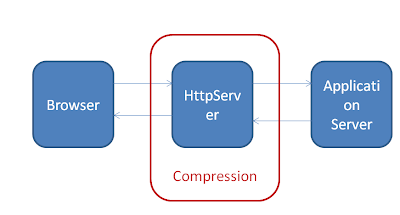
One of the advantage of this approach is that your application server does not have to know anything about GZIP and you can simply configure Http Server to decide what type of files to compress, enable compression trace, exclude browsers that bugs from compression, exclude URL's or file extensions that should be excluded from compression, configure your proxy to handle compression.
The Apache Http Server(IBM Http Server is based on Apache Http Server) has mod_deflate module that can be used to configure compression.
You can enable Http Compression at Apache level by opening HTTPServerRoot/conf/httpd.conf and adding these lines to it
The AddOutputFilterByType directive activates a particular output filter for a request depending on the response MIME-type. In our example it is applying mod_deflate to response where content-type is either text/html, text/plain or text/xml. The DEFLATE filter will compress the output before sending it to the client.
Enabling filters with AddOutputFilterByType may fail partially or completely in some cases. For example, no filters are applied if the MIME-type could not be determined and falls back to the DefaultType setting, even if the DefaultType is the same. SO there is another more complex and powerful way in which we can configure mod_deflate
If you have a Http Server in between your browser and Application Server, then you can configure it to compress the response before sending it back to the Browser. YOu can configure Http Server to configure not only the static text files that are hosted on Http Server such as CSS and JavaScript files but it can also configure the dynamic Html files created by Application server like this.

One of the advantage of this approach is that your application server does not have to know anything about GZIP and you can simply configure Http Server to decide what type of files to compress, enable compression trace, exclude browsers that bugs from compression, exclude URL's or file extensions that should be excluded from compression, configure your proxy to handle compression.
The Apache Http Server(IBM Http Server is based on Apache Http Server) has mod_deflate module that can be used to configure compression.
You can enable Http Compression at Apache level by opening HTTPServerRoot/conf/httpd.conf and adding these lines to it
LoadModule deflate_module modules/mod_deflate.so
AddOutputFilterByType DEFLATE text/html text/plain text/xml
The AddOutputFilterByType directive activates a particular output filter for a request depending on the response MIME-type. In our example it is applying mod_deflate to response where content-type is either text/html, text/plain or text/xml. The DEFLATE filter will compress the output before sending it to the client.
Enabling filters with AddOutputFilterByType may fail partially or completely in some cases. For example, no filters are applied if the MIME-type could not be determined and falls back to the DefaultType setting, even if the DefaultType is the same. SO there is another more complex and powerful way in which we can configure mod_deflate
<Location />
# Insert filter
SetOutputFilter DEFLATE

# Netscape 4.x has some problems...
BrowserMatch ^Mozilla/4 gzip-only-text/html

# Netscape 4.06-4.08 have some more problems
BrowserMatch ^Mozilla/4\.0[678] no-gzip

# MSIE masquerades as Netscape, but it is fine
# BrowserMatch \bMSIE !no-gzip !gzip-only-text/html

# NOTE: Due to a bug in mod_setenvif up to Apache 2.0.48
# the above regex won't work. You can use the following
# workaround to get the desired effect:
BrowserMatch \bMSI[E] !no-gzip !gzip-only-text/html

# Don't compress images
SetEnvIfNoCase Request_URI \
\.(?:gif|jpe?g|png)$ no-gzip dont-vary

# Make sure proxies don't deliver the wrong content
Header append Vary User-Agent env=!dont-vary
</Location>
YSlow - Compress components with GZIP
I wanted to improve client side performance of the WebSphere Portal site, so i did YSlow analysis of the login page and one of the recommendations that i got from YSlow was to "Compress components with GZIP"

So i wanted to see effects of GZIP on the WebSphere Portal performance, so what i did is i did delete everything from my browser cache and then tried accessing the portal login page, and used firefox to see how much data is being downloaded

When i access the portal login page with empty cache, the browser is trying to download 16 resources, close to 1 MB of data for downloading all the 16 resources.
Then i configured my HttpServer, which is seating infront of WebSphere Portal to gzip all the text resources and i tried accessing the same page after clearing browser cache, it made 16 requests to download all the resources as before, but the amount of data being downloaded came down to 240.9KB from 1 MB (without gzip) before and the time it took to download and execute the resources came down from 2.9 seconds to 1.8 second.

The GZIP compression reduces size of Http Response by close to 70 %. The actual performance improvement would depend on the network speed for the client. For the clients who have slow network this could be a big boost

So i wanted to see effects of GZIP on the WebSphere Portal performance, so what i did is i did delete everything from my browser cache and then tried accessing the portal login page, and used firefox to see how much data is being downloaded

When i access the portal login page with empty cache, the browser is trying to download 16 resources, close to 1 MB of data for downloading all the 16 resources.
Then i configured my HttpServer, which is seating infront of WebSphere Portal to gzip all the text resources and i tried accessing the same page after clearing browser cache, it made 16 requests to download all the resources as before, but the amount of data being downloaded came down to 240.9KB from 1 MB (without gzip) before and the time it took to download and execute the resources came down from 2.9 seconds to 1.8 second.

The GZIP compression reduces size of Http Response by close to 70 %. The actual performance improvement would depend on the network speed for the client. For the clients who have slow network this could be a big boost
How to configure Apache Server for not gziping response to Apache Commons Http Client
In the Decoding the gziped response in HttpClient entry i demonstrated a sample of how you can decode the gzip response in Apache HttpClient program.
But if you are calling a URL of your own site then you might not want to first compress response on the producer and decompress response on the consumer side. Or your web site is already accessed by lot of other java programs and now if you start gzipping response your afraid that it might break existing clients.
If thats the case then you can figure out what is value of User-Agent header when request is made by Java client, In case if your using Apache Jakarta Commons Http Client, the User Agent header would be set like this
If your using Apache Server for gzipping your response, you can add BrowerMatch statement like this to tell Apache server not to gzip response if the client is Jakarta commons http client
But if you are calling a URL of your own site then you might not want to first compress response on the producer and decompress response on the consumer side. Or your web site is already accessed by lot of other java programs and now if you start gzipping response your afraid that it might break existing clients.
If thats the case then you can figure out what is value of User-Agent header when request is made by Java client, In case if your using Apache Jakarta Commons Http Client, the User Agent header would be set like this
User-Agent Jakarta Commons-HttpClient/3.1
If your using Apache Server for gzipping your response, you can add BrowerMatch statement like this to tell Apache server not to gzip response if the client is Jakarta commons http client
AddOutputFilterByType DEFLATE text/html text/plain text/xml text/json

BrowserMatch ^Jakarta Commons-HttpClient no-gzip
What content should be compressed
As mentioned in the What is GZIP compression, the gzip can reduce size of the response by approximately 70%. You should apply gzip to all text response such as
But applying gzip to binary content is not a good idea. For example content such as images, pdfs, .tar, .zip files are already compressed trying to compress them again will require CPU and it might be counter productive. So you should not compress
- HTML
- XML
- JSON
- CSS
- JavaScript
But applying gzip to binary content is not a good idea. For example content such as images, pdfs, .tar, .zip files are already compressed trying to compress them again will require CPU and it might be counter productive. So you should not compress
- Images
- EXE
- .ZIP
- JavaScript
What is GZIP compression
You can reduce size of the Http response (HTML, CSS, JavaScript ) by zipping your response (Approximately 70% reduction in response size). Its same as normal zip that we use for sending files as email attachment, with difference that in this case either your Application Server of Http Server will zip the response and the browser knows how to unzip the response. Reducing size of response will result in faster network response time and as a result improve the web site performance.
Starting from Http 1.1, browser can let your Http Server know that it can handle zipped content by sending Accept-Encoding header in request like this
This header tells the server that browser know how to unzip content zipped using either gzip or deflate.
When web server sees this, it might decide to zip the response using one of the method that browser understand say gzip, so first it zips the response and sets Content-Encoding header like this on the response to let browser know that the response is zipped and the method used for zipping response
There are two methods for zipping the Http Response one is gzip and other is deflate. Most of the browsers support gzip but not deflate. Some of the browsers that do support deflate, also support gzip, so we should use gzip as much as possible.
Starting from Http 1.1, browser can let your Http Server know that it can handle zipped content by sending Accept-Encoding header in request like this
Accept-Encoding: gzip, deflate
This header tells the server that browser know how to unzip content zipped using either gzip or deflate.
When web server sees this, it might decide to zip the response using one of the method that browser understand say gzip, so first it zips the response and sets Content-Encoding header like this on the response to let browser know that the response is zipped and the method used for zipping response
Content-Encoding: gzip
There are two methods for zipping the Http Response one is gzip and other is deflate. Most of the browsers support gzip but not deflate. Some of the browsers that do support deflate, also support gzip, so we should use gzip as much as possible.
Decoding the gziped response in HttpClient
I am using Apache Http Client to get Http response from a a web site and display that response in the portlet. That website supports GZIP and i wanted to take advantage of it. So i built this sample code to demonstrate how you can set Accept-Encoding header while making Http call to the web site and then once you get response check if the response is gziped using value of Content-Encoding header and if yes decode that value
You can let a Http Server know that you can handle gzip response by setting Accept-Encoding header like this method.addRequestHeader("Accept-Encoding", "gzip").
If the HttpServer is able to compress the response using gzip it will do that and set Content-Encoding header with value equal to gzip. In your client code you will have to check if this header is set if yes, unzip the response body
package com.webspherenotes.performance;

import java.io.BufferedReader;
import java.io.IOException;
import java.io.InputStreamReader;
import java.io.PrintWriter;
import java.io.Reader;
import java.io.StringWriter;
import java.util.zip.GZIPInputStream;

import org.apache.commons.httpclient.DefaultHttpMethodRetryHandler;
import org.apache.commons.httpclient.Header;
import org.apache.commons.httpclient.HttpClient;
import org.apache.commons.httpclient.HttpException;
import org.apache.commons.httpclient.HttpMethod;
import org.apache.commons.httpclient.HttpStatus;
import org.apache.commons.httpclient.methods.GetMethod;
import org.apache.commons.httpclient.params.HttpMethodParams;

public class GZIPHttpClient {

  public static void main(String[] args) {
    HttpClient client = new HttpClient();

    HttpMethod method = new GetMethod("http://www.apache.org");
     method.getParams().setParameter(HttpMethodParams.RETRY_HANDLER,
            new DefaultHttpMethodRetryHandler(3, false));
     System.out.println("Setting gzip header explicitiy");
      method.addRequestHeader("Accept-Encoding", "gzip");
        try {
          int statusCode = client.executeMethod(method);

          if (statusCode != HttpStatus.SC_OK) {
            System.err.println("Method failed: " + method.getStatusLine());
          }
          Header[] responseHeader = method.getResponseHeaders();
          for(int i = 0 ; i < responseHeader.length ;i++){
            Header header = responseHeader[i];
            System.out.println(header.getName() +" " + header.getValue());
          }
          String responseBody = getResponseBody(method);
          System.out.println(new String(responseBody));

        } catch (HttpException e) {
          System.err.println("Fatal protocol violation: " + e.getMessage());
          e.printStackTrace();
        } catch (IOException e) {
          System.err.println("Fatal transport error: " + e.getMessage());
          e.printStackTrace();
        } finally {
          // Release the connection.
          method.releaseConnection();
        }
  }

  public static String getResponseBody(HttpMethod method) throws IOException{
    Header contentEncoding = method.getResponseHeader("Content-Encoding");
    System.out.println("Value of Content-encoding header " + contentEncoding);
    if(contentEncoding !=  null ){
      String acceptEncodingValue = contentEncoding.getValue();
      if(acceptEncodingValue.indexOf("gzip") != -1){
      System.out.println("This is gzipped content  " );
      StringWriter responseBody = new StringWriter();
      PrintWriter responseWriter = new PrintWriter(responseBody);
      GZIPInputStream zippedInputStream =  new GZIPInputStream(method.getResponseBodyAsStream());
        BufferedReader r = new BufferedReader(new InputStreamReader(zippedInputStream));
        String line = null;
          while( (line =r.readLine()) != null){
            responseWriter.println(line);
          }
          return responseBody.toString();
      }
    }
    System.out.println("The response is not zipped");
    return method.getResponseBodyAsString();
  }
}
You can let a Http Server know that you can handle gzip response by setting Accept-Encoding header like this method.addRequestHeader("Accept-Encoding", "gzip").
If the HttpServer is able to compress the response using gzip it will do that and set Content-Encoding header with value equal to gzip. In your client code you will have to check if this header is set if yes, unzip the response body
Subscribe to:
Posts (Atom)