The HTTP Vary response header lists all of the client request headers that the server considers to select the document or generate custom content.
For example if the server response depends on the User-Agent header, the Vary must include User-Agent. Ex. Lets say if your server side code can generate a version of document that does not use JavaScript for browsers that do not support JavaScript then you should add Vary: User-Agent header.
The Vary header is used by the caching proxies (Proxy could be your corporate proxy, ISP proxy, or some other proxy). Big portion of internet traffic goes through one or other proxy. The caching proxies store the response generated by server and when they get the next request for same resource, from either same client or different client they can return response from the cache instead of going to the originating server.
When a new request arrives the cache find the matching document. Before it can serve this document to the client it must see whether the server sent a Vary header in the cached response. If a Vary header is present, the header values for the header in the new request must match the header values in the old, cached request. Because server may vary their response based on the client request headers, caches must store both the client request headers and the corresponding server response headers witch each cached variant.
Showing posts with label webcaching. Show all posts
Showing posts with label webcaching. Show all posts


How to cache portal page in browser/proxy
WebSphere Portal allows you to configure a page so that it can be cached by user's browser or the proxy server. It does that by setting the appropriate values for Cache-control and Expires header.
I wanted to try this feature and see if i can configure a page to be cached for 1 day (i.e. 86400 seconds). In order to do that i had to configure WebSphere Portal so that it sets cache-control: max-age=86400. Also since i want the page to be cached across users, so this is how my cache-control header should look like
Once the page is configured try accessing the page and you should see the headers being set like this

You can see that Cache-control header is being set and now if you look for the cache-entry in the browser you will notice that page is supposed to get expired in 24 hrs from the time you accessed it

Important Note The headers returned by portal server look ok but when i tried it on local somehow the IE browser is making request to the server. But the Google's Chrome browser is not it is able to deal with cache properly. Not sure if something else is causing this
I wanted to try this feature and see if i can configure a page to be cached for 1 day (i.e. 86400 seconds). In order to do that i had to configure WebSphere Portal so that it sets cache-control: max-age=86400. Also since i want the page to be cached across users, so this is how my cache-control header should look like
Cache-Control public, max-age=86400- First find out what all portlets are going to be displayed on the page that you want to cache, for each of those portlets set expirate-cache and public-scope header. In my case i have only one RemoteCachePortlet on the page so i configured it like this
<?xml version="1.0" encoding="UTF-8"?>
<portlet-app xmlns="http://java.sun.com/xml/ns/portlet/portlet-app_2_0.xsd"
  version="2.0" xmlns:xsi="http://www.w3.org/2001/XMLSchema-instance"
  xsi:schemaLocation="http://java.sun.com/xml/ns/portlet/portlet-app_2_0.xsd
  http://java.sun.com/xml/ns/portlet/portlet-app_2_0.xsd">
  <portlet>

    <portlet-name>RemoteCachePortlet</portlet-name>
    <display-name>Remote Cache Portlet</display-name>
    <portlet-class>com.webspherenotes.performance.RemoteCachePortlet</portlet-class>
    <expiration-cache>86400</expiration-cache>
    <cache-scope>public</cache-scope>
    <supports>
      <mime-type>text/html</mime-type>
      <portlet-mode>view</portlet-mode>
    </supports>

    <portlet-info>
      <title>Remote Cache Portlet</title>
      <short-title>Remote Cache Portlet</short-title>
      <keywords>Remote Cache Portlet</keywords>
    </portlet-info>

  </portlet>

</portlet-app> - Next create a page and configure the Page Cache Options like this

- Last step would be to add two set these two properties at the Navigation Service like this


Once the page is configured try accessing the page and you should see the headers being set like this

You can see that Cache-control header is being set and now if you look for the cache-entry in the browser you will notice that page is supposed to get expired in 24 hrs from the time you accessed it

Important Note The headers returned by portal server look ok but when i tried it on local somehow the IE browser is making request to the server. But the Google's Chrome browser is not it is able to deal with cache properly. Not sure if something else is causing this
Navigator Service
The WebSphere Portal Server has Navigator Service that allows you to configure how your portal page (By that i mean HTML generated by portal) gets cached in users browser as well as proxy server. It lets you configure value of Cache-control and Expires header.
# Cache expiration time (in seconds) for the portal internal cache for the
# unpersonalized and unauthenticated portal page.
# (values <= 0 are automatically replaced with the default)


# Default: 60
#public.reload = 60


# The cache expiration time (in seconds) for caches outside of portal server
# and for unauthenticated pages only.
# These caches must adhere to the HTTP 1.1 specification (RFC 2616)
# and specifies the time when HTTP caches should drop the response.
#
# This value will be used as a maximum value for the cache expiry time and
# as a global default value for unauthenticated pages.
# In case the setting remote.cache.expiration is also set to a value
# greater than or equal to 0 the minimum value of both settings will be used.
#
# Note that portal may reduce the cache lifetime or may reduce the cache scope
# (public, private) or may switch off the overall cacheability of page
# while processing a request.
# So this value might not be static for all responses to requests
# to unauthenticated pages.
#
# The response of portal server will set the following header fields:
# - The 'Expires' header with the expiry time added to the
#   system date & time of the portal server
# - The 'Cache-Control : max-age =' header with the expiry time as its parameter

# Default: 60
#public.expires = 60


# The remote cache expiration (in seconds) for caches outside of portal server
# and for authenticated as well as for unauthenticated pages
# These caches must adhere to the HTTP 1.1 specification (RFC 2616)
# and specifies the time when HTTP caches should drop the response.
#
# This value will be used as a maximum value for the cache expiry time
# for unauthenticated and authenticated pages.
# The global default value for authenticated pages will be 0.
# In case the setting public.expires is also set to a value
# greater than or equal to 0 the minimum value of both settings will be used
# as the global default value for unauthenticated pages.
#
# Note that portal may reduce the cache lifetime or may reduce the cache scope
# (public, private) or may switch off the overall cacheability of page
# while processing a request.
# So this value might not be static for all responses to requests
# to unauthenticated and authenticated pages.
#
# The response of portal server will set the following header fields:
# - The 'Expires' header with the expiry time added to the
#   system date & time of the portal server
# - The 'Cache-Control : max-age =' header with the expiry time as its parameter

# Default for full page responses (in seconds)
#remote.cache.expiration = 10800


# The remote cache information for fragment responses (i.e. responses which do
# not refresh the entire page but single page parts only, e.g. a single portlet).
# The specified value will be used as a maximum value for the cache expiry time
# (i.e. a fragment response will never be cacheable longer than the specified value
# even if the fragment itself specifies a value that is greater than the threshold
# specified here).
#
# If an addressed fragment does not specify an expiry value the portal server will
# use the default 0 i.e. the response will not be cacheable.
#
# Special values:
# - Specify a value of -1 to indicate that fragment responses should not underlie a
#   a certain treshold.
# - Specify a value of 0 to prevent fragment caching.

# Default for fragment responses (in seconds)
#remote.cache.expiration.fragment = -1


# The default remote cache information for model feeds (typically ATOM responses
# carrying model data. The supported models are content model (identifier "cm"),
# navigation model (identifier "nm"), layout model (identifier "lm"), and portlet
# model (identifier "pm"). If no value is provided the feed expiry will default to 0.

# Default for feeds (in seconds)
#remote.cache.expiration.feed.cm = 60
#remote.cache.expiration.feed.nm = 60
#remote.cache.expiration.feed.lm = 60
#remote.cache.expiration.feed.pm = 60


# The vary response header indicates the set of request-header fields
# that fully determines whether a cache outside of portal is permitted
# to use a response to reply to a subsequent request.
# These caches must adhere to the HTTP 1.1 specification (RFC 2616).
#
# The response of portal server will set the following header fields:
# - The 'Vary' header with the specified parameter
# If more than one request-header field shall be referenced as the parameter value
# it must be provided as comma separated list like the original vary header
# as specified in the HTTP 1.1 specification.

# Default for full page responses
#vary = User-Agent, Cookie


# The vary response header for fragment responses (i.e. responses which do not
# refresh the entire page but single page parts only, e.g. a single portlet).

# Default for fragment responses
#vary.fragment = User-Agent


# Specifies whether the unauthenticated (anonymous) user always has a session.
# This may be desirable because a portlet requires a session for
# anonymous users. However, remember that having a session forbids
# any HTTP proxy to cache the response.

# Default: false
#public.session = false
How to enable ETag in Apache Http Server
If your using Apache HTTP Server then you can use it to generate and return ETag for static resources that are served from disk. The Apache Http Server also takes care of comparing the value of If-None-Match header with ETag of the resource and returning either 304 Not modified or 200 OK.
Support for ETag is part of the Apache Core and it is enabled by default. Ex. These are the response headers that i get when i try to access cachesample.gif, which is a static image file on disk from Apache Server

The value of ETag header in this case is combination of three things
You can configure the behavior of the ETag using the FileETag directive which configures the file attributes that are used to create the ETag (entity tag) response header field when the document is based on a file. (The ETag value is used in cache management to save network bandwidth.) In Apache 1.3.22 and earlier, the ETag value was always formed from the file's inode, size, and last-modified time (mtime). The FileETag directive allows you to choose which of these -- if any -- should be used. The recognized keywords are:
Support for ETag is part of the Apache Core and it is enabled by default. Ex. These are the response headers that i get when i try to access cachesample.gif, which is a static image file on disk from Apache Server

The value of ETag header in this case is combination of three things
INode MTime SizeYou can configure the behavior of the ETag using the FileETag directive which configures the file attributes that are used to create the ETag (entity tag) response header field when the document is based on a file. (The ETag value is used in cache management to save network bandwidth.) In Apache 1.3.22 and earlier, the ETag value was always formed from the file's inode, size, and last-modified time (mtime). The FileETag directive allows you to choose which of these -- if any -- should be used. The recognized keywords are:
- INode : The file's i-node number will be included in the calculation. i-node is the number generated by OS to keep track of the file, it includes things like access level, creation time,... You can configure apache to use only INode by adding this line to httpd.conf
FileETag INode
This is screen of how the INode only ETag looks like
- MTime: The date and time the file was last modified will be included. You can configure apache to use only Last-Modified date of the file to generate ETag by adding this line to httpd.conf
FileETag MTime
This is how my cachecontrol.gif response headers look like when i use MTime for ETag generation
- Size: The number of bytes in the file will be included. You can configure Apache to use only size of the file for generating ETag by adding this line to httpd.conf
FileETag Size
This screen shot of headers when Apache is configured to use only file Size for calculating ETag
- All: All available fields will be used. This is equivalent to:
FileETag INode MTime Size - None: You can disable generation of ETag by Apache Http Server by adding this line
FileETag None
THis is screen shot of headers after ETag is disabled


Using Entity Tag (ETag) for validation
In the Last-modified time stamp validation, i talked about how you can use Last-Modified date for making conditional request and problems with that approach.
The Http 1.1 specification provides another kind of validator known as an entity tag(ETag) . An entity tag is nothing but a string that is used to identify a specific instance of an object.
When you request a resource, server can calculate string representing the version of the resource and return it to the client using ETag header like this
After that whenever browser wants to check if it has the correct version of the resource it will add following header to the conditional request
Server will check the version in If-None-Match the version of resource that it has and will return either 304 (Not modified) if the version is same or 200 with full response body if the resource is changed.
Important Note: As per HTTP 1.1 specification client must use an entity tag validator if a server sends back an entity tag. If the server sends only a Last-Modified value, the client can use If-Modified-Since validator. If both an entity tag and last-modified date are available, the client should use both re-validation schemes. If an HTTP 1.1 cache or server receives a request with both If-Modified-Since and entity tag conditional headers, it must not return a 304 Not Modified response unless doing so is consistent with all of the conditional header fields in the request.
The Http 1.1 specification provides another kind of validator known as an entity tag(ETag) . An entity tag is nothing but a string that is used to identify a specific instance of an object.
When you request a resource, server can calculate string representing the version of the resource and return it to the client using ETag header like this
Etag "9c334-9933-74b9cec0"
After that whenever browser wants to check if it has the correct version of the resource it will add following header to the conditional request
If-None-Match "9c334-9933-74b9cec0"
Server will check the version in If-None-Match the version of resource that it has and will return either 304 (Not modified) if the version is same or 200 with full response body if the resource is changed.
Important Note: As per HTTP 1.1 specification client must use an entity tag validator if a server sends back an entity tag. If the server sends only a Last-Modified value, the client can use If-Modified-Since validator. If both an entity tag and last-modified date are available, the client should use both re-validation schemes. If an HTTP 1.1 cache or server receives a request with both If-Modified-Since and entity tag conditional headers, it must not return a 304 Not Modified response unless doing so is consistent with all of the conditional header fields in the request.
Last-modified time stamp validation
In the What is conditional/ validation request i explained concept of conditional request, which means the server will execute the request only if particular condition is met.
When a browser requests any resource, sometime the server response includes Last-modified header that specifies the time when the resource was last changed on the origin server like this
This header tells the client that the requested resource was last modified on 22nd of July 2010. If requested resource is static file served by the HTTP Server, then this value would be equal to the file system modification time. The Last-modified time stamp is given in the Greenwich Mean Time (GMT) with one second resolution.
When the browser/cache wants to validate if the resource that it has is changed, it will take the value of Last-modified header from the response that it already has and make a conditional get request by adding If-Modified-Since header to the request like this
These are the disadvantages of using If-Modified-Since header for making conditional request
When a browser requests any resource, sometime the server response includes Last-modified header that specifies the time when the resource was last changed on the origin server like this
Last-Modified Thu, 22 Jul 2010 23:41:23 GMT
This header tells the client that the requested resource was last modified on 22nd of July 2010. If requested resource is static file served by the HTTP Server, then this value would be equal to the file system modification time. The Last-modified time stamp is given in the Greenwich Mean Time (GMT) with one second resolution.
When the browser/cache wants to validate if the resource that it has is changed, it will take the value of Last-modified header from the response that it already has and make a conditional get request by adding If-Modified-Since header to the request like this
If-Modified-Since Thu, 22 Jul 2010 23:41:23 GMT
These are the disadvantages of using If-Modified-Since header for making conditional request
- A file's time stamp might get updated without any changes in the actual content of the file. In that case any conditional get request will result in 200 response and will send the full body of resource
- One of the common problems in that HTTP servers clocks are out of synch. Even if your environment has multiple HTTP servers they might not have same time. So if you copy same file to different server at the same time, it might end up getting different last-modified time. SO if your request goes to different HTTP server, the last modified time wont match and it will return 200 for file that is not changed
- If-modified-since values cannot be used for objects that may be updated more frequently than once per second, because value of Last-Modified is specified in seconds
What is conditional/ validation request
The HTTP Specification has concept of conditional/ validation request, which client makes to check if the cached copy that it has is still valid. Client will make the conditional get request in two cases
When a browser makes conditional request either of two things will happen
Conditional requests are implemented by conditional headers that start with
Means return
There are two different attributes that you can use for testing creating conditional request
- Resource is not cacheable: If it made a request for resource and got the response, but request does not have either Expires or cache-control header or you explicitly set the resource as non-cachable by setting Expires equal to 0 or in the past date, or set Cache-control: no-cache.
- Cached resource is expired: A resource is cachable and lets say it was cacheable till 1 PM on 1st of August 2010, then if you query for the resource at 1.30 pm, in that case browser/ cache will make a request
When a browser makes conditional request either of two things will happen
- Client copy is fresh: That means the copy that browser has is same as that of the copy of the server or the resource is not modified. In that case the server sends HTTP status code 304 (Not modified) with only headers without body. The server can send new expires date for the resource so that the resource can get cached in the browser
- Client copy is stale: Means the server has new copy of the resource, or the resource has changed since the last time user requested for it. In that case the server will return HTTP status code 200 OK, with full resource in the body.
Conditional requests are implemented by conditional headers that start with
If. The conditional header allows method to execute only if particular conditional is met
GET /perf/images/cachesample.gif  HTTP/1.0
If-Modified-Since Thu, 22 Jul 2010 23:41:23 GMT
Means return
/perf/images/cachesample.gif, only if it was modified since 22nd of JulyThere are two different attributes that you can use for testing creating conditional request
- Last Modified date: Means check if the document has changed since the last modified date
- ETag: Used to check if the entity tag(ETag) of the document has changed
Setting additional headers while making Ajax request
In the How to prevent caching of Ajax request using Dojo i talked about how you can use preventCache flag to change the URL of Ajax request so that browser and caching proxy is not able to cache it.
But what if you want the response to be cached but validated, or you want to set Cache-Control: max-age=0 header so that the request is validated end to end, similar to what happens when you click on browser refresh button.
The dojo toolkit provides a way to set headers while making xhrGet() call like this
You can set headers by adding header field with map of name and values while making xhrGet() call. In my case i am setting Cache-Control and PreventCache header. and this is what happens when i make the request. If the resource is cached by browser the browser will not make a conditional get request to verify if it is changed. But it will add the headers like this

But what if you want the response to be cached but validated, or you want to set Cache-Control: max-age=0 header so that the request is validated end to end, similar to what happens when you click on browser refresh button.
The dojo toolkit provides a way to set headers while making xhrGet() call like this
 dojo.xhrGet({
              url: "<portlet:resourceURL/>",
              headers: {
               "Cache-control" :"max-age=0",
               "PreventCache": "nocache"
              },

              load: function(data, ioargs){
                 dojo.byId("resourceResponse").innerHTML = data;
              },
              error: function(error,ioargs){
                 alert(error);
              }
           });
You can set headers by adding header field with map of name and values while making xhrGet() call. In my case i am setting Cache-Control and PreventCache header. and this is what happens when i make the request. If the resource is cached by browser the browser will not make a conditional get request to verify if it is changed. But it will add the headers like this

How to prevent caching of Ajax request using Dojo
The Portlet Specification 2.0 allows you set cache-control header on response of serveResource() call. So what you can do is inside the serveResource() method set max-age for your response like this
Now the question is what if i want to prevent response from being cached if thats the case you can set preventCache flag to true while making dojo request like this
What the preventCache flag would do is that it will append

PortletResponse.getCacheControl().setExpirationTime(100000);Now the question is what if i want to prevent response from being cached if thats the case you can set preventCache flag to true while making dojo request like this
dojo.xhrGet({
url: "
preventCache: true,
load: function(data, ioargs){
dojo.byId("resourceResponse").innerHTML = data;
},
error: function(error,ioargs){
alert(error);
}
});
What the preventCache flag would do is that it will append
dojo.preventCache query parameter to the url before making request so in my case it will take the <portlet:resourceURL/> and append the dojo.preventCache query parameter and the value of dojo.preventCache parameter will change every time the xhr call is made so server will always return the full response.
Using mod_rewrite to serve new version of cached resource
You should use following best practice when setting Cache-Control/Expires header for your resource
The question would be what if say my JavaScript is cached and i realized that there is a bug and i want to roll out a new version of JavaScript, in that case you should change the reference to JavaScript file in your HTML.
Ex.
<script src="/resource/test.js">
Should be changed to
<script src="/resource/test-v1.js">
Important Note: Basic idea is you should somehow change the URL of the resource in your HTML and that will force browser to make a new request for the resource.
One way of doing that is changing the name of the file but sometimes its not possible to upload new version of JavaScript with different name on your HTTP server in that case you have one other option, you can update the test.js at same location but change URL to it in your HTML and let HttpServer rewrite the URL to same location
Ex.
<script src="/resource/test.js">
You have a new version of test.js at same location and you want to force browser to download new version in that case change reference to test.js in HTML like this
<script src="/resource/v1/test.js">
Browser will make a new request to the HTTP server and on the HTTP server you can create a URL rewrite rule like this
What this rule will do is it will take the incoming request /resource/v1/test.js and rewrite it to /resource/test.js and which will return a new copy of the test.js to browser
- The dynamic HTML should never be cache
- The static resource such as images/ JavaScript and CSS should be cached for ever
The question would be what if say my JavaScript is cached and i realized that there is a bug and i want to roll out a new version of JavaScript, in that case you should change the reference to JavaScript file in your HTML.
Ex.
<script src="/resource/test.js">
Should be changed to
<script src="/resource/test-v1.js">
Important Note: Basic idea is you should somehow change the URL of the resource in your HTML and that will force browser to make a new request for the resource.
One way of doing that is changing the name of the file but sometimes its not possible to upload new version of JavaScript with different name on your HTTP server in that case you have one other option, you can update the test.js at same location but change URL to it in your HTML and let HttpServer rewrite the URL to same location
Ex.
<script src="/resource/test.js">
You have a new version of test.js at same location and you want to force browser to download new version in that case change reference to test.js in HTML like this
<script src="/resource/v1/test.js">
Browser will make a new request to the HTTP server and on the HTTP server you can create a URL rewrite rule like this
RewriteEngine on
RewriteLogLevel 3
RewriteLog "/tmp/rewrite.log"

RewriteRule /resource/v([0-9]+)/(.*)  /$2
What this rule will do is it will take the incoming request /resource/v1/test.js and rewrite it to /resource/test.js and which will return a new copy of the test.js to browser
What is mod_rewrite ?
The Apache HTTP Server has a mod_rewrite module that you can use to rewrite the URL of the request that is coming into Apache HTTP Server
This module uses a rule-based rewriting engine (based on a regular-expression parser) to rewrite requested URLs on the fly. It supports an unlimited number of rules and an unlimited number of attached rule conditions for each rule, to provide a really flexible and powerful URL manipulation mechanism. The URL manipulations can depend on various tests, of server variables, environment variables, HTTP headers, or time stamps. Even external database look ups in various formats can be used to achieve highly granular URL matching.
This module operates on the full URLs (including the path-info part) both in per-server context (httpd.conf) and per-directory context (.htaccess) and can generate query-string parts on result. The rewritten result can lead to internal sub-processing, external request redirection or even to an internal proxy throughput.
If you want to use the functionality provided by the mod_rewrite module then you will have to first turn this module on by adding these line to the httpd.conf
Then you can add the rewrite rules Ex. if you want to rewrite a incoming /test.js to say /new/test.js then you can add a rule like this
If your new to the mod_rewrite module then you turn on log for the mod_rewrite module by adding these lines to your httpd.conf
Once you do that mod_rewrite will generate log for every incoming request and write statements for what is incoming request url and if it is applying rewrite rule to it and why
This module uses a rule-based rewriting engine (based on a regular-expression parser) to rewrite requested URLs on the fly. It supports an unlimited number of rules and an unlimited number of attached rule conditions for each rule, to provide a really flexible and powerful URL manipulation mechanism. The URL manipulations can depend on various tests, of server variables, environment variables, HTTP headers, or time stamps. Even external database look ups in various formats can be used to achieve highly granular URL matching.
This module operates on the full URLs (including the path-info part) both in per-server context (httpd.conf) and per-directory context (.htaccess) and can generate query-string parts on result. The rewritten result can lead to internal sub-processing, external request redirection or even to an internal proxy throughput.
If you want to use the functionality provided by the mod_rewrite module then you will have to first turn this module on by adding these line to the httpd.conf
RewriteEngine on
Then you can add the rewrite rules Ex. if you want to rewrite a incoming /test.js to say /new/test.js then you can add a rule like this
RewriteRule /test.js /new/test.js
If your new to the mod_rewrite module then you turn on log for the mod_rewrite module by adding these lines to your httpd.conf
RewriteLogLevel 3
RewriteLog "/tmp/rewrite.log"
Once you do that mod_rewrite will generate log for every incoming request and write statements for what is incoming request url and if it is applying rewrite rule to it and why
What happens if you dont set either the Cache-Control or Expires header
If you don't set either the Cache-Control or Expires header on the response it does not mean that resource wont get cached at all or the browser will validate it with the originating server every time, instead how that is handled depends on your browser.
The HTTP Specification says " Since origin servers do not always provide explicit expiration times, HTTP caches typically assign heuristic expiration times, employing algorithms that use other header values (such as the Last-Modified time) to estimate a plausible expiration time. The HTTP/1.1 specification does not provide specific algorithms, but does impose worst-case constraints on their results. Since heuristic expiration times might compromise semantic transparency, they ought to used cautiously, and we encourage origin servers to provide explicit expiration times as much as possible."
That means, if you dont set Expires or Cache-Control and if your request is going through the proxy server then there is good chance the response will get cached based for different duration based on the algorithm used by the proxy or browser.
Internet Explorer
If you have a css style sheet say http_server_styles.css on your page and it does not have a cache related information, then when you go the page that has this style sheet, the IE will download that stylesheet and keep it until you close the browser. It wont check with originating server to see if the style sheet is changed until you close the browser.
But if you close the browser, reopen it and access the page, it will make a conditional get request to server, to check if the style sheet is actually changed, if not the server will respond with HTTP 304 NOt Modified. IF yes the server will return HTTP 200 with full body of the response
Firefox
The Firefox handles this differently, if you dont set the cache-control or expires header, Firefox will use the following formula to calculate expiration date
Ex. in my case the resource is not changed since 26th of March 2010, so it decides to catch the resource for 12 days i.e. till 31st of July 2010 like this

The HTTP Specification says " Since origin servers do not always provide explicit expiration times, HTTP caches typically assign heuristic expiration times, employing algorithms that use other header values (such as the Last-Modified time) to estimate a plausible expiration time. The HTTP/1.1 specification does not provide specific algorithms, but does impose worst-case constraints on their results. Since heuristic expiration times might compromise semantic transparency, they ought to used cautiously, and we encourage origin servers to provide explicit expiration times as much as possible."
That means, if you dont set Expires or Cache-Control and if your request is going through the proxy server then there is good chance the response will get cached based for different duration based on the algorithm used by the proxy or browser.
Internet Explorer
If you have a css style sheet say http_server_styles.css on your page and it does not have a cache related information, then when you go the page that has this style sheet, the IE will download that stylesheet and keep it until you close the browser. It wont check with originating server to see if the style sheet is changed until you close the browser.
But if you close the browser, reopen it and access the page, it will make a conditional get request to server, to check if the style sheet is actually changed, if not the server will respond with HTTP 304 NOt Modified. IF yes the server will return HTTP 200 with full body of the response
Firefox
The Firefox handles this differently, if you dont set the cache-control or expires header, Firefox will use the following formula to calculate expiration date
Expiration Time = Now + 0.1 * (Time since Last-Modified)
Ex. in my case the resource is not changed since 26th of March 2010, so it decides to catch the resource for 12 days i.e. till 31st of July 2010 like this

What happens when you click on F5 - Refresh button of browser
You can ask browser to ignore content from its cache and get new content from originating server by clicking on F5 or Shift + F5(Firefox) or Ctrl + F5(Internet explorer). I did some research on how Firefox handles refresh button
I have a simple html page on Apache Server and it has a static image which is also served by Apache Http Server. My Http Server is configured to set cache time of 3 months for images like this
h4. Refresh
I went to the html page first and i did let the image download, now if i access the html page it does not download the image at all. So i did go to the page and i clicked on F5(Refresh) in firefox and this is what i saw

When we click Refresh button the Firefox is ignoring the cached copy of image and it is setting following additional headers
The browser is sending the If-Modified-Since and If-None-Match as it does for any validation request. But in addition to that it is sending max-age=0, which means that if the request goes through proxy, it is telling the proxy that, it will not accept cached resource, instead proxy should check with the originating server to see if the response that it has is fresh, by sending conditional get.
When we click on Refresh button the browser will send
Important Note: When you send F5 request, it will result in end-to-end invalidation, so if the image is not actually changed then originating server will send HTTP 304 response
h4. Shift + F5/ Ctrl + F5
When you click on F5, your sending end to end validation request, that means every component in the chain should verify with the originating server if the cached copy that it has is fresh if not get fresh copy. But what if you dont want cached copy at all instead you want fresh response from the orignating server, in that case you should click Shift + F5 in firefox or Ctrl + F5 in IE. I tried that on my test page and this is what happens

If you look at the request header you will notice two things there is no If-Modified-Since or If-None-Match validation header and there are these two additional headers
The Cache-control: no-cache header tells the proxy that request is going through that it wont accept any cached response. So proxy must make request to originating server. Now since the request header does not have any If-Modified-Since or If-None-Match header, it cant return 304, instead it must return the full body of response with 200 status code. This will overwrite the cached copy.
Important Note: When you send Shift + F5 request your saying that it should be end to end full response fetch and originating server must send the new full copy
I have a simple html page on Apache Server and it has a static image which is also served by Apache Http Server. My Http Server is configured to set cache time of 3 months for images like this
ExpiresActive On

<FilesMatch "\.(gif|jpg|jpeg|png|swf)$">
ExpiresDefault "access plus 3 month"
Header append Cache-Control "public,s-maxage=2592000"
</FilesMatch>
h4. Refresh
I went to the html page first and i did let the image download, now if i access the html page it does not download the image at all. So i did go to the page and i clicked on F5(Refresh) in firefox and this is what i saw

When we click Refresh button the Firefox is ignoring the cached copy of image and it is setting following additional headers
If-Modified-Since Thu, 15 Jul 2010 22:54:21 GMT
If-None-Match "9c334-9933-fba1e140"
Cache-Control max-age=0
The browser is sending the If-Modified-Since and If-None-Match as it does for any validation request. But in addition to that it is sending max-age=0, which means that if the request goes through proxy, it is telling the proxy that, it will not accept cached resource, instead proxy should check with the originating server to see if the response that it has is fresh, by sending conditional get.
When we click on Refresh button the browser will send
Cache-Control max-age=0 for all the embedded request.Important Note: When you send F5 request, it will result in end-to-end invalidation, so if the image is not actually changed then originating server will send HTTP 304 response
h4. Shift + F5/ Ctrl + F5
When you click on F5, your sending end to end validation request, that means every component in the chain should verify with the originating server if the cached copy that it has is fresh if not get fresh copy. But what if you dont want cached copy at all instead you want fresh response from the orignating server, in that case you should click Shift + F5 in firefox or Ctrl + F5 in IE. I tried that on my test page and this is what happens

If you look at the request header you will notice two things there is no If-Modified-Since or If-None-Match validation header and there are these two additional headers
Pragma no-cache
Cache-Control no-cache
The Cache-control: no-cache header tells the proxy that request is going through that it wont accept any cached response. So proxy must make request to originating server. Now since the request header does not have any If-Modified-Since or If-None-Match header, it cant return 304, instead it must return the full body of response with 200 status code. This will overwrite the cached copy.
Important Note: When you send Shift + F5 request your saying that it should be end to end full response fetch and originating server must send the new full copy
Mixing mod_expires and mod_headers
The cache-control header gives you granular control over the caching behavior, it has directives like s-maxage, public, private in addition to the max-age directive.
The mod_expires module can be used for setting only max-age directive but what is you want to configure the proxy related directives say you want to set Cache-Control to something like this
This means the browser can cache the resource for 3 months but the public cache, such as cache proxy can cache it for 1 month.
You should use mix of mod_expires and mod_headers to set these headers by adding following lines to the httpd.conf
This configuration will tell Apache HTTP Server to set 3 month caching for browser and 1 month caching for cache proxy only for resources with
This is screen shot of Firefox when i try to access a image from HTTP server that has the above configuration

The mod_expires module can be used for setting only max-age directive but what is you want to configure the proxy related directives say you want to set Cache-Control to something like this
Cache-Control max-age=7776000, public,s-maxage=2592000
This means the browser can cache the resource for 3 months but the public cache, such as cache proxy can cache it for 1 month.
You should use mix of mod_expires and mod_headers to set these headers by adding following lines to the httpd.conf
ExpiresActive On

<FilesMatch "\.(gif|jpg|jpeg|png|swf)$">
ExpiresDefault "access plus 3 month"
Header append Cache-Control "public,s-maxage=2592000"
</FilesMatch>
This configuration will tell Apache HTTP Server to set 3 month caching for browser and 1 month caching for cache proxy only for resources with
gif|jpg|jpeg|png|swf extension. This is screen shot of Firefox when i try to access a image from HTTP server that has the above configuration

What is mod_headers
The mod_headers provides directives to control and modify HTTP request and response headers. Headers can be merged, replaced or removed.
For example i want to set Cache-control: public,s-maxage=7776000 header for every image that is served by Apache, so that these images can be cached by a proxy server for all the users for three months, so this is what i have to add to my httpd.conf file
After doing that when i try accessing a static image from Http Server this is what i get

For example i want to set Cache-control: public,s-maxage=7776000 header for every image that is served by Apache, so that these images can be cached by a proxy server for all the users for three months, so this is what i have to add to my httpd.conf file
<FilesMatch "\.(gif|jpg|jpeg|png|swf)$">
Header append Cache-Control "public,s-maxage=7776000"
</FilesMatch>
After doing that when i try accessing a static image from Http Server this is what i get

Difference between no-cache and no-store
The Cache-Control header has no-cache and no-store headers that look very similar and i wanted to figure out what is difference between them so i did few experiments and this is what i found.
I do have a simple Html page on my Apache Server and that page has a static image which is also served by Apache Http Server and i tried setting Cache-Control :no-cache and Cache-Control: no-store header for that image and i used Firefox to find the results.
no-cache
Tells the browser and cache that they cant reuse the content without checking with the originating server first. Ex. If you send no-cache header from the originating server, then the resource will be cached in browser as well as caching proxy, but next time when you request that resource, the cache it will send conditional GET request to check if the resource is changed. If yes then server will send HTTP 200 response, if the resource is not changed it will send HTTP 304 response
Important Note: The no-cache header tells browser that you can reuse the image but you should validate it with the originating server if the resource is actually changed
This is screen shot of my firefox when i tried accessing the sample page

Then i went to the firefox cache information page at about:cache and i looked for the cachesample.gif, and there is entry for the cachesample.gif in diskcache like this

Now whenever i go to the page, the browser makes conditional GET request to the server and since i am not changing image, it always gets HTTP 304 (Not Modified)
no-store
The no-store directive is more strict, it means the response cannot be written to the cache at all. Ex. If you send no-store for a response then cache wont store it at all and next time when it gets request for that resource it will send that request to the originating server, which will send the full response with HTTP 200 status
This is what i see when i try to access the same page, but now apache is configured to return Cache-Control: no-store header

After that i tried searching in the firefox cache configure (about:cache) page but i could not find the entry for the image in disk cache. Also when i go to the page that has this page, it makes a full request, without If-Modified-Since and server always returns full response with body and status code equal to 200.
I do have a simple Html page on my Apache Server and that page has a static image which is also served by Apache Http Server and i tried setting Cache-Control :no-cache and Cache-Control: no-store header for that image and i used Firefox to find the results.
no-cache
Tells the browser and cache that they cant reuse the content without checking with the originating server first. Ex. If you send no-cache header from the originating server, then the resource will be cached in browser as well as caching proxy, but next time when you request that resource, the cache it will send conditional GET request to check if the resource is changed. If yes then server will send HTTP 200 response, if the resource is not changed it will send HTTP 304 response
Important Note: The no-cache header tells browser that you can reuse the image but you should validate it with the originating server if the resource is actually changed
This is screen shot of my firefox when i tried accessing the sample page

Then i went to the firefox cache information page at about:cache and i looked for the cachesample.gif, and there is entry for the cachesample.gif in diskcache like this

Now whenever i go to the page, the browser makes conditional GET request to the server and since i am not changing image, it always gets HTTP 304 (Not Modified)
no-store
The no-store directive is more strict, it means the response cannot be written to the cache at all. Ex. If you send no-store for a response then cache wont store it at all and next time when it gets request for that resource it will send that request to the originating server, which will send the full response with HTTP 200 status
This is what i see when i try to access the same page, but now apache is configured to return Cache-Control: no-store header

After that i tried searching in the firefox cache configure (about:cache) page but i could not find the entry for the image in disk cache. Also when i go to the page that has this page, it makes a full request, without If-Modified-Since and server always returns full response with body and status code equal to 200.
Cache-control vs. Expires
If you want browser and cache devices to cache some of your resources, you have two options one is using Expires header and other is using max-age directive in cache-control header. Consider following things before deciding on whether you should use max-age or cache-control header
I wanted to see how the browser reacts if i set both Expires and Cache-control header at the same time. I did create a servlet which sets
I am setting cache-control header with value of max-age equal to 2592000, which means 30 days. Then i set Expires date to
When i tried accessing the ResourceServlet these are the headers that i got in the Firebug

As you can see i am setting both Expires and Cache-control header and value of Date field is 19th of July 2010, which means the response was returned from the server on 19th of July 2010. When i looked the cache entry in the firebug this is what i see

The Firefox entry is about to expire on the 18th of July 2010, which is 30 days. That means firefox ignores the value of Expires header even though it is more restrictive.
- The Expires header is deprecated in the Http 1.1 specification
- The Cache-control header was introduced in HTTP 1.1 specification, and there are quite a few HTTP 1.0 devices out there and some of them dont understand Cache-control
- The HTTP 1.1 Header definition says this "If a response includes both an Expires header and a max-age directive, the max-age directive overrides the Expires header, even if the Expires header is more restrictive."
- The cache-control directive gives you more fine grained control over the different aspects of caching.
I wanted to see how the browser reacts if i set both Expires and Cache-control header at the same time. I did create a servlet which sets
public class ResourceServingServlet extends HttpServlet {
 private static final long serialVersionUID = 1L;
  protected void doGet(HttpServletRequest request, HttpServletResponse response)
throws ServletException, IOException {
    System.out.println("Entering ResourceServingServlet.doGet()");

    System.out.println("Request path " + request.getPathInfo());
    System.out.println("Query String " + request.getQueryString());
    printRequestHeaders(request);
    response.setContentType("application/javascript");
    response.setHeader("Cache-Control", "max-age=2592000");
    response.setHeader("Expires", "Thu, 25 Jul 2010 18:26:10 GMT");
    getServletContext().getRequestDispatcher("/js/test.js").include(request, response);
    System.out.println("Exiting ResourceServingServlet.doGet()");
  }
}
I am setting cache-control header with value of max-age equal to 2592000, which means 30 days. Then i set Expires date to
Thu, 25 Jul 2010 18:26:10 GMT, and when i tried accessing this servlet on 19th of July, the Expires header was supposed to expire the content in 6 days.When i tried accessing the ResourceServlet these are the headers that i got in the Firebug

As you can see i am setting both Expires and Cache-control header and value of Date field is 19th of July 2010, which means the response was returned from the server on 19th of July 2010. When i looked the cache entry in the firebug this is what i see

The Firefox entry is about to expire on the 18th of July 2010, which is 30 days. That means firefox ignores the value of Expires header even though it is more restrictive.
What is cache-control header
The cache-control header was introduced in HTTP 1.1 to replace Expires header, it lets you define the time for which a resource is cachable in seconds from the time response was generated. But cache-control is more complex, it has set of keywords that you can use to control different aspects of resource cachability
Following are the cache-control directives that can appear in the HTTP response
Following are the cache-control directives that can appear in the HTTP response
- max-age: This directive is used to specify time in seconds for which the response is fresh. I.e. if you set value of max-age to say 3600, then browser can reuse the resource without validating for next 1 hr. Same thing with caching proxy it will tell caching proxy to cache resource for 1 hr.
- private: The private directive gives the browser permission to store a response but prevent shared caching proxies from doing so. This directive is useful if the response contains content customized for particular user
- public: The public directive means this response can be cached by both caching proxies and browsers. Also response cached by proxies for one user can be reused for other user. If you specify only max-age and don't add private header it will be considered public by default
- s-maxage: The s-maxage is same as that of the max-age but with difference that it applies to the shared cache. Ex. if you set max-age equal to 3 hr and s-maxage equal to 1 hr. Then browser will consider the resource as fresh for 3 hours. But the caching proxy will consider it fresh for 1 hr.
- must-validate: The HTTP allows caches to take liberties with the freshness of objects; by specifying this header, you're telling the cache that you want it to strictly follow your rules.
- proxy-validate: The HTTP allows caches to take liberties with the freshness of objects; by specifying this header, you're telling the cache proxies that you want it to strictly follow your rules
- no-cache: Tells the browser and cache that they cant reuse the content without checking with the originating server first. Ex. If you send no-cache then the resource will be cached, but next time when cache gets request for the cache it will send conditional GET request to check if the resource is changed. If yes then server will send HTTP 200 response, if the resource is not changed it will send HTTP 304 response
- no-store: Means the response cannot be written to the cache cache at all. Ex. If you send no-store for a response then cache wont store it at all and next time when it gets request for that resource it will send that request to the originating server, which will send the full response with HTTP 200 status
What is Expires HTTP Header
The Expires header tells the cache exactly how long the response may be considered fresh. A response that includes an Expires header may be reused without validation until the expiration time is reached. The Expires header is deprecated in HTTP 1.1 because lots of servers and intermediate devices have un-synchronized on incorrect time.
Important Note: The presence of an Expires header can also turn an otherwise un-cachable response into cachable one. For example the response to POST requests are un-cachable by default but they can be cached if there is an Expires line in the reply header.
These are three ways in which we can set Expires header in Apache HTTP Server
Important Note: The presence of an Expires header can also turn an otherwise un-cachable response into cachable one. For example the response to POST requests are un-cachable by default but they can be cached if there is an Expires line in the reply header.
These are three ways in which we can set Expires header in Apache HTTP Server
- mod_expires: You can use mod_expires module to set both Cache-control and Expires header. BUt problem with this approach is that it does not let you set absolute time say Friday night for expiry of resource, instead you can set expiry time like either access time plus fixed time interval or modification time of a resource plus fixed time interval
<FilesMatch "\.(gif|jpg|jpeg|png|swf)$">
ExpiresDefault "access plus 3 month"
</FilesMatch>
This tells the Apache to set expires time of 3 moths from the time the resource was accessed.
Since mod_expires sets both cache-control and expires header the cache-control will always take precedence and the value of Expires will be ignored unless the device is HTTP 1.0 and it does not understand cache-control header - mod_header: The mod_headers is a simpler solution which you can use for setting any header on the response
<FilesMatch "\.(gif|jpg|jpeg|png|swf)$">
Header append Expires "Fri, 15 Oct 2010 16:49:25 GMT"
</FilesMatch>
This tells the Apache to set 15th of October as the expiry date for every image, which could be your next release date. But problem with this approach is that you will have to modify the expires date manually after 15th of October or it will set expiry date in the past and which would cause that resource to be un-cachable. - mod_cern_meta: THe mod_cern_meata allows you to define list of HTTP headers in a file and then you can associate that file with resource
Advanced configuration for mod_expires
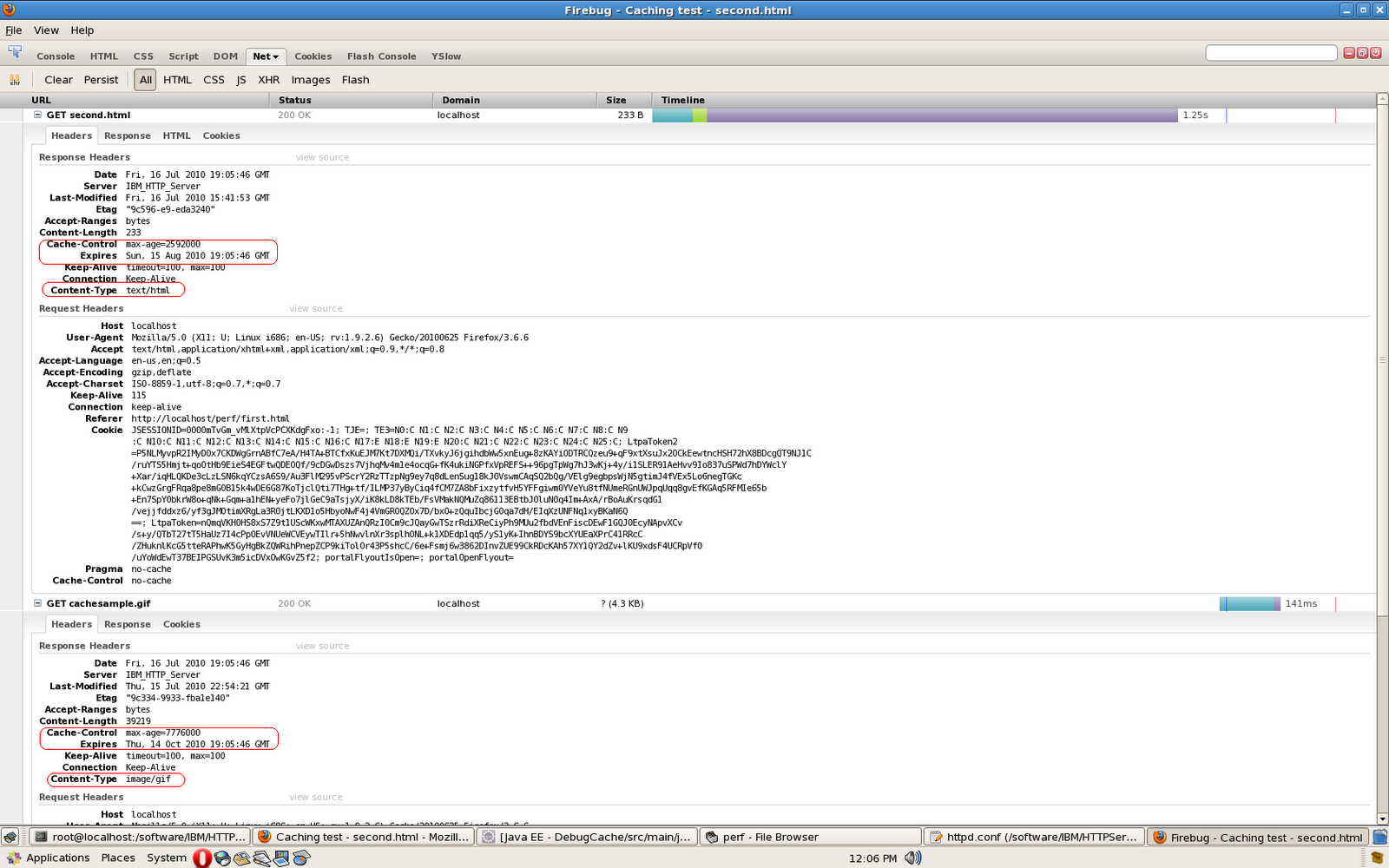
The How to configure Apache Http Server to return cache-control, expires header has information about how you can use mod_expires module to set cache-control and Expires header. I wanted to learn details of how to set headers using mod_expires and this is what i found
The mod_expires has two directives that you can use to configure its behavior
In both cases you have to use syntax like this for information on what should be the expiration date
I changed my httpd.conf to use following configuration
So by default every resource will expire in 1 month but gif images will expire in 3 months. I tried accessing a html page which has an image and this is what i see

The mod_expires has two directives that you can use to configure its behavior
- ExpiresDefault: This directive sets the default algorithm for calculating the expiration time for all documents in the affected realm. It can be overridden on a type-by-type basis by the ExpiresByType directive
ExpiresDefault "access plus 1 month"
This directive tells that every resource served by the Apache will have expiration date of 1 month after the resource was accessed - ExpiresByType: This directive defines the value of the Expires header and the max-age directive of the Cache-Control header generated for documents of the specified type. Ex if you want to setup rule for gif images you can use expression like this
ExpiresByType image/gif "access plus 3 month"
This directive will override the expiration time for resources which return image/gif as content type and it will set expiration time of 3 months after the image is accessed by client
In both cases you have to use syntax like this for information on what should be the expiration date
ExpiresDefault "<base> [plus] { }*"
- Base: Represents what should be the base for calculating expiration time or max-age value. Value of base can be either of following 2
- access/now: In this case the base will be when the resource is accessed by the client. Ex. if you want images to be cached for say 1 month from the time it is accessed by client then you can set it to access plus 1 month. So if as a user i access image on 1st Jan, it will set expiration date of 1st Feb but if i access same image on 20th of Jan it will set expiration date of 20th of Feb, so the expiration date will depend on the time when client access the image
- modification: Means the modification date of the resource on disk is considered as base. Ex. if your HTML changes everyday night at 12.00 PM and you want to cache it for 1 day you can configure to modification plus 1 day. So if the html was generated say on 1.00 AM today and if first user accesses it at 1.15 AM, it will send expiration date of 1.00 AM tomorrow, if second user accesses that image at 12 PM it will still set the same expiration date as that of the first user. SO the expiration date remains same for every user
- type: value of type can be either of this
- years
- months
- weeks
- days
- hours
- minutes
- seconds
I changed my httpd.conf to use following configuration
ExpiresActive On
ExpiresDefault "access 1 month"
ExpiresByType image/gif "access plus 3 month"
So by default every resource will expire in 1 month but gif images will expire in 3 months. I tried accessing a html page which has an image and this is what i see
Subscribe to:
Posts (Atom)