I am learning about the new Modular theme that ships as part of the WPS 7002 and i wanted to create a new modular theme so that i could play around with it. So these are the steps that i followed
- First i did connect to
http://localhost:10039/wps/mycontenthandler/dav/themelist URL using the WebDAV client and there i could see csa2.theme folder for PageBuilder2 based theme and ibm.portal.7002Theme folder for the Modular theme, so i did download the ibm.portal.7002Theme folder on my local machine
- Then i did change name of that folder to
webspherenotes.firstmodular
- Then i opened the metadata/localized_en.properties file and i did change the title of the theme like this
description=
title=FirstModular
I also made changes in the metadata.properties file to change the value of com.ibm.portal.layout.template.href to point to a 2ColumnEqual layout that is inside the firstmodular theme like this. I also change the value of com.ibm.portal.layout.template.href
com.ibm.portal.layout.template.href=dav\:fs-type1/themes/firstmodular/layout-templates/2ColumnEqual/
com.ibm.portal.themetype=CSA2
resourceaggregation.profile=profiles/profile_full.json
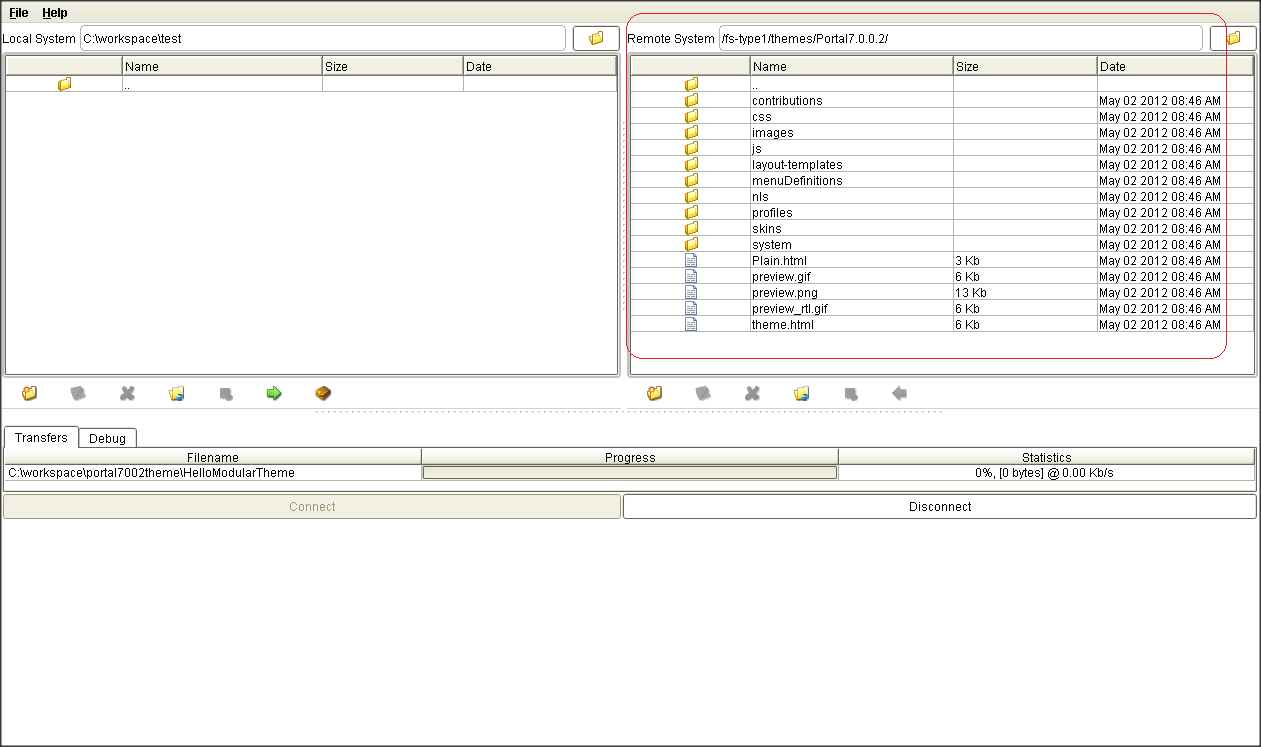
- After that i did upload the
webspherenotes.firstmodular theme back to the WebDAV store like this
- Now when i logged into WebSphere Portal Admin console and went to Theme and Skin management i could see FirstModular theme in the list like this
- The last step was to assign the Portal 7.0.0.2 based skins to the FirstModular theme and then assign that theme to the page. When i tried accessing a FirstModular based page without assigning the Portal 7.0.0.2 based skin it looked like this
But assigning correct skin solved the problem




6 comments:
Wow! these are wonderful tips. Thanks for sharing them with us. Please visit https://goo.gl/TwgDjZ
Nice post and great content.
Avast Customer Support is here to help you out with the whole procedure to Download Avast Antivirus online, We not only fix your Avast Support related issues but will guide with how to get started with your new Avast product once it gets installed successfully. We at Avast Tech Support provides service to protect your PC from potential online threats and external attacks like viruses, Trojans, malwares, spywares and phishing scams. And Avast Refund. Call on our Avast Phone Number
Gmail Customer service is a third party technical support service for Gmail users when they face any technical issue or error in their Gmail account. Our Gmail Customer Support team solves issues like forgot Gmail account password, Gmail configuration or Sync issues, recover deleted emails and many more. Toll Free number (800) 986-9271
How you install or reinstall Office 365 or Office 2016 depends on whether your Office product is part of an Office for home or Office for business plan. If you're not sure what you have, see what office com setup products are included in each plan and then follow the steps for your product. The steps below also apply if you're installing a single, stand-alone Office application such as Access 2016 or Visio 2016. Need Help with office setup Enter Product Key? Call 1-800-000-0000 Toll Free
Norton Tech Support is a third party service provider and not in any way associated with Norton or any of its partner companies. We offer support for Norton products and sell subscription based additional warranty on computer and other peripheral devices. Call our Toll Free number 1 855 966 3855
Other Services
Norton Toll Free , Office-Setup , office.com/setup.
Awasome Blog..Thanks for sharing..
Web Expert India are a popular and reputed website design and development company in India.
VIEW MORE Website Designing Company in Delhi
Thankyou..
THANK YOU FOR THE INFORMATION
PLEASE VISIT US
Web Design Company in Bangalore
Thanks for your interesting information in this blog is very much useful for me to improve my knowledge.You can also check info about Best Web Development Services Company
Very nice blog post. Thanks for sharing such helpful blog post. Keep posting in future also.
Web Design Company in Bangalore
Website Design Company Bangalore
Post a Comment